Singular Selected
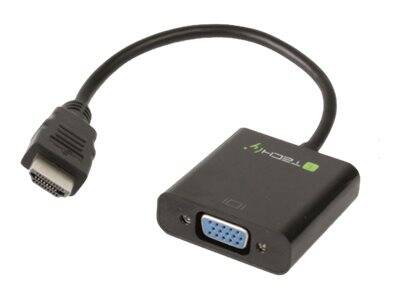
Techly IDATA-HDMI-VGA2A HDMI to VGA Converter with 3.5 mm Audio
Connects an HDMI laptop, mini PC or media player to a VGA projector or monitor, with separate audio out.
HDMI → VGA1920 × 12003.5 mm audio outNo power needed
The Techly IDATA-HDMI-VGA2A is an HDMI to VGA converter cable that turns the digital HDMI signal from a laptop, ultrabook, mini PC or media player into analogue VGA for projectors and older monitors, at up to 1920 × 1200. Part number IDATA HDMI-VGA2A adds a 3.5 mm stereo audio output for speakers or a sound system, supports HDCP 1.0/1.1/1.2, draws its power from the HDMI port (2 W) and comes with a 1 m audio cable.
Compatibility Note: The adapter works in one direction only: HDMI source → VGA display. Sources that enforce HDCP 2.x copy protection (some streaming apps and Blu-ray players) may not show protected content through a VGA converter.
Technical Specifications
| Identification |
| Part Number |
IDATA-HDMI-VGA2A |
| EAN / GTIN |
8057685306493 |
| MPN |
IDATA HDMI-VGA2A |
| Brand |
Techly |
| Connection |
| Input |
HDMI Type A male (19-pin) on a 16.5 cm cable |
| Outputs |
VGA female + 3.5 mm stereo audio female |
| Max resolution |
1920 × 1200; Full HD 1080p; UXGA 1600 × 1200 |
| Bandwidth |
165 MHz / 1.65 Gbps per channel (6.75 Gbps total), 9-bit DAC |
| HDCP |
1.0 / 1.1 / 1.2 |
| Physical |
| Power |
Not required — draws about 2 W from the HDMI port |
| Dimensions |
43 × 15 × 44 mm |
| Weight |
80 g |
| Colour |
Black |
| Operating temperature |
0 to +70 °C |
| In the box |
Converter cable, 1 m 3.5 mm audio cable, instruction manual |
Frequently Asked Questions
Can I connect a VGA computer to an HDMI TV with the IDATA-HDMI-VGA2A?
No. It converts HDMI to VGA only. To connect a VGA source to an HDMI display you need a VGA to HDMI converter such as the DIGITUS DA-70473 or Manhattan 152426.
Does it work with Raspberry Pi and Android TV boxes?
Yes, with standard HDMI outputs. Some small devices need their HDMI output forced on (for example hdmi_force_hotplug on Raspberry Pi) because a VGA screen cannot report its details back over HDMI.
Singular Expert Insight
The IDATA-HDMI-VGA2A is a handy fix for keeping VGA projectors and monitors in use with modern HDMI laptops, and the 3.5 mm output solves the missing-audio problem VGA always had. It needs no power adapter, which makes it ideal for the laptop bag.
✓ Buy it if you need to connect an HDMI laptop or PC to a VGA projector or monitor and still get sound.
✕ Skip it if your display has an HDMI or DisplayPort input — a direct digital cable looks sharper.
→ Also consider A USB-C multiport adapter with VGA if your laptop has no HDMI port.