Special B2B pricing available after sign-in

StarTech.com 194UE-USBC-SMARTDOCK Dual-4K 60Hz USB-C DisplayLink Smart Dock, 96W PD, EU/UK

Brand:
StarTech.com
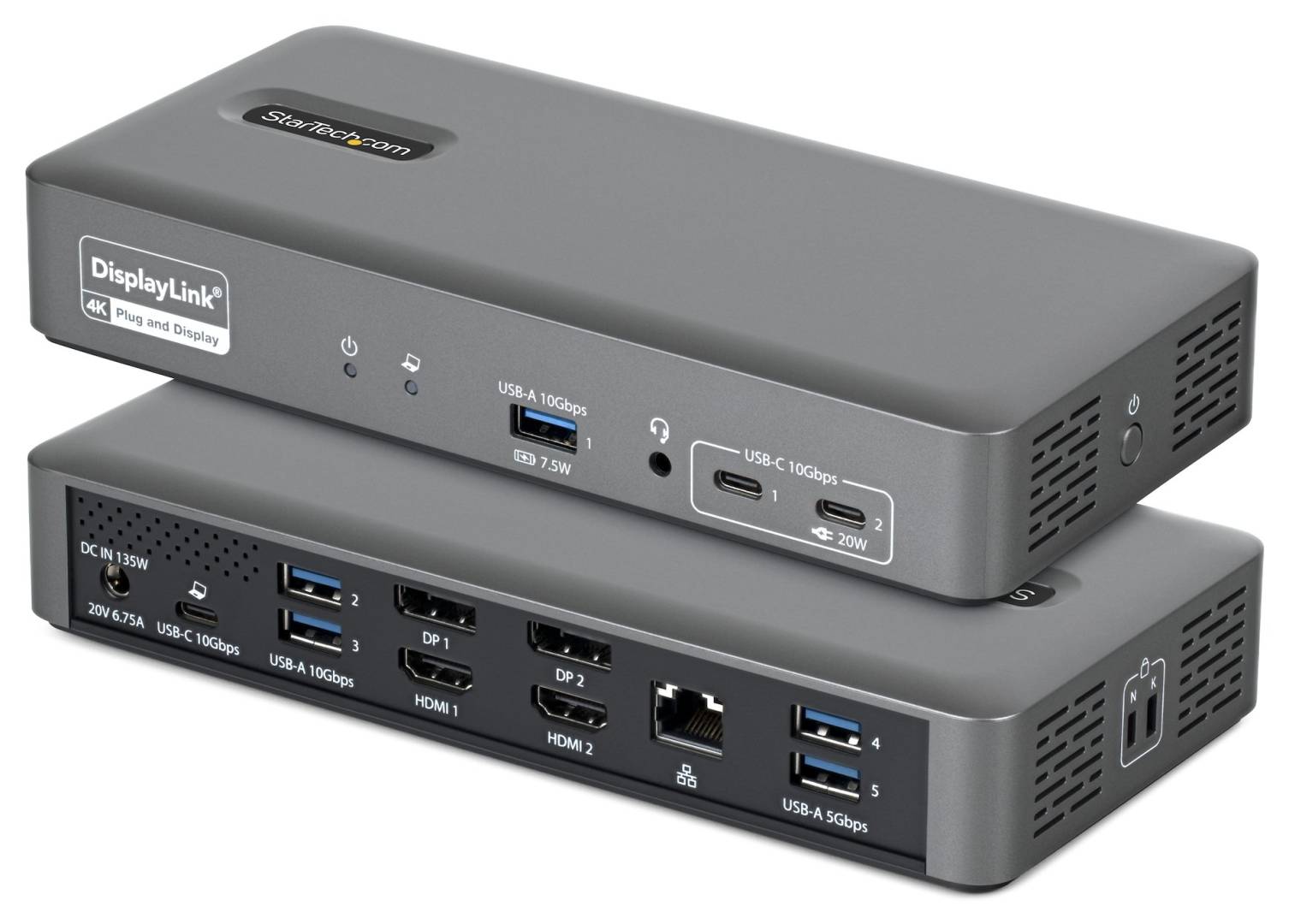
StarTech.com 194UE-USBC-SMARTDOCK Space Gray Dual Monitor USB-C Dock Front and Rear Views
StarTech.com 194UE-USBC-SMARTDOCK Dual-4K 60Hz USB-C DisplayLink Smart Dock, 96W PD, EU/UK
€369.29 inc. VAT
Buy
194UE-USBC-SMARTDOCK
€310.33
€369.29 inc. VAT
Ships from EU stock: 5 item(s)
Product Code
CS91524
EAN Code
0065030921923
Manufacturer
StarTech.com

Quick Specs

Displays
2 × 4K 60Hz / HDMI or DisplayPort
Host / charging
USB-C 10Gbps / up to 96W PD
Connectivity
7 USB / Gigabit LAN / 3.5mm audio
Video technology
DisplayLink DL-6950; driver required
Delivery

Order Today...
Ships...
Delivery...
ℹ️ Large or fragile items (e.g. monitors) may require extra handling time. We'll keep you informed.
Payment options
✓ Bank Deposit
Secure checkout with flexible payment methods
Trusted Tech Choice
Buying Benefits Verified
Competitive EU pricing
Delivered to Cyprus from EU stock
Local warranty support

Two 4K displays and a managed USB-C workspace

Dual 4K 60HzDisplayLink96W PD7 USB ports

This StarTech.com Smart Dock connects a compatible USB-C computer to two external displays, USB peripherals, wired Gigabit Ethernet and a headset, while offering up to 96W USB-C laptop charging. Its DisplayLink video system uses the appropriate DisplayLink driver on the host. The package contains one dock, a USB-C host cable, a universal EU/UK power adapter and documentation. The main image shows front and rear views of the same dock. IT teams can additionally use Smart Dock Manager for central monitoring and firmware management; the currently supplied Manager download is for Windows.

Before you order:
Check host USB support, OS/driver compatibility and permission to install DisplayLink before purchase. Use one HDMI or DisplayPort connection from each numbered display group: the four video sockets support a maximum of two displays. Laptop charging requires USB-C Power Delivery support and remains limited to 96W; high-power laptops may need their own charger. Display cables and monitors are not listed in the package.

What It Means in Practice

  • At a shared desk, connect the two monitors, Ethernet and peripherals to the dock, install the supported DisplayLink software, then attach the laptop using the supplied USB-C cable. Configure the displays in the host OS. IT administrators can deploy the Windows Manager separately where central dock control is required.

What Will Not Work

  • It does not provide four simultaneous external displays, independent computing or guaranteed charging of laptops requiring more than 96W. General dock OS support does not establish that every Manager feature runs on every OS.

Key Features

 
Dual DisplayLink video
HDMI or DisplayPort choices provide two 4K 60Hz display connections through the DL-6950 chipset.
 
Workstation connectivity and charging
Seven peripheral USB ports, Gigabit Ethernet, TRRS audio and up to 96W host PD consolidate the desk connection.
 
Central fleet management
Smart Dock Manager supports remote firmware updates, port status, activity logs and port control for IT deployments.

Technical Specifications

Identity and display support
Brand / model StarTech.com / 194UE-USBC-SMARTDOCK
EAN / UPC / quantity 0065030921923 / 065030921923 / 1 dock
Host connection 1 × USB-C, USB 3.2 Gen 2 10Gbps
Displays / resolution 2 displays; up to 4K 60Hz
Video connections 2 × HDMI + 2 × DisplayPort, arranged as display groups 1 and 2; maximum 2 displays
Video chipset DisplayLink DL-6950
USB and network
Downstream USB total 7 ports: 5 × USB-A, 2 × USB-C
USB-C peripheral ports 1 × 10Gbps, up to 20W; 1 × 10Gbps, 4.5W
Rear USB-A 2 × 10Gbps, 4.5W each; 2 × 5Gbps, 4.5W each
Front USB-A charging port 1 port; BC 1.2, 1.5A / 7.5W; exact front-port data rate not confirmed
Network 1 × RJ45, 10/100/1000Mbit/s; PXE; Wake-on-LAN
UASP / audio UASP supported; 1 × 3.5mm four-conductor TRRS audio
Additional chipsets VIA Labs VL108, VL822, VL817, VL122; Realtek RTL8153B
Software and management
Dock OS support Windows 10/11, Windows 11 ARM; macOS; Ubuntu; ChromeOS. Check current DisplayLink driver requirements
Display software DisplayLink drivers; INF, EXE and MSI corporate installer options
Management software Smart Dock Manager; current provided download is for Windows
Management capabilities Remote firmware updates, connection/port status, port disabling, activity logs and asset management
Network note Jumbo frames not supported in macOS
Power
Host USB Power Delivery Up to 96W; compatible USB-C PD laptop required
Power source Included universal AC adapter, EU/UK
Adapter input 110–240V AC / 1.9A
Adapter output / rating 20V DC / 6.75A / 135W; centre positive
Physical and environmental
Colour / material Space Gray plastic; housing made with 75% post-consumer recycled plastic
Dimensions / weight 202 × 95 × 32mm / 360g
Lock slots Kensington K-Slot / Kensington Nano Slot
Operating / storage temperature 0–40°C / −20–70°C
Humidity / MTBF 20–80% RH / 10,000 hours statistical MTBF
Status indication Power LED; dock LED: red LAN disconnected, green LAN connected, blue application connected; flashing blue firmware updating, flashing white update pending
Package and coverage
Included 1 dock; 1 USB-C host cable; 1 universal EU/UK power adapter; product documentation
Package dimensions / shipping weight 255 × 140 × 90mm / 1.1kg
Manufacturer warranty 3 years; seller terms separate

Frequently Asked Questions

Can all four video sockets drive four monitors?
No. The manufacturer specifies two displays. Choose HDMI or DisplayPort within each display group.
Is software required?
DisplayLink drivers are required for this video architecture. Smart Dock Manager is additional management software; its currently listed download is Windows.
Does the 135W adapter mean 135W laptop charging?
No. The supported host Power Delivery limit is 96W. The adapter also powers the dock and peripherals.
Singular Expert Insight
Confirm the software deployment policy as carefully as the physical ports. DisplayLink enables a consistent dual-display workspace, while driver permissions, host charging needs and managed deployment requirements determine whether it fits your organisation. Check your laptop, displays and driver requirements

Buyer’s Guide

✓ 

Buy it if

 Your supported USB-C host can run DisplayLink and you need two 4K60 displays plus managed desk connectivity.
✕ 

Skip it if

 You cannot install the necessary driver, need four displays or require more than 96W charging from the dock.
→ 

Also consider

 A dock whose video architecture, charging budget and management software match the actual host fleet.
Check your laptop, displays and driver requirements

Features - StarTech.com - 194UE-USBC-SMARTDOCK

Colour
grey
More Details
Product Code
CS91524
EAN Code
0065030921923
Manufacturer
StarTech.com
  • Recently Viewed
  • Customers Also Bought
 
Why Buy from Singular

Trusted by businesses across Cyprus

Genuine products, EU stock, and expert support for every purchase.
✓ Genuine Products
Sourced through official distribution channels, with full manufacturer warranty.
✓ EU Stock
Shipped from our EU distribution network, with real-time availability on every product.
✓ B2B Ready
VAT invoices for business deduction and credit terms for verified buyers.
Expert Support
Talk to our team for sizing, configuration or volume orders.