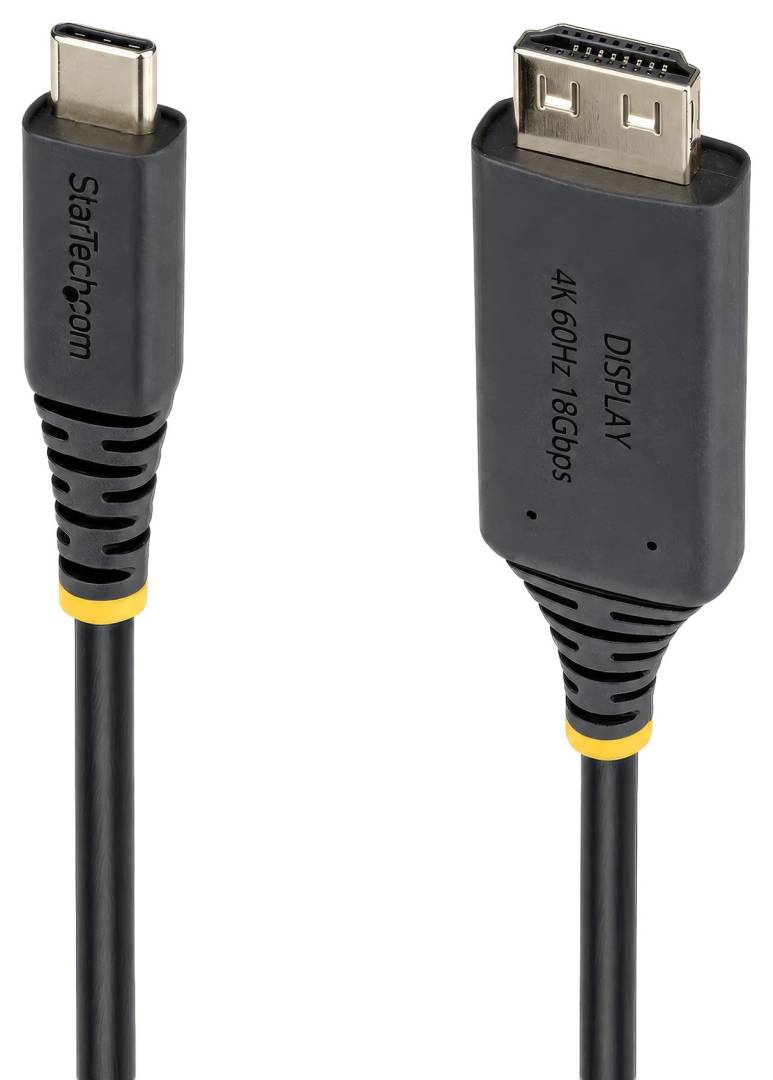
StarTech.com 3m USB-C to HDMI Adapter Cable, 4K 60Hz HDR, Gripping HDMI Connector
4K 60Hz · HDRUSB-C (DP Alt Mode) → HDMI 2.03 m · blackDriverless
The StarTech.com 3M-USBC-HDMI-4K60-G is a 3-metre active adapter cable that connects a laptop, tablet or PC with a video-capable USB-C port directly to an HDMI monitor, TV or projector at up to 3840 × 2160 at 60Hz, with HDR. It replaces a USB-C dongle plus a separate HDMI cable with one cord, which means fewer connection points on a desk, in a meeting room or behind a TV.
Inside the USB-C end is an active converter (VL600 chipset) that turns the DisplayPort Alt Mode signal from your USB-C port into HDMI 2.0, with 18Gbps bandwidth, full 4:4:4 / RGB colour, 7.1-channel audio and HDCP 2.3. It is driverless and works with any operating system, because the conversion runs in the cable itself and the image comes from your existing graphics (Intel, AMD or NVIDIA).
The HDMI end uses a gripping connector that holds firmly in the socket and resists vibration and cable strain, which helps in meeting rooms and on wall-mounted screens where a loose HDMI plug is a common cause of a black screen. The cable is also Thunderbolt compatible, so it works from Thunderbolt 3 and 4 ports on laptops such as MacBook, Dell, HP and Lenovo models.
Before you order: Your USB-C port must carry video (DisplayPort Alt Mode, usually shown by a DP or Thunderbolt symbol next to the port). Charge-only or data-only USB-C ports give no picture. Send us your laptop model and we will check the port before you order.
What's in the Box
- 1 × StarTech.com 3M-USBC-HDMI-4K60-G USB-C to HDMI cable, 3 m
What It Means in Practice
- Plug the USB-C end into the laptop and the HDMI end into the display: no driver, no software and no power adapter needed.
- 4K at 60Hz gives smooth scrolling and video on a 4K monitor or TV; at lower resolutions the display simply runs at its own native mode.
- HDR content passes through when both the source and the display support HDR.
- 3 metres reaches from a meeting-room table to a wall-mounted screen or from a desk to a TV across the room.
What Will Not Work
- USB-C ports without DisplayPort Alt Mode (charge-only or data-only ports): no video output.
- The other direction: the cable is uni-directional, USB-C source to HDMI display only. It cannot bring an HDMI signal into a laptop USB-C port.
- 8K, 4K at 120Hz or 144Hz gaming modes: output is HDMI 2.0, 18Gbps, maximum 4K at 60Hz.
- Charging the laptop: there is no power pass-through, so keep your charger on a second USB-C port if needed.
- Phones and tablets that do not output video over USB-C: check your device first.
Key Features
4K 60Hz with HDR
Up to 3840 × 2160 at 60Hz with HDR, 18Gbps, full 4:4:4 / RGB colour and HDCP 2.3 for protected content.
Gripping HDMI connector
Holds firmly in the HDMI socket and resists vibration and strain: fewer loose connections in meeting rooms.
One cable, no dongle
Integrated adapter design means fewer connection points between laptop and display.
Driverless, any OS
Works with any operating system; the conversion runs in the cable, using your existing GPU.
Technical Specifications
| Identification |
| Part Number |
3M-USBC-HDMI-4K60-G |
| EAN / GTIN |
0065030928137 |
| Brand |
StarTech.com |
| Connectivity |
| Connector 1 |
USB-C male (DP Alt Mode, DP++) |
| Connector 2 |
HDMI male |
| Direction |
Uni-directional: USB-C source → HDMI display |
| Thunderbolt |
Thunderbolt compatible |
| Video & Audio |
| Video revision |
HDMI 2.0 |
| Bandwidth |
18Gbps |
| Max resolution |
3840 × 2160 @ 60Hz |
| HDR |
Yes |
| Colour |
Full 4:4:4 / RGB |
| HDCP |
2.3 |
| Audio |
HDMI 7.1 channel |
| Chipset |
VL600 (active) |
| Physical |
| Length |
3 m (9.8 ft) |
| Cable diameter |
4.5 mm |
| Jacket |
TPE (Thermoplastic Elastomer) |
| Connector plating |
Gold |
| Colour |
Black |
| Weight |
187 g |
| Environmental |
| Operating temperature |
0 to 40°C |
| Storage temperature |
-20 to 70°C |
| Humidity |
10–90% RH |
| Warranty |
| Warranty |
1-Year Warranty (Singular) |
| Manufacturer Term |
3 years per StarTech.com — claims handled through Singular |
Frequently Asked Questions
How do I know if my USB-C port supports video?
Look for a DisplayPort (DP) or Thunderbolt symbol next to the port, or check the laptop specifications for "DisplayPort Alt Mode". If you are not sure, send us the laptop model and we will check.
Do I need to install drivers?
No. StarTech.com describes it as a driverless cable that works with any operating system; the conversion is handled inside the cable and the image comes from your existing graphics.
Can I use it with a TV or projector?
Yes, any display with an HDMI input works. The maximum is 4K at 60Hz; a 1080p TV or projector simply runs at its own resolution.
Singular Expert Insight · Buyer's Guide
A single active USB-C to HDMI cable is the tidiest way to connect a modern laptop to one HDMI screen: one cord, no dongle hanging off the port, and a gripping HDMI plug that does not work loose. The only real check is the laptop port, which must output video. If you need more than one screen, network and charging from one cable, look at our
docking stations instead.
✓ Buy it if Your laptop has a USB-C or Thunderbolt port with video output and you connect it to one HDMI monitor, TV or projector up to 4K 60Hz.
✕ Skip it if You need charging through the same cable, more than one display, or 4K at 120Hz and higher.
→ Also consider A USB-C docking station if you want display, charging, network and USB from one connection.
Not sure your laptop port outputs video? Send us the laptop model and we will check compatibility before you order.