Special B2B pricing available after sign-in

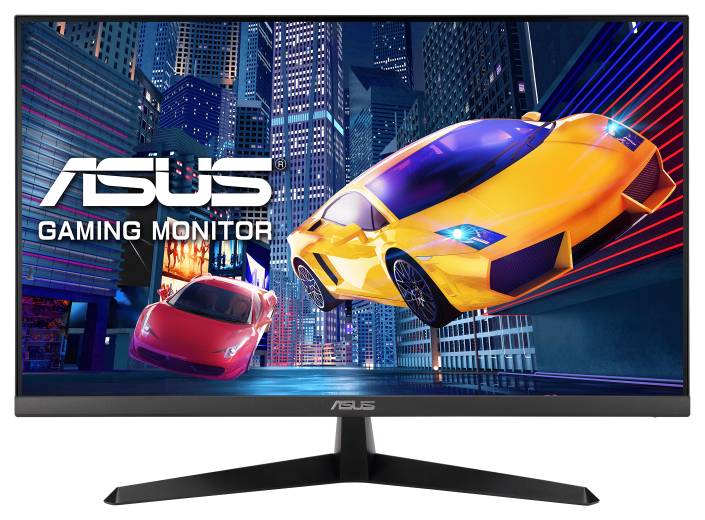
ASUS VY249HG2 Eye Care Gaming Monitor, 23.8″ IPS Full HD, 144Hz, 1ms MPRT, FreeSync, HDMI/VGA, Black

Brand:
ASUS
ASUS VY249HG2 Black 23.8-inch IPS Full HD 144Hz Monitor
ASUS VY249HG2 Eye Care Gaming Monitor, 23.8″ IPS Full HD, 144Hz, 1ms MPRT, FreeSync, HDMI/VGA, Black
€155.31 inc. VAT
Buy
90LM06A3-B01O71
€130.51 €145.01
€155.31 inc. VAT
Ships from EU stock: 72 item(s)
Product Code
04:601816
EAN Code
4711636516617
Manufacturer
ASUS

Quick Specs

Panel / resolution
23.8″ IPS / 1920 × 1080
Refresh / response metric
Up to 144Hz / 1ms MPRT
Video inputs
1 × HDMI 1.4 / 1 × VGA
Positioning
Tilt −5° to +22° / VESA 100 × 100mm
Delivery

Order Today...
Ships...
Delivery...
ℹ️ Large or fragile items (e.g. monitors) may require extra handling time. We'll keep you informed.
Payment options
✓ Bank Deposit
Secure checkout with flexible payment methods
Trusted Tech Choice
Buying Benefits Verified
Competitive EU pricing
Delivered to Cyprus from EU stock
Local warranty support

Full HD IPS for work and smoother gaming

23.8″ IPS1920 × 1080Up to 144HzFreeSync

The ASUS VY249HG2 is a black 23.8-inch IPS monitor for a mix of everyday work, study and gaming. Full HD resolution and wide viewing angles suit documents and media, while a maximum 144Hz refresh rate offers smoother motion when the connected computer supplies an appropriate HDMI signal. The stand adjusts in tilt, and the monitor also accepts a separate 100 × 100mm VESA mount. It is a display for an external computer or other compatible video source, not a standalone computer.

Before you order:
Use HDMI for 144Hz and AMD FreeSync; ASUS does not provide those features over VGA. The quoted 1ms is MPRT, not a grey-to-grey response or total input-lag measurement. There are no built-in speakers and no stand height adjustment. Plan headphones or separate speakers and choose a suitable screen height before ordering.

What It Means in Practice

  • Connect a compatible computer by HDMI, select 1920 × 1080 and the supported high-refresh mode in the operating system, then enable FreeSync where supported by the source. For reading, the blue-light setting, Reading Strips overlay and rest reminder offer adjustable viewing tools. DisplayWidget Center allows compatible monitor settings to be changed with a mouse on Windows or macOS.

What Will Not Work

  • The listed video inputs are one HDMI 1.4 and one VGA; this model has no listed DisplayPort or USB-C video connection. The headphone output does not mean speakers are fitted. A separate VESA arm is needed if tilt alone cannot provide the required positioning.

Key Features

 
IPS Full HD image
The 23.8-inch anti-glare IPS panel provides 1920 × 1080 resolution, typical 300cd/m² brightness and 178° horizontal/vertical viewing angles at CR≥10.
 
High refresh over HDMI
Up to 144Hz and FreeSync support suit a compatible high-refresh source. The 1ms MPRT figure describes motion-picture response, so compare it with equivalent metrics.
 
Adjustable viewing tools
Eye Care+ combines Low Blue Light and Flicker-free features with colour augmentation and a rest reminder. Reading Strips adds a tinted focus window; ComfortRate operates with FreeSync enabled.
 
Desk or VESA placement
Tilt from −5° to +22° supports basic positioning, with 100 × 100mm VESA mounting and a Kensington lock provision for a suitable installation.

Technical Specifications

Identity and display
Brand / model / MPN / EAN ASUS / VY249HG2 / 90LM06A3-B01O71 / 4711636516617
Colour Black
Panel size / type / backlight 23.8″ / IPS / LED
Aspect ratio / surface 16:9 / anti-glare
Active area / pixel pitch 527.04 × 296.46mm / 0.2745mm
Resolution / maximum refresh 1920 × 1080 / 144Hz via HDMI
Typical brightness / contrast 300cd/m² / 1500:1
Colours / response 16.7 million / 1ms MPRT
Viewing angles (CR≥10) 178° horizontal / 178° vertical
Connections and timing
Video / audio outputs 1 × HDMI 1.4; 1 × VGA; headphone jack
Speakers / HDCP No speakers / HDCP 1.4
HDMI signal range 31–166kHz horizontal / 48–144Hz vertical
VGA signal range 31–84kHz horizontal / 59–75Hz vertical
Adaptive refresh AMD FreeSync, HDMI only
Image and viewing features
Motion / image tools Trace Free, Motion Sync, SPLENDID, QuickFit; 4 colour-temperature modes
GamePlus Crosshair, timer and FPS counter
Eye Care+ Flicker-free, Low Blue Light, colour augmentation and rest reminder
ComfortRate Requires FreeSync/VRR; selectable levels. Up to 7× lower brightness fluctuations in ASUS internal testing with High level
Reading Strips Adjustable tinted overlay with a transparent reading window
Settings software ASUS DisplayWidget Center for Windows and macOS; settings controlled by mouse
Additional supported feature ASUS Power Sync
Antibacterial treatment Applied to bezels and hotkeys, as described by ASUS; surface treatment
Mounting and power
Tilt / height adjustment −5° to +22° / no height adjustment
VESA / lock provision 100 × 100mm / Kensington
Power / saving / off Below 12W / below 0.5W / below 0.3W
AC input 100–240V / 50–60Hz
Estimated dimensions and weight; vary by region
With stand (W × H × D) 541 × 395 × 185mm
Without stand (W × H × D) 541 × 323 × 53mm
Box (W × H × D) 603 × 392 × 130mm
Net with stand / without stand / gross 3.36kg / 2.77kg / 5.13kg
Regional accessories and certifications
Manufacturer accessory list Warranty card, quick-start guide, power cord, L-shaped screwdriver, HDMI cable; ASUS states accessories vary by region, confirm exact box supply
Manufacturer-listed certifications AMD FreeSync, TÜV Low Blue Light, TÜV Flicker-free, TCO Certified, EPEAT Silver

Frequently Asked Questions

How do I get the 144Hz mode?
Connect by HDMI to a source supporting the required Full HD timing, then select the available 144Hz mode in its display settings. ASUS limits 144Hz and FreeSync to HDMI on this model.
Does 1ms MPRT mean 1ms input lag?
No. MPRT is a motion-picture response metric. It is not a complete input-lag measurement or the same specification as grey-to-grey response.
Can I raise the screen or use its own speakers?
The supplied stand design has tilt but no height adjustment, and speakers are not fitted. Use an appropriate VESA mount for different positioning and headphones or separate speakers for audio.
Singular Expert Insight
This configuration suits someone who wants a compact Full HD IPS display with high refresh over HDMI and accepts a simple tilt stand. Compare the actual input connections, MPRT metric and lack of speakers before deciding; high refresh does not replace a compatible graphics output or guarantee a particular game frame rate. Check source compatibility and monitor positioning

Buyer’s Guide

✓ 

Buy it if

 You need a 23.8-inch Full HD IPS display for work and gaming with a compatible HDMI source.
✕ 

Skip it if

 You require USB-C video/power docking, DisplayPort, integrated speakers or a height-adjustable stand.
→ 

Also consider

 A monitor with the exact ergonomic adjustments or connection standard your desk setup requires.
Check source compatibility and monitor positioning

Features - ASUS - 90LM06A3-B01O71

Colour
black
More Details
Product Code
04:601816
EAN Code
4711636516617
Manufacturer
ASUS
Technical specifications
Monitor Usage
  • Gaming
Resolution
FHD (1080p)
Resolution (raw)
1920×1080
Complete Your Setup

Add the essentials to your monitor

Pair your monitor with accessories that match its capabilities.
HDMI & DP Cables

HDMI, DisplayPort and USB-C video cables to connect your monitor.

Browse →
Monitor Stands & Arms

Adjustable arms, desk mounts and stands for ergonomic positioning.

Browse →
Privacy Filters

Anti-glare and privacy filters to protect your screen and your work.

Browse →
Monitor Accessories

Cleaning kits, calibration tools and other monitor essentials.

Browse →
  • Recently Viewed
  • Customers Also Bought
 
Why Buy from Singular

Trusted by businesses across Cyprus

Genuine products, EU stock, and expert support for every purchase.
✓ Genuine Products
Sourced through official distribution channels, with full manufacturer warranty.
✓ EU Stock
Shipped from our EU distribution network, with real-time availability on every product.
✓ B2B Ready
VAT invoices for business deduction and credit terms for verified buyers.
Expert Support
Talk to our team for sizing, configuration or volume orders.