
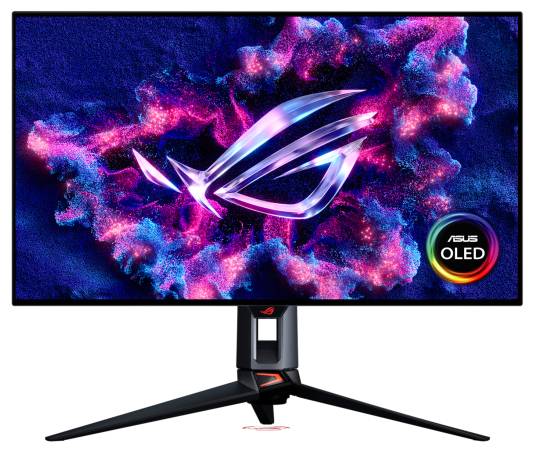
ASUS ROG Swift OLED PG32UCWM 32-inch Tandem RGB OLED 4K Gaming Monitor
Brand:
ASUS




90LM0DN0-B01971
Delivery
Order Today...
Ships...
Delivery...
ℹ️ Large or fragile items (e.g. monitors) may require extra handling time. We'll keep you informed.
Payment options
Trusted Tech Choice
Buying Benefits
Verified
Competitive EU pricing
Delivered to Cyprus from EU stock
Local warranty support
Please sign in so that we can notify you about a reply
ASUS ROG Swift OLED PG32UCWM - 32-inch 4K OLED Monitor
Tandem RGB OLED3840 × 2160 (4K)4K 240Hz or Full HD 480HzUp to 90W to a compatible host
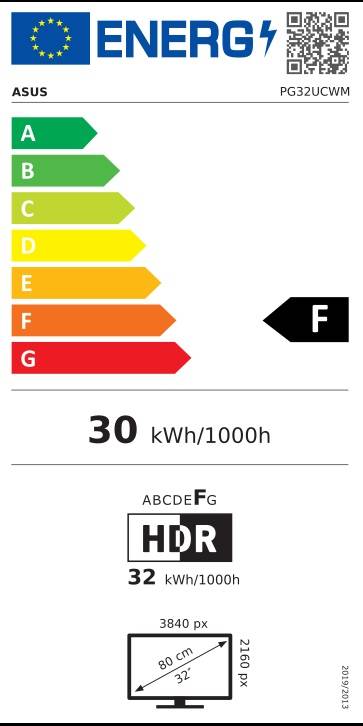
The ASUS ROG Swift OLED PG32UCWM is a 31.5-inch viewable, marketed 32-inch Tandem RGB OLED gaming monitor with a 3840 × 2160 native resolution. Choose 4K at 240Hz or Full HD at 480Hz; these are alternative modes, not 4K at 480Hz. Its USB-C port supports DisplayPort Alt Mode and up to 90W Power Delivery with a compatible host.
Best For: For buyers seeking a large 4K OLED monitor with a high-refresh 4K mode and a separate Full HD 480Hz mode. The refresh modes require a compatible GPU, cable and settings; they do not guarantee in-game frame rates.
Before you order: The 480Hz mode is Full HD, not 4K. HDR peak brightness of 1000 cd/m² is not sustained across the full screen. This monitor has no speakers; audio requires separate headphones or external audio. OLED care features reduce, but do not eliminate, burn-in risk. Regional box contents and power plug may vary. A compatible GPU, cable and settings are needed for supported display modes; connect a USB host to use the hub/KVM. Do not unplug the monitor during Pixel Cleaning. Keep the proximity sensor clean. Optional wall bracket, tripod and camera are separate; a computer and headphones are not included.
What's in the Box
- One black monitor with stand
- Regional accessory list: DisplayPort 2.1 DP80 cable, Ultra High Speed HDMI cable, USB 3.2 cable, USB-C cable, power cord, microfiber cloth, quick guide, ROG pouch and sticker, VESA mounting kit and warranty card. Confirm local package contents and power plug.
What It Means in Practice
- The stand adjusts through 0–80mm of height, tilts from −5° to 20° and swivels ±15°; pivot is not listed.
- USB-C supports DisplayPort Alt Mode and up to 90W Power Delivery for a compatible host. The USB hub and KVM require a USB host connection.
- For 4K at 240Hz or Full HD at 480Hz, the GPU, cable and settings must support the selected mode. The monitor's refresh rate does not guarantee game frame rates; non-native resolution will look different.
- Pixel Cleaning should be allowed to complete without unplugging the monitor. OLED care reduces burn-in risk but does not make the panel immune. Uniform Brightness reduces peak sRGB brightness to maintain consistent levels.
What Will Not Work
- The monitor does not have built-in speakers; headphones or external audio are separate.
- It has no Thunderbolt or Ethernet connection.
- The monitor's two refresh modes are 4K at 240Hz and Full HD at 480Hz; 4K at 480Hz is not a supported mode.
- USB-C Power Delivery is up to 90W for a compatible host; this does not mean all ports provide 90W or that every laptop will operate at full performance.
- Optional wall bracket, tripod and camera are separate. A computer and headphones are not included.
- Compatible GPU, cable and settings are required for the selected display mode and adaptive-sync features; tearing or latency results are not guaranteed.
Key Features
Dual display modes
Select 4K at 240Hz or Full HD at 480Hz to suit the resolution and refresh mode you need.
Tandem RGB OLED
A pure RGB stripe layout without a white subpixel, with TrueBlack Glossy finish.
USB-C with up to 90W PD
Carries DisplayPort Alt Mode and can power a compatible host at up to 90W; a host connection is needed for hub/KVM use.
OLED care tools
Pixel Cleaning, Screen Move and other care features reduce burn-in risk; they do not eliminate it.
Technical Specifications
Frequently Asked Questions
Singular Expert Insight
Its defining choice is between 4K at 240Hz and Full HD at 480Hz, alongside Tandem RGB OLED and broad display connections. USB-C can deliver up to 90W to a compatible host, but does not guarantee full performance for every laptop.
Buyer’s Guide
✓ Buy it if For buyers seeking a large 4K OLED monitor with a high-refresh 4K mode and a separate Full HD 480Hz mode. The refresh modes require a compatible GPU, cable and settings; they do not guarantee in-game frame rates.
✕ Skip it if The 480Hz mode is Full HD, not 4K. HDR peak brightness of 1000 cd/m² is not sustained across the full screen. This monitor has no speakers; audio requires separate headphones or external audio. OLED care features reduce, but do not eliminate, burn-in risk. Regional box contents and power plug may vary. A compatible GPU, cable and settings are needed for supported display modes; connect a USB host to use the hub/KVM. Do not unplug the monitor during Pixel Cleaning. Keep the proximity sensor clean. Optional wall bracket, tripod and camera are separate; a computer and headphones are not included.
Features - ASUS - 90LM0DN0-B01971
Colour
black
More Details
Product Code
04:597091
EAN Code
4711636571531
Manufacturer
ASUS