
ASUS ZenScreen Duo MB14FCD 14-inch Dual WUXGA IPS Portable Monitor
Brand:
ASUS



90LM0CZ1-B01N71
Delivery
Order Today...
Ships...
Delivery...
ℹ️ Large or fragile items (e.g. monitors) may require extra handling time. We'll keep you informed.
Payment options
Trusted Tech Choice
Buying Benefits
Verified
Competitive EU pricing
Delivered to Cyprus from EU stock
Local warranty support
Please sign in so that we can notify you about a reply
ASUS ZenScreen Duo MB14FCD - Dual 14-inch Portable Monitor
2 × 14-inch IPS1920 × 1200 WUXGA each2 USB-C DP Alt Mode, 1 mini-HDMIApprox. 1.2kg
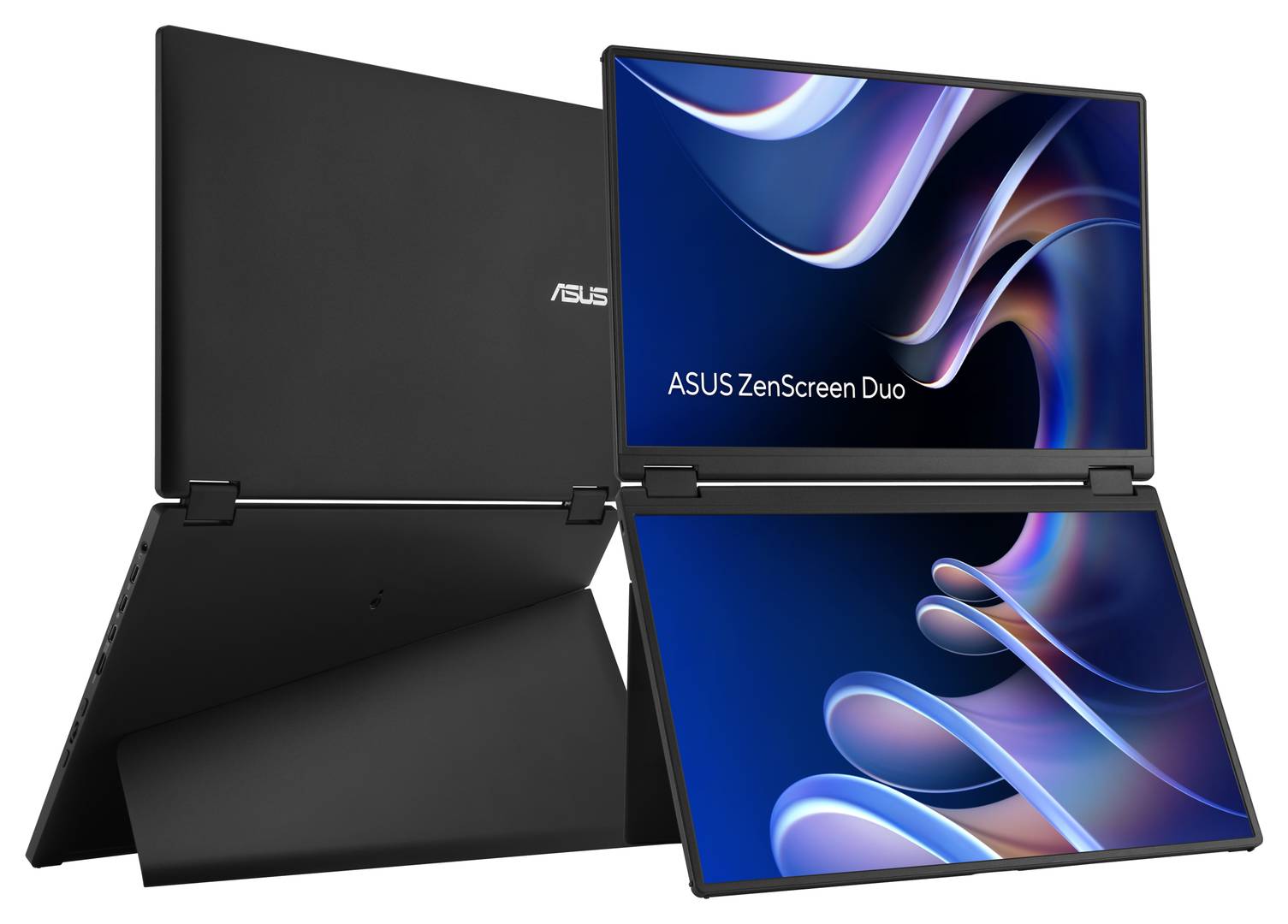
The ASUS ZenScreen Duo MB14FCD (manufacturer SKU 90LM0CZ1-B01N71) is one foldable portable monitor with two 14-inch IPS displays, each at 1920 × 1200 WUXGA and 60Hz. Its 360° hinge and integrated kickstand support portrait, landscape and tent-style setups. It is a non-touch external display, not a standalone computer; a compatible video source is required.
Best For: For users who want a portable two-panel external display for compatible laptop workflows, presentations or multitasking, and can check that their host and connection support the mode they need.
Before you order: This is one monitor with two panels, not a two-pack, and it has no touch input, speakers, PC, CPU, storage or standalone apps. Check host and connection support before relying on dual extended or auto-rotation features. USB-C video requires a DP Alt Mode-capable host port; otherwise use mini-HDMI for video with USB-C DC power. Up-to-65W pass-through is conditional, not a guaranteed included charging arrangement. The laptop and tripod are not included. The listed accessories can vary by region.
What's in the Box
- One ASUS ZenScreen Duo MB14FCD dual-panel monitor
- ZenScreen sleeve
- Power adapter
- Two USB-C cables
- Mini-HDMI-to-HDMI cable
- Quick guide
- Warranty card
What It Means in Practice
- Each panel is 14 inches with 1920 × 1200 resolution; the unit can be used in portrait, landscape or tent-style positions.
- Split and extend modes use USB-C 2. The availability of 1920 × 2400 combined split output depends on the graphics and connection capability of the host.
- For USB-C video, the host port must support DP Alt Mode. If it does not, use mini-HDMI for the video signal and USB-C DC-in power.
- Auto-rotation requires ASUS DisplayWidget Center and works in mirror/split modes with USB-C 2; HDMI does not support DisplayWidget Center.
What Will Not Work
- No touch input, speakers, PC/CPU, storage or standalone apps.
- A USB-C host port must support DP Alt Mode for USB-C video; otherwise mini-HDMI video and USB-C DC-in power are required.
- Dual extended display is not supported to a second external display on MacOS hosts with AMD graphics or phones using DP Alt Mode, according to the manufacturer footnote.
- Auto-rotation requires DisplayWidget Center and USB-C 2 in mirror/split modes; HDMI does not support that software.
- Up-to-65W power pass-through requires appropriate external power and cables and a compatible laptop; it is not an unconditional charging guarantee.
- Laptop and tripod are separate; accessory availability varies by region.
Key Features
Two WUXGA IPS panels
One foldable unit provides two 14-inch 1920 × 1200 panels, rather than a pair of separate monitors.
Flexible positioning
A 360° hinge and integrated kickstand support portrait, landscape and tent-style use.
Multiple display modes
Split, extend, mirror and independent modes are supported, subject to the required host and connection.
Portable format
The folded unit measures approximately 316 × 214 × 19mm and weighs approximately 1.2kg.
Technical Specifications
Frequently Asked Questions
Singular Expert Insight
Its two 14-inch WUXGA panels fold into a single portable unit, while the hinge, kickstand and multiple display modes offer flexible placement and presentation options.
Buyer’s Guide
✓ Buy it if For users who want a portable two-panel external display for compatible laptop workflows, presentations or multitasking, and can check that their host and connection support the mode they need.
✕ Skip it if This is one monitor with two panels, not a two-pack, and it has no touch input, speakers, PC, CPU, storage or standalone apps. Check host and connection support before relying on dual extended or auto-rotation features. USB-C video requires a DP Alt Mode-capable host port; otherwise use mini-HDMI for video with USB-C DC power. Up-to-65W pass-through is conditional, not a guaranteed included charging arrangement. The laptop and tripod are not included. The listed accessories can vary by region.
→ Also consider If you need a single external panel, compare single-screen portable monitors instead; this model's dual-display modes depend on the host, port and software requirements listed above.
Features - ASUS - 90LM0CZ1-B01N71
Colour
black
More Details
Product Code
04:595250
EAN Code
4711636454605
Manufacturer
ASUS