Put the screen, keyboard and mouse 100 m away from the computer
HDBaseT 2.04K/60Hz (4:2:0)USB 2.0, up to 6 devicesUp to 100 m over CAT6A/7/8
The DIGITUS DS-55505 is a 4K HDMI HDBaseT 2.0 KVM extender set that carries video, audio and USB 2.0 over a single CAT6A/7/8 cable up to 100 m, for control rooms, reception desks, digital signage and workstations where the computer must stay in a server room or locked cabinet. A transmitter connects to the computer, a receiver drives the display and USB devices at the far end.
Video is uncompressed up to 3840 x 2160 at 60 Hz with 4:2:0 chroma subsampling, plus 4096 x 2160 at 24 Hz, 1080p and Full 3D. The USB link is Hi-Speed USB 2.0 for up to six devices, so a keyboard, mouse, touch screen, barcode scanner or webcam can sit beside the display. HDCP 2.2 and CEC are supported, and audio passes through as LPCM 7.1 or compressed DTS, Dolby Digital, DTS-HD Master Audio and Dolby TrueHD.
Before you order: For the full 100 m, DIGITUS specifies CAT6A, CAT7 or CAT8 cable; reach over CAT5e or CAT6 is not published, so plan a CAT6A or better run if you are pulling new cable.
What's in the Box
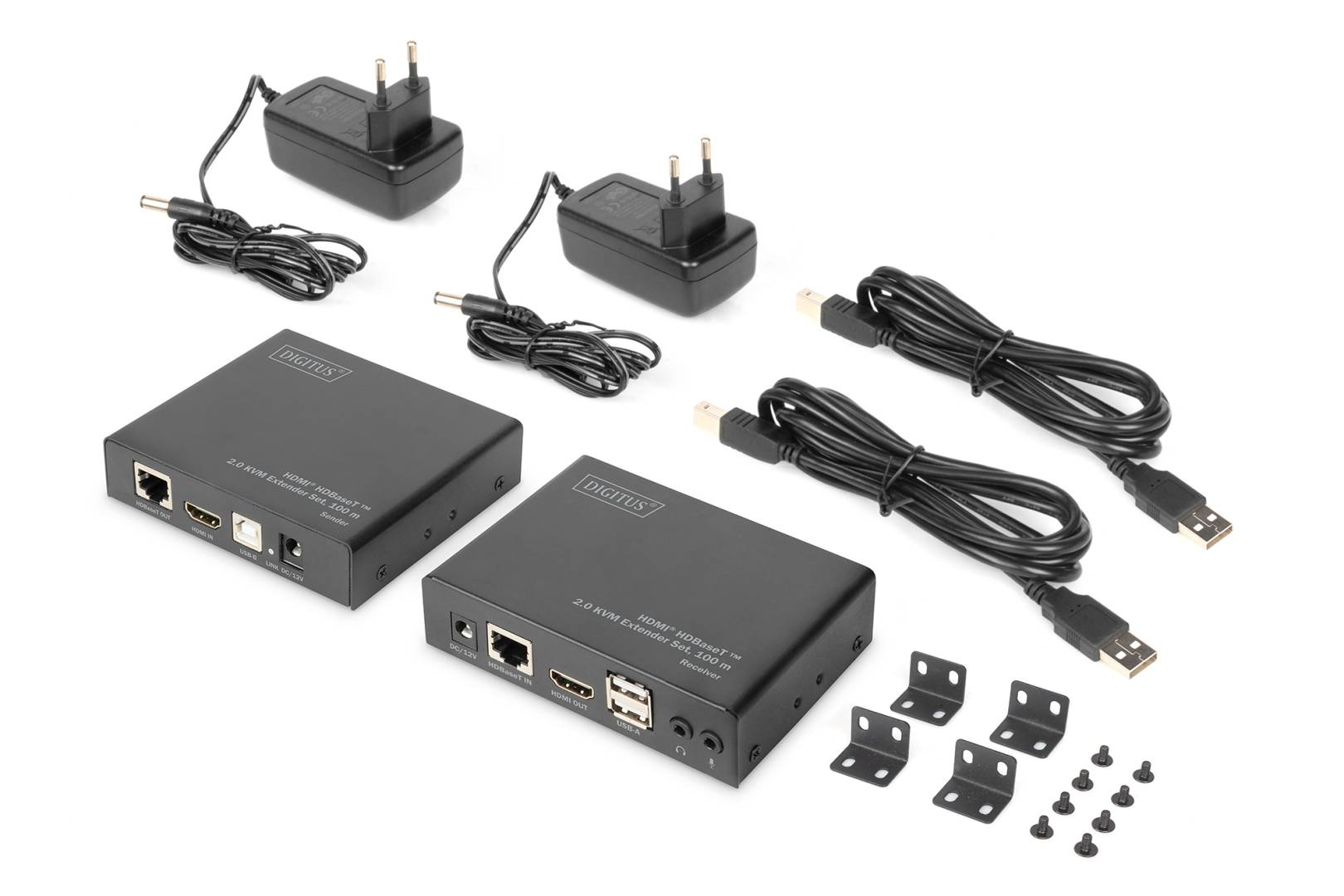
- 1 x HDBaseT 2.0 KVM extender set (transmitter + receiver)
- 2 x power supply 12 V / 2 A (100-240 V AC)
- 1 x USB connection cable, 1.5 m
- 4 x wall-mounting brackets
What It Means in Practice
- Keep noisy or valuable PCs in the server room and leave only a screen, keyboard and mouse at the desk or kiosk.
- One network cable carries everything, so there is no separate USB extender or audio cable to install.
- 4K at 60 Hz is delivered with 4:2:0 colour, which looks sharp for video, dashboards and signage; small coloured text can look softer than with a direct 4:4:4 connection.
- USB 2.0 Hi-Speed handles touch screens, scanners, card readers and webcams, not just keyboard and mouse. Connect the transmitter to the computer with the included 1.5 m USB cable.
- Plan power outlets at both ends: the transmitter side draws about 3 W and the receiver side about 7 W, each from its own 12 V adapter with a 1.2 m lead.
- Both units need mains power; each comes with its own 12 V power supply in the box.
- Metal housings and the included wall brackets let you fix the units behind a display, under a desk or inside a rack shelf.
- Run the cable point to point between the two units, with no switch or patch panel electronics in between; passive patch panels are fine if the total stays within 100 m.
What Will Not Work
- It is not a network device: the HDBaseT link cannot pass through an Ethernet switch, router or IP network.
- It does not carry 4K/60Hz 4:4:4 or HDR; the published path is HDMI 1.4 at 10.2 Gbps with 4:2:0 subsampling only.
- There is no PoE or power over cable: both transmitter and receiver must be powered locally.
- IR and RS232 control pass-through are not published, so do not plan on controlling a TV or projector through this set.
Key Features
HDBaseT 2.0 with USB 2.0
Built on the Valens VS2310 HDBaseT 2.0 chipset, adding Hi-Speed USB 2.0 for up to six devices to the video link.
4K with HDCP 2.2
Uncompressed 3840 x 2160 at 60 Hz (4:2:0), 4096 x 2160 at 24 Hz and 36-bit colour depth, with HDCP 2.2 for protected content.
Full audio pass-through
LPCM 7.1 plus DTS, Dolby Digital, DTS-HD Master Audio and Dolby TrueHD reach the display or soundbar.
Installer-friendly
Metal housings, wall-mounting brackets and separate power supplies for clean, permanent installations.
Technical Specifications
| Identification |
| Part Number |
DS-55505 |
| EAN / GTIN |
4016032472667 |
| Brand |
DIGITUS |
| Type |
4K HDMI HDBaseT 2.0 KVM extender set |
| Connectivity |
| Inputs |
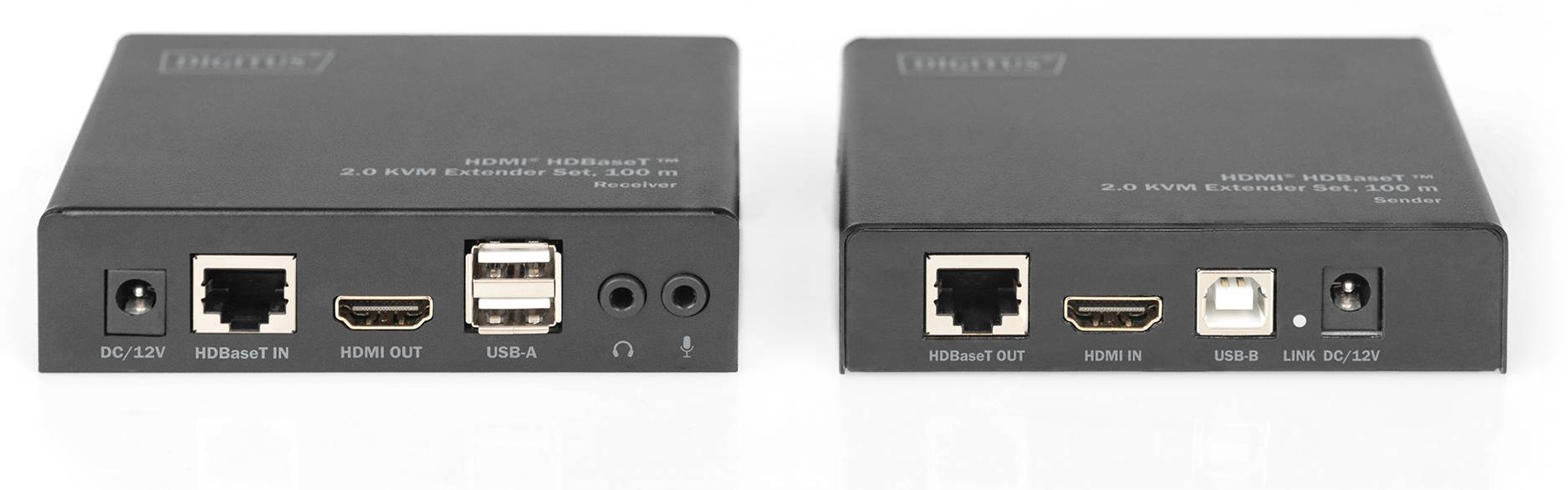
1 x HDMI, 1 x USB-B |
| Outputs |
1 x HDMI, 6 x USB-A |
| Link |
RJ45, HDBaseT 2.0 (VS2310) |
| Cable |
CAT6A/7/8 |
| Distance |
Up to 100 m |
| USB |
USB 2.0 Hi-Speed, up to 6 devices |
| CEC |
Supported |
| PoE |
No |
| Video |
| HDMI version |
1.4 |
| HDCP version |
2.2 |
| HDMI bandwidth |
10.2 Gbps |
| Max. resolution |
3840 x 2160 @ 60 Hz (4:2:0) |
| Other 4K modes |
4096 x 2160 @ 24 Hz, 3840 x 2160 @ 30 Hz |
| Progressive |
480p, 576p, 720p, 1080p |
| Interlaced |
480i, 576i, 1080i |
| Colour depth |
36-bit (12-bit per channel) |
| 3D |
Full 3D |
| Audio |
| Uncompressed |
LPCM 7.1 |
| Compressed |
DTS, Dolby Digital, DTS-HD Master Audio, Dolby TrueHD |
| Electrical |
| Power supply |
2 x 100-240 V AC in, 12 V / 2 A out |
| PSU cable length |
1.2 m |
| Power consumption |
Transmitter 3 W, receiver 7 W |
| Physical |
| Housing |
Metal |
| Transmitter dimensions |
130 x 100 x 25 mm (W x D x H) |
| Receiver dimensions |
110 x 80 x 28 mm (W x D x H) |
| Weight |
Transmitter 212 g, receiver 240 g |
| Operating temperature |
0 to 40 °C |
| Humidity |
5-90% RH, non-condensing |
| Warranty |
| Warranty |
1-Year Warranty (Singular) |
| Manufacturer Term |
Manufacturer does not publish a separate term for this accessory — claims handled through Singular |
Frequently Asked Questions
How far can I go at 1080p compared with 4K?
DIGITUS publishes a single figure of up to 100 m over CAT6A/7/8; a longer distance for 1080p is not published, so plan for 100 m at any resolution.
Can I use the existing CAT5e cabling in the building?
It may work on shorter runs, but DIGITUS specifies CAT6A or better for 100 m. Test the run first, or tell us the length and cable type and we will advise.
Does the computer need drivers?
No. The computer sees a normal HDMI display and standard USB devices.
Can I connect two screens at the far end?
No. The receiver has one HDMI output. For a second screen you need a second set or an HDMI splitter after the receiver.
Singular Expert Insight · Buyer's Guide
HDBaseT works best on a clean, dedicated run: use shielded CAT6A or better, avoid wall-plate couplers in the middle where you can, and keep the cable away from mains lines. If you are pulling new cable, a CAT6A or CAT7A run from our
network cables range gives headroom for the full 100 m. For signage that needs 4:4:4 colour or HDR, ask us for an 18 Gbps HDBaseT model instead.
✓ Buy it if Buy it to move a PC or media player up to 100 m away from its screen and USB devices, with 4K video and full audio over one CAT6A cable.
✕ Skip it if Skip it if you need HDR or 4K 4:4:4, IR or RS232 control of the display, or if the signal must travel over an IP network.
→ Also consider Consider shielded CAT6A installation cable, shielded keystones or couplers, and an HDMI splitter if one source must feed several screens.
Planning a control room or signage install? Send us the cable length, cable type and display model and we will check that this set fits before you order.