
Epson WorkForce DS-1760WN A4 Network Flatbed and Duplex ADF Scanner
Brand:
Epson



B11B274401
Delivery
Order Today...
Ships...
Delivery...
ℹ️ Large or fragile items (e.g. monitors) may require extra handling time. We'll keep you informed.
Payment options
Trusted Tech Choice
Buying Benefits
Verified
Competitive EU pricing
Delivered to Cyprus from EU stock
Local warranty support
Please sign in so that we can notify you about a reply
Shared network scanning with A4 glass and duplex document feeding
Network + Wi-Fi60-sheet duplex ADF6 cm touchscreenA4 flatbed
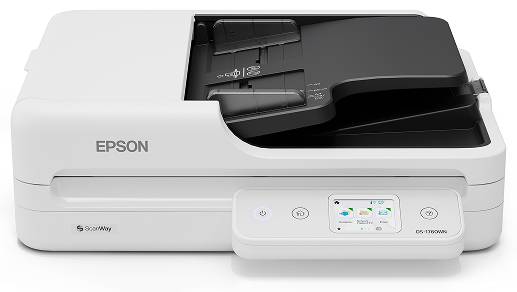
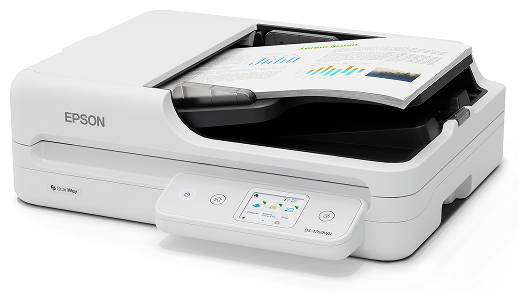
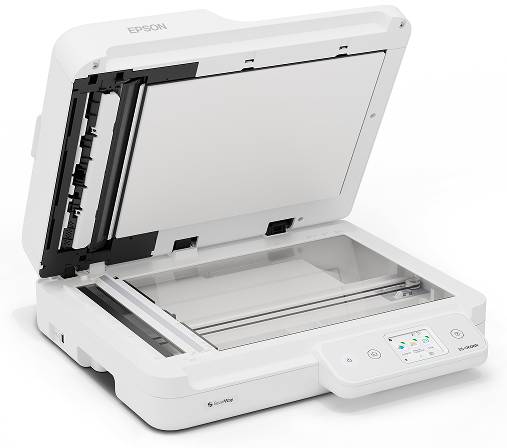
The Epson WorkForce DS-1760WN combines an A4 flatbed, 60-sheet single-pass duplex ADF and integrated network connectivity. Gigabit Ethernet, Wi-Fi Direct and USB 2.0 support flexible compatible installations, while a 6 cm colour touchscreen provides local control. This exact B11B274401 model can serve shared document-capture workflows, with the glass available for suitable fragile or irregular originals.
Best For: Small teams and home offices needing shared network scanning plus both duplex paper feeding and careful glass scanning.
Before you order: Configure the network and required destinations before deployment. Email, FTP, folders and cloud workflows depend on supported settings, service credentials and compatible software where applicable. ADF optical resolution is 600dpi and glass1200dpi; the 30ppm/ 60ipm rating applies at 200/300dpi. Do not assume every destination works without setup or identical features across operating systems.
What's in the Box
- Epson WorkForce DS-1760WN main unit.
- Power cable and USB cable.
- Quick Setup Guide and warranty card.
- Computer, network equipment and sample documents separate; Ethernet cable is not listed in box contents.
What It Means in Practice
- Share the scanner through a suitable Ethernet or Wi-Fi network and configure authorised destinations.
- Use the 60-sheet duplex ADF for supported 50–120g/m² paper batches.
- Use A4 glass for suitable fragile, irregular or individual originals outside feeder requirements.
- Create searchable PDFs and integrate files using supported Epson software; confirm platform-specific features.
What Will Not Work
- Do not transfer1200dpi glass resolution to the 600dpi ADF.
- Long-document ADF support up to 5588mm does not apply to the A4 glass.
- Network scanning requires correct configuration; remote services and software have their own requirements.
- No Wi-Fi generation, frequency band or wireless data rate is established here.
- Feed only suitable media within ADF limits; actual speed and OCR depend on originals, host and settings.
Key Features
Shared office connection
Gigabit Ethernet and integrated Wi-Fi support access by multiple users in compatible workflows.
Two scanning paths
Single-pass duplex ADF for paper batches and A4 glass for careful individual-original handling.
Touchscreen control
A 6 cm colour touchscreen supports local operation and configured document workflows.
Capture software
Epson Scan 2, platform-specific Document Capture tools and Epson SmartPanel are listed for this model.
Technical Specifications
Frequently Asked Questions
Singular Expert Insight
Start with the destination and user workflow, then configure the scanner around it. Network sharing and the touchscreen improve placement flexibility, but service credentials, software support and paper-path limits still matter. Keep fragile originals on the glass and test real duplex batches before wider rollout.
Buyer’s Guide
✓ Buy it if You need shared network scanning with both a duplex ADF and A4 flatbed.
✕ Skip it if You need a long-document glass bed or expect every destination to work without configuration.
→ Also consider Network access, authorised destinations, software compatibility, ADF media limits and counter space.
Features - Epson - B11B274401
Colour
white
Interface
- USB2.0,
- Ethernet,
- WIFI
More Details
Product Code
04:589858
EAN Code
8715946737584
Manufacturer
Epson