
equip 245205 Professional USB Numeric Keypad Soft-Touch Full-Size Key Layout 1.35 m Cable Plug and Play Black
Brand:
Equip

equip 245205 Professional USB Numeric Keypad Soft-Touch Full-Size Key Layout 1.35 m Cable Plug and Play Black
€10.41 inc. VAT
245205
Delivery
Order Today...
Ships...
Delivery...
ℹ️ Large or fragile items (e.g. monitors) may require extra handling time. We'll keep you informed.
Payment options
Trusted Tech Choice
Buying Benefits
Verified
Competitive EU pricing
Delivered to Cyprus from EU stock
Local warranty support
Please sign in so that we can notify you about a reply
equip 245205 — Professional USB Numeric Keypad, Black
Soft touch1.35 m cableUSB powered85 g
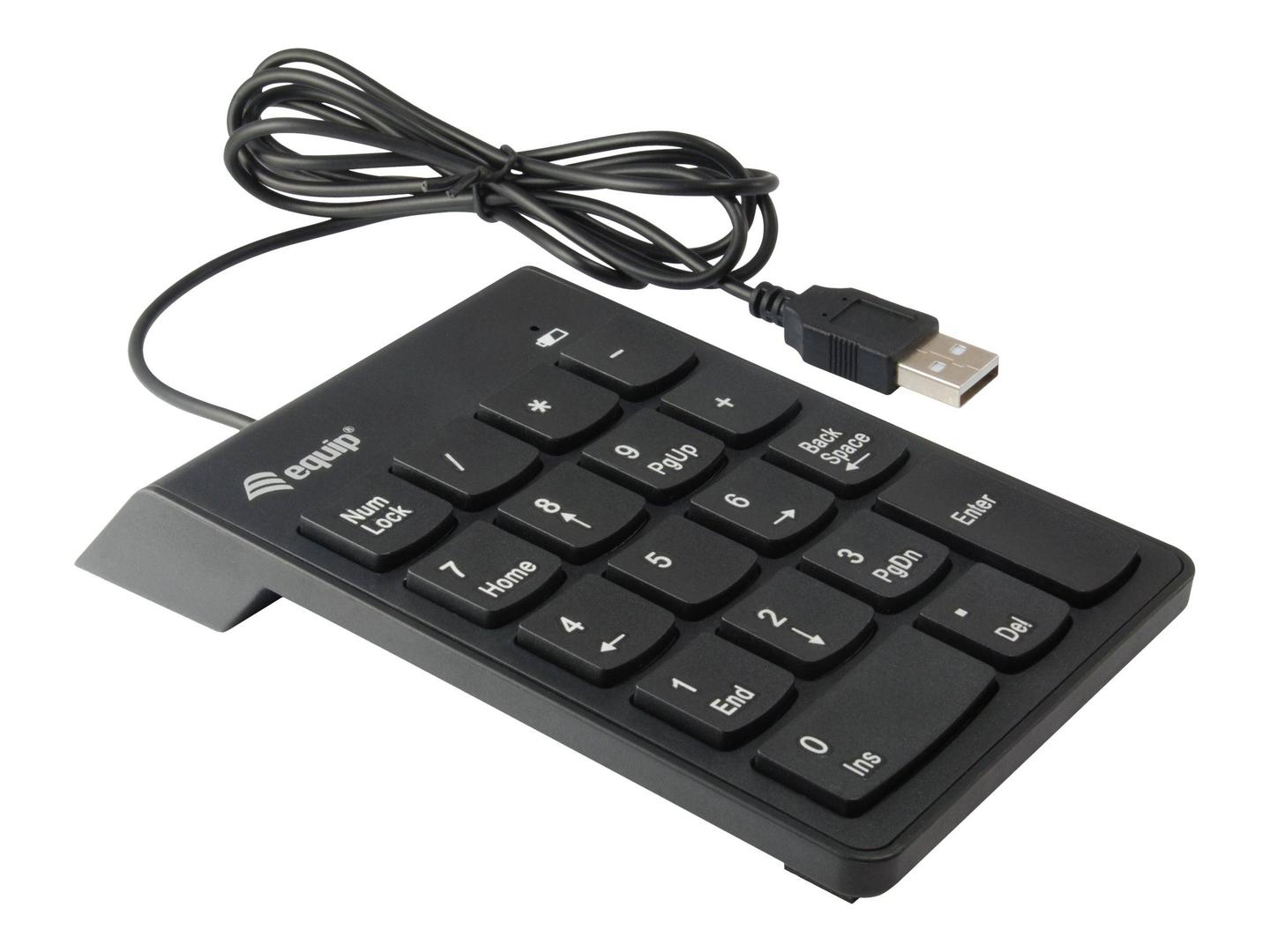
A straightforward, well-made number pad for a laptop that has none. equip specifies soft-touch keys engineered for synchronized, comfortable typing and a full-size key layout, which is the part that matters: a cramped numpad slows you down more than having no numpad at all, because your fingers never settle. It connects over USB-A with a 1.35 m cable, is plug and play with nothing to install, and is USB powered with no batteries required. equip lists it as USB 2.0 at 480 Mbps, weighing 85 g, in black, and certifies it to CE and RoHS. Compatible operating systems are given as Windows 7, 8, 10 and 11.
Compatibility — check before buying:
Three practical notes. The port is USB-A, so a laptop with only USB-C needs an adapter — ask us and we will include one. The cable is 1.35 m and fixed. And equip publishes the operating systems as Windows 7 to 11 only: a plain USB HID keypad will normally work on macOS and Linux too, but we quote the manufacturer’s list rather than promise support it does not claim. One transparency note on the data: equip gives the dimensions as 85 x 10 x 140 mm (W x D x H), and that label order looks transposed — a 10 mm depth is not possible for a keypad with a 140 mm height. Read it as roughly 85 mm wide, 140 mm deep and 10 mm thick. We publish the figures as given and flag the labelling rather than silently rewriting them. equip publishes no key count, no key-switch type and no keystroke lifespan.
Best For
✓ Laptops with no number pad
✓ Spreadsheet and accounting work
✓ Hot desks and travel kits, at 85 g
✓ Windows 7 to 11 machines
✓ Locked-down work machines where installs are blocked
✓ Anyone who dislikes cramped mini keypads
Key Features
A full-size layout
The keys are spaced like a desktop keyboard’s numpad, so your hand finds them without looking — the thing compact keypads get wrong.
Soft-touch keys
equip specifies them for synchronised, comfortable typing, which on hours of numeric entry is what stops the hand tiring.
No batteries, ever
Powered from the USB port. Nothing to charge, nothing to run flat in the middle of a month-end close.
85 g
Light enough to live in a laptop bag permanently rather than being left at one desk.
Technical Specifications
Frequently Asked Questions
Singular Expert Insight
Full-size spacing is the whole argument for this over a pocket keypad: your fingers learn the layout once and stop hunting. Light enough to travel, and there is nothing to charge. See our keyboard accessories and our keyboards.
Buyer’s Guide
Buy it if
You want a light, full-size numeric keypad on a Windows machine that works the second you plug it in.
Skip it if
You need a published Mac or Linux listing, you want it wireless, or you want a backlit keypad.
Also consider
The LogiLink ID0184 if you want a published 19-key count, or the LogiLink ID0201 if you would rather go wireless.
Features - Equip - 245205
Colour
black
More Details
Product Code
04:316780
EAN Code
4015867221433
Manufacturer
Equip