
Equip 128964 USB-C 4-Port Hub 2x USB-C 2x USB-A 5Gbps USB 3.2 Gen 1 with 5V 2A Power Port Black
Brand:
Equip

Equip 128964 USB-C 4-Port Hub 2x USB-C 2x USB-A 5Gbps USB 3.2 Gen 1 with 5V 2A Power Port Black
€18.73 inc. VAT
128964
Delivery
Order Today...
Ships...
Delivery...
ℹ️ Large or fragile items (e.g. monitors) may require extra handling time. We'll keep you informed.
Payment options
Trusted Tech Choice
Buying Benefits
Verified
Competitive EU pricing
Delivered to Cyprus from EU stock
Local warranty support
Please sign in so that we can notify you about a reply
equip 128964 — USB-C Hub, 2 x USB-C and 2 x USB-A
2 x USB-C + 2 x USB-A5 Gbps SuperSpeedExtra 5 V / 2 A input102 mm, 40 g
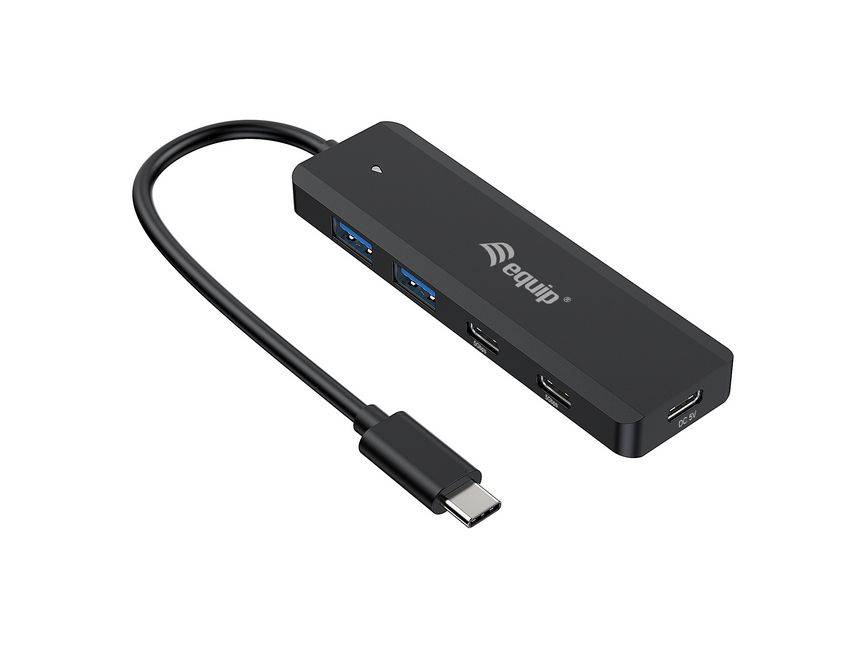
The equip 128964 is a four-port USB-C hub that splits its sockets two USB-C and two USB-A, so a current SSD and an older keyboard can share the same hub without adapters. All four run at up to 5 Gbps. There is a fifth connector on the side: a plain 5 V / 2 A input you can feed when four busy ports ask for more current than the laptop will give.
Compatibility — check before buying:
The extra power port is not Power Delivery. equip publishes it as a 5 V / 2 A input to improve stability, and the power cord is not included. It will not charge your laptop, and there is no PD anywhere on this hub — on a machine with a single USB-C port, plugging this in means the laptop is not charging. Note also the near-identical 128966, which has exactly the same two-and-two port layout but runs at 10 Gbps instead of 5. If you own a fast external SSD, that two-digit difference in the part number is worth twice the throughput. There is no video output, no Ethernet and no card reader. equip lists Windows 7 to 11, macOS 10.6 or newer and ChromeOS.
Best For
✓ Desks halfway through the move from USB-A to USB-C
✓ Keyboards, mice, dongles and card readers alongside one SSD
✓ Laptops where a stability problem can be fixed by adding current
✓ USB-C phones and tablets charging at standard current
✓ Travel — 40 g and 12.5 mm thick
✓ Mixed Windows, Mac and ChromeOS environments
Key Features
Two of each connector
Two USB-C and two USB-A ports. A modern drive and a legacy keyboard both plug in directly, which is the point of buying this rather than a four-of-a-kind hub.
5 Gbps on every port
USB 3.2 Gen 1 across all four sockets, backward compatible with USB 2.0 devices. The bandwidth is shared, so one drive at a time reaches the full rate.
A power input for stability
A separate 5 V / 2 A socket lets you add current when all four ports are busy. It is not Power Delivery and it does not charge the host — it keeps the hub’s own devices from dropping out. The cord is not supplied.
Small and light
30 x 102 x 12.5 mm and 40 g. It sits beside the laptop rather than across the desk, and disappears into a bag.
Technical Specifications
Frequently Asked Questions
Singular Expert Insight
The two-and-two connector split is the practical answer to a desk that is halfway through the USB-C changeover, and it is worth more than the extra ports on a four-of-a-kind hub. Be clear about two things before ordering. The power port is a 5 V stabiliser, not a charger, and the cord is not supplied. And the sibling trap is real: the 128966 looks identical and runs at 10 Gbps, which only matters if you own a fast external SSD — on flash drives and keyboards the two are indistinguishable. A monitor or a network socket means a docking station, not this.
Buyer’s Guide
Buy it if
You have both USB-C and USB-A devices, 5 Gbps is enough for what you connect, and you want the option of adding current when all four ports are busy.
Skip it if
Skip it if you own a 10 Gbps SSD (order the 128966), if the laptop must charge through the hub, or if video or Ethernet are required.
Also consider
equip 128966 for the same layout at 10 Gbps, or a USB-C docking station if a screen and a network port need to come off one cable.
Features - Equip - 128964
Colour
black
Interface
- USB Type-C
More Details
Product Code
04:446064
EAN Code
4015867234235
Manufacturer
Equip