
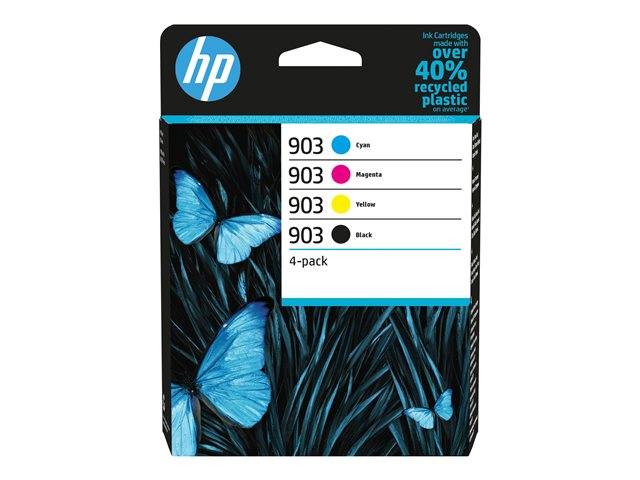
HP 903 Original Ink Cartridges 4-Pack · Black, Cyan, Magenta, Yellow · approx. 300/315 Pages · for OfficeJet 6950/6970
Brand:
Hewlett Packard

HP 903 Original Ink Cartridges 4-Pack · Black, Cyan, Magenta, Yellow · approx. 300/315 Pages · for OfficeJet 6950/6970
€75.48 inc. VAT


6ZC73AE
Delivery
Order Today...
Ships...
Delivery...
ℹ️ Large or fragile items (e.g. monitors) may require extra handling time. We'll keep you informed.
Payment options
Trusted Tech Choice
Buying Benefits
Verified
Competitive EU pricing
Delivered to Cyprus from EU stock
Local warranty support
Please sign in so that we can notify you about a reply
HP 903 4-Pack Black/Cyan/Magenta/Yellow Original Ink Cartridges
Original HPK + C + M + Y300 / 315 pagesStandard capacity
HP HP 903 (6ZC73AE) is a genuine HP ink cartridge 4-pack in black, cyan, magenta, yellow, 8 ml black · 4 ml each colour, rated at approx. 300 pages black / 315 pages per colour, made for owners of HP OfficeJet 6950 and OfficeJet Pro 6960/6970 printers who want the manufacturer's own ink rather than a compatible.
A complete set of standard HP 903 cartridges — black, cyan, magenta and yellow — for the OfficeJet 6950 and OfficeJet Pro 6960/6970.
Original HP cartridges are recognised by the printer and the HP Smart app, so ink levels are reported correctly and you avoid the "non-HP cartridge" warnings — and the firmware updates HP printers receive can stop cartridges with cloned chips from working, which does not affect originals.
What's in the Box
- 1 × HP 903 black ink cartridge (standard)
- 1 × HP 903 cyan ink cartridge (standard)
- 1 × HP 903 magenta ink cartridge (standard)
- 1 × HP 903 yellow ink cartridge (standard)
What It Means in Practice
- The yield is HP's figure measured with the ISO/IEC 24711 or HP testing methodology method on a standard mixed text-and-graphics test page. Full-page colour, photos or heavy graphics use ink faster, so real page counts will be lower; plain text documents usually land close to the rating.
- Each colour is a separate cartridge, so unused ones stay sealed as spares.
- Standard capacity — high-volume users should add a 903XL black (approx. 750 pages).
- The printhead stays in the printer; these are ink supplies only.
- The printhead is a separate part that stays in the printer — this cartridge is only the ink supply. If print quality drops while there is still ink, the fix is usually a printhead clean from the printer menu, not another cartridge.
- Installing takes a minute: open the cartridge access door, wait for the carriage to stop, press the old cartridge to release it, and push the new one into the slot of the same colour until it clicks. Close the door and the printer recognises it.
- Keep spare cartridges sealed in their box at room temperature and install them before the date printed on the packaging; an opened cartridge is best used rather than stored.
- Empty HP cartridges can be returned for free recycling through HP Planet Partners where the programme is offered.
- HP sells its consumer and office ink cartridges by region. This is the European/EMEA version, made for printers sold in Europe, the Middle East and Africa — which covers printers bought in Cyprus, Greece or elsewhere in the EU.
What Will Not Work
- OfficeJet 8010/8020/8030 (HP 912) or 6830 (HP 934/935).
- XL page counts — all four are standard.
- A printer bought in the US, Latin America or Asia — it is set up for that region's cartridges and can reject this European version.
- Any printer that is not in the compatibility list below — if your model is not listed, send us the model before ordering.
Key Features
Full CMYK set
Four cartridges, one box.
Pigment inks
Water-resistant prints.
Individual cartridges
Replace only what runs out.
Separate printhead
Ink-only replacement.
Technical Specifications
Frequently Asked Questions
Singular Expert Insight · Buyer's Guide
A full restock for OfficeJet 6950/6960/6970 printers; pair it with a 903XL black if your office prints mostly text. Browse all original ink cartridges at Singular for the matching colours or packs.
✓ Buy it if several cartridges are low at once.
✕ Skip it if only the black runs out — buy the 903XL black.
→ Also consider HP 903XL black (T6M15AE).
Not sure which cartridge your printer takes? Send us the exact printer model (it is on the front panel or the label inside the lid) and we will confirm the right cartridge before you order.
Features - Hewlett Packard - 6ZC73AE
More Details
Product Code
04:375555
EAN Code
0195122352271
Manufacturer
Hewlett Packard