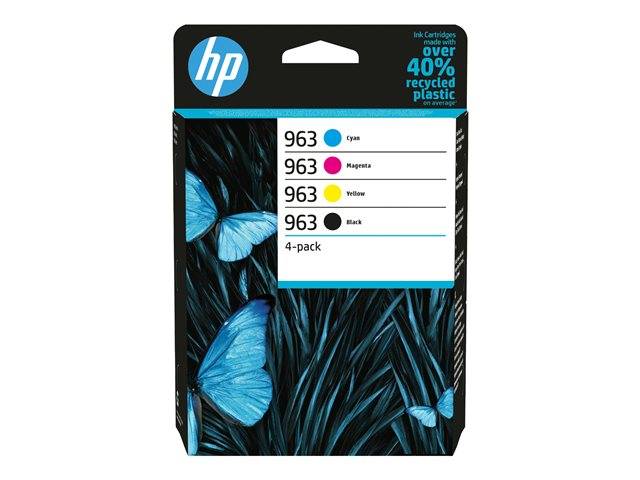
HP 963 4-pack Black/Cyan/Magenta/Yellow Original Ink Cartridges
Original HP4-pack K/C/M/YHP 963OfficeJet Pro 9010/9020 series
HP 963 4-pack Black/Cyan/Magenta/Yellow Original Ink Cartridges (6ZC70AE) is the genuine HP multipack bundling all four colours — black, cyan, magenta and yellow — in one box for HP OfficeJet Pro 9010/9020 series users who want to replace the full set at once.
HP 963 is the cartridge series for the OfficeJet Pro 9010 and 9020 all-in-ones. This pack holds one standard-capacity cartridge of each colour — handy when setting up a printer or replacing a full set at once.
Ordering by the exact part number (6ZC70AE) is the safest route: HP uses similar names across printer families, and a supply that looks identical but carries a different number will not be recognised by the printer. If you are replacing a supply that is already installed, the part number is printed on its label and in the printer's supplies status page.
Original or compatible? A genuine HP supply is the one the printer and its colour profiles are calibrated for, it reports ink levels correctly, and it keeps the printer within HP's support terms. Compatible inks cost less up front but can shift colours, clog nozzles over time or be rejected after a firmware update — for business-critical printers, original is the lower-risk choice.
Before you order: HP 963 fits the OfficeJet Pro 9010 and 9020 series only. The newer OfficeJet Pro 9110/9120/9130 and 9720/9730 use HP 937 and will not accept HP 963.
What's in the Box
- 1 x HP 963 Black ink cartridge
- 1 x HP 963 Cyan, 1 x Magenta and 1 x Yellow ink cartridge
- Factory-sealed multipack — no printer or printhead included
What It Means in Practice
- Black yields about 1,000 pages and each colour about 700 pages (HP-rated) — colours usually run out at different times, so keep the spare cartridges sealed until needed.
- The four cartridges are standard HP 963 singles, identical to those sold individually.
- A multipack is convenient for a fresh start after setup or a long idle period.
- For heavy printing the XL singles give a lower cost per page.
- Installation is tool-free: open the ink door, release the empty cartridges, insert the new one until it locks and close the door — the printer confirms the new supply on its panel.
- Used supplies can go to manufacturer recycling schemes rather than general waste; keep the empty in its bag to avoid ink stains in transport.
- Need several colours or a spare? Send us your printer model and current ink status and we will quote the full set in one order.
What Will Not Work
- OfficeJet Pro 9110b/9120/9130 and 9720/9730 series (they use HP 937).
- OfficeJet Pro 8000-series (HP 912/953/957) and OfficeJet 6950/6960 (HP 903/907).
- HP+ printers (e-models) accept only original HP cartridges — this original pack is fine, refills are not.
Key Features
Full set in one box
Black plus cyan, magenta and yellow.
Standard 963 capacity
Same cartridges as the individual standard singles.
Genuine HP chips
Accurate ink-level reporting on the printer and HP Smart app.
HP security compatible
Original cartridges are accepted by HP firmware updates.
Technical Specifications
| Identification |
| Part Number |
6ZC70AE |
| EAN/GTIN |
0195122352219 |
| MPN |
6ZC70AE |
| Brand |
HP |
| Series |
HP 963 |
| Product |
| Product type |
4-pack of ink cartridges (K/C/M/Y) |
| Colour |
Black, Cyan, Magenta, Yellow |
| Ink volume |
Black 21.5 ml · Cyan/Magenta/Yellow 9.5 ml each |
| Page yield |
Black ~1,000 pages · each colour ~700 pages (ISO/IEC 24711) |
| Ink type |
HP pigment ink |
| Print technology |
HP Thermal Inkjet |
| Compatibility |
| Compatible printers |
HP OfficeJet Pro 9010 / 9010e, HP OfficeJet Pro 9012 / 9012e, HP OfficeJet Pro 9013, HP OfficeJet Pro 9014 / 9014e, HP OfficeJet Pro 9015 / 9015e, HP OfficeJet Pro 9016, HP OfficeJet Pro 9019 / 9019e, HP OfficeJet Pro 9020, HP OfficeJet Pro 9022 / 9022e, HP OfficeJet Pro 9023, HP OfficeJet Pro 9025 / 9025e |
| Physical |
| Package dimensions |
123 x 48.5 x 171 mm |
| Weight |
~0.24 kg (packed) |
| Warranty |
| Warranty |
1-Year Warranty (Singular) |
| Manufacturer Term |
HP limited warranty: free from defects in materials and workmanship until the warranty-end date on the product or until the HP ink is depleted, whichever comes first — claims handled through Singular |
Frequently Asked Questions
Are these the same as the single HP 963 cartridges?
Yes — standard-capacity HP 963 cartridges, packed together.
Is HP 963XL a better buy?
For regular printing, yes: the XL singles cost less per page. The pack suits light users or a full-set refresh.
Will it work in my OfficeJet Pro 9010e (HP+)?
Yes. HP+ printers require original HP cartridges, which these are.
How should I store a spare?
Keep it sealed in its original pack, upright where the pack indicates, at normal room temperature and away from direct sun. Install it before the date printed on the pack — out-of-date ink can cause banding and is not covered as a defect.
Singular Expert Insight · Buyer's Guide
On the OfficeJet Pro 9010/9020 the black runs out first in most offices, so pairing this pack with a spare HP 963XL Black is the efficient approach. Browse our
original ink range for the XL singles.
✓ Buy it if you run an OfficeJet Pro 9010/9020 series and want the whole set replaced in one order.
✕ Skip it if your printer is an OfficeJet Pro 9110/9120/9130 or 9720/9730 (HP 937).
→ Also consider HP 963XL singles for a lower cost per page.
Not sure this is the right multipack? Tell us your printer model (it is on the front panel or the label at the back) and we will check it against HP's compatibility list before you order.