i-tec Thunderbolt 5 Triple Display Docking Station — M.2 Slot, 2.5GbE, 140W PD
Thunderbolt 53 displaysM.2 NVMe Gen4140W PD
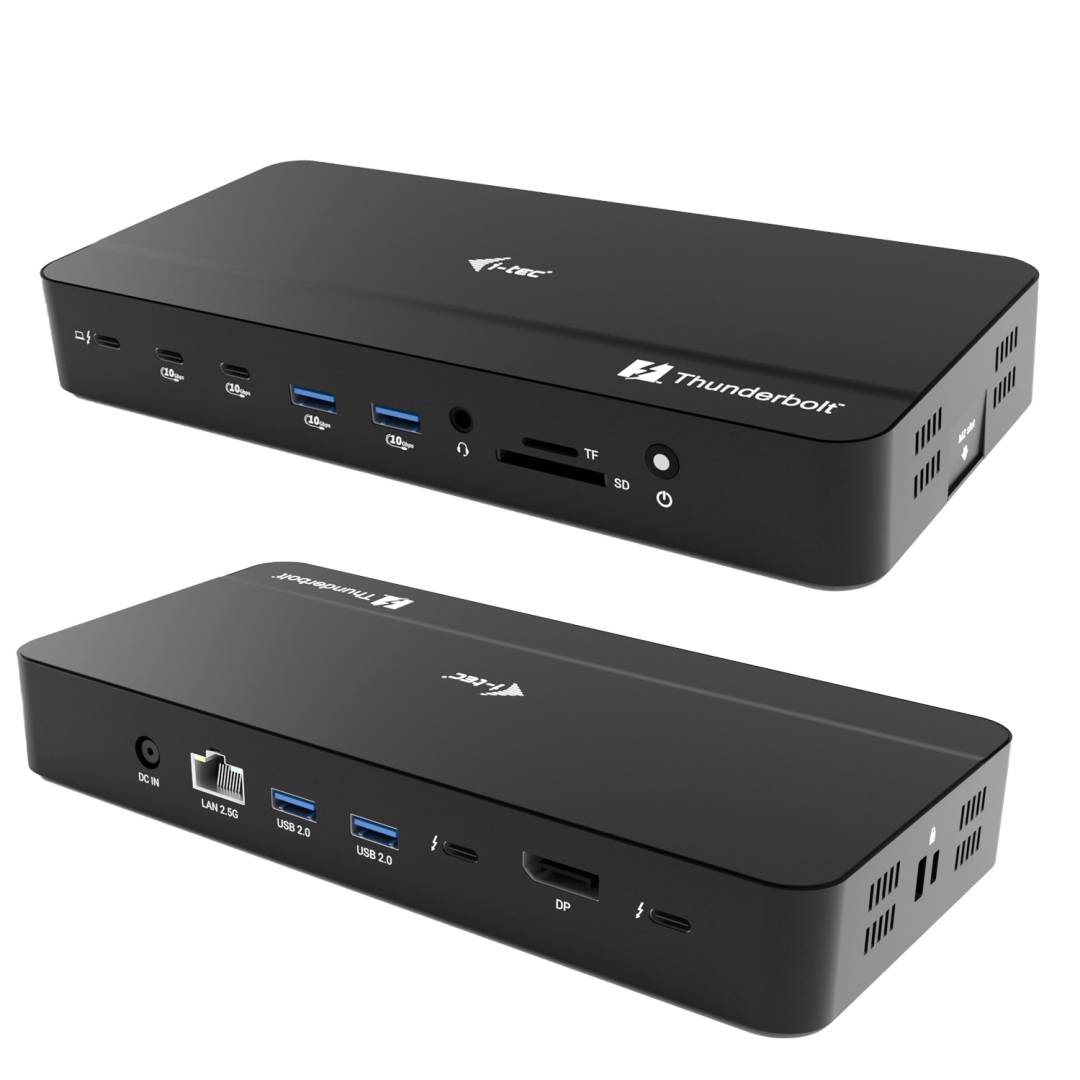
The i-tec Thunderbolt 5 Triple Display Docking Station (TB5TRIPLEDOCKM2PD) connects a Thunderbolt 5 laptop to up to three monitors, wired 2.5 Gigabit Ethernet, six USB ports, an SD/microSD reader and an internal M.2 NVMe SSD slot — and charges the laptop at up to 140W — over one cable. It is built for creative and engineering workstations that need high-resolution screens and fast local storage at the desk.
With a Thunderbolt 5 host the dock drives one 8K/60Hz or 4K/240Hz screen, two 8K/60Hz or two 4K/120Hz screens, or three 8K/30Hz or three 4K/120Hz screens (DP 1.4 with DSC). Thunderbolt 4/3 and USB4 laptops still work, with lower display limits, and plain USB-C laptops with DisplayPort Alt Mode get one 4K/60Hz screen.
The M.2 slot accepts an NVMe PCIe Gen 4 x4 SSD at up to 7000 MB/s, so project files, a Time Machine target or a scratch disk can live inside the dock instead of on a separate external drive.
Before you order: macOS supports a maximum of two external displays through this dock. Display counts and resolutions depend on the laptop port: full triple-screen performance needs Thunderbolt 5. Laptops that only accept PD 3.0 charge at up to 100W. Tell us your laptop model and monitors and we will confirm the setup.
What's in the Box
- Docking station
- Thunderbolt 5 cable (100 cm)
- Power adapter 180W (20V / 9A)
- User manual
What It Means in Practice
- One cable to the laptop: screens, LAN, USB, card reader, SSD and charging connect and disconnect together.
- Video outputs are 2x Thunderbolt 5 and 1x DisplayPort 2.1 — use USB-C/TB to DisplayPort or HDMI cables for monitors without USB-C input.
- 2.5GbE RJ45 is faster than Gigabit when your switch or NAS supports 2.5G.
- Four 10Gbps USB ports (2x USB-A, 2x USB-C, BC 1.2 charging) for fast drives, plus two USB 2.0 ports for keyboard and mouse.
- SD 4.0 and microSD 4.0 slots and a 3.5 mm combo audio jack for headsets.
- Up to 140W PD 3.1 to the laptop from the included 180W adapter; Kensington slot for desk security.
What Will Not Work
- No HDMI port on the dock — HDMI monitors need a DisplayPort/USB-C to HDMI cable or adapter (not included).
- macOS: maximum two external displays, regardless of how many outputs are connected.
- USB-C laptops without Thunderbolt/USB4 get only one 4K/60Hz display and reduced bandwidth.
- No SSD is included — the M.2 slot is empty. i-tec does not publish the supported M.2 length or maximum capacity; ask us before buying a drive.
Key Features
Thunderbolt 5 bandwidth
Up to 120 Gbps for high-resolution multi-monitor setups and fast storage at the same time.
Built-in NVMe slot
M.2 NVMe PCIe Gen 4 x4, up to 7000 MB/s, for an always-attached project or backup drive.
140W laptop charging
PD 3.1 up to 140W from the included 180W adapter for performance laptops.
2.5GbE and card reader
Faster wired network plus SD/microSD 4.0 for camera workflows.
Technical Specifications
| Identification |
| Part Number |
TB5TRIPLEDOCKM2PD |
| EAN/GTIN |
8595611707940 |
| MPN |
TB5TRIPLEDOCKM2PD |
| Brand |
i-tec |
| Host & video |
| Host connection |
1x Thunderbolt 5 (works with TB5, TB4, TB3, USB4, USB-C) |
| Bandwidth |
Up to 120 Gbps |
| Video outputs |
2x Thunderbolt 5, 1x DisplayPort 2.1 |
| TB5 host |
1x 8K/60Hz or 4K/240Hz; 2x 8K/60Hz or 4K/120Hz; 3x 8K/30Hz or 4K/120Hz |
| TB4 / TB3 / USB4 host |
1x 8K/60Hz or 4K/120Hz; 2x 4K/60Hz |
| USB-C (DP Alt Mode) host |
1x 4K/60Hz |
| macOS |
Max. 2 external displays |
| Ports |
| USB-C |
2x USB-C 3.2 Gen 2 (10 Gbps), BC 1.2 |
| USB-A |
2x USB-A 3.2 Gen 2 (10 Gbps), BC 1.2; 2x USB-A 2.0 |
| Ethernet |
RJ45 2.5GbE (10/100/1000/2500) |
| Card reader |
SD 4.0, microSD 4.0 |
| Audio |
3.5 mm combo audio/mic |
| M.2 slot |
NVMe PCIe Gen 4 x4, up to 7000 MB/s |
| Power & physical |
| Power Delivery |
Up to 140W (PD 3.1); PD 3.0 devices up to 100W |
| Power adapter |
180W, 20V / 9A (included) |
| Cable |
Thunderbolt 5, 100 cm |
| OS |
Windows 10/11, macOS, iPadOS, Android, ChromeOS, Linux |
| Dimensions |
215 x 100 x 30 mm |
| Weight |
360 g |
| Material |
ABS |
| Other |
Power button with LED, Kensington slot |
| Warranty |
| Warranty |
1-Year Warranty (Singular) |
| Manufacturer Term |
2-year i-tec manufacturer warranty with lifetime technical support, per manufacturer — claims handled through Singular |
Frequently Asked Questions
Does it work with a Thunderbolt 4 laptop?
Yes, with up to one 8K/60Hz or 4K/120Hz screen, or two 4K/60Hz screens. Three displays need a Thunderbolt 5 host.
Can I connect three monitors to a MacBook?
No. macOS supports a maximum of two external displays through this dock.
What SSD can I install?
An M.2 NVMe PCIe SSD (Gen 4 x4 for the full 7000 MB/s). Ask us to confirm the length and capacity before ordering a drive.
Will it charge my laptop at full speed?
Up to 140W for PD 3.1 laptops and up to 100W for PD 3.0 laptops.
Singular Expert Insight · Buyer's Guide
This dock makes sense when you already own or plan a Thunderbolt 5 laptop and high-resolution monitors; on older laptops a Thunderbolt 4 dock is cheaper. Add one of our
internal NVMe SSDs to turn the slot into fast desk storage.
✓ Buy it if you run a Thunderbolt 5 laptop with two or three high-resolution monitors and want storage and 2.5GbE at the desk.
✕ Skip it if your laptop is USB-C only or you need just one monitor — a simpler USB-C dock costs much less.
→ Also consider an i-tec Thunderbolt 4 or USB-C docking station for older laptops, or a USB-C hub for travel.
Not sure it fits your setup? Send us the model of your laptop, PC or device and we will check compatibility before you order.