
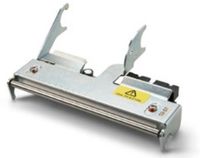
Honeywell Intermec 710-179S-001 Genuine 300 dpi 4-inch Printhead Assembly for PM42, PM43 and PM43c Label Printers
Brand:
Intermec

Honeywell Intermec 710-179S-001 Genuine 300 dpi 4-inch Printhead Assembly for PM42, PM43 and PM43c Label Printers
€827.57 inc. VAT
710-179S-001
Delivery
Order Today...
Ships...
Delivery...
ℹ️ Large or fragile items (e.g. monitors) may require extra handling time. We'll keep you informed.
Payment options
Trusted Tech Choice
Buying Benefits
Verified
Competitive EU pricing
Delivered to Cyprus from EU stock
Local warranty support
Please sign in so that we can notify you about a reply
Honeywell Intermec 710-179S-001 300 dpi Printhead
Genuine Honeywell300 dpi4-inchPM42 · PM43 · PM43c
The Honeywell (Intermec) 710-179S-001 is the genuine 300 dpi, 4-inch printhead assembly for the PM42, PM43 and PM43c industrial label printers. It is for warehouses, factories and logistics sites whose 300 dpi labels show white lines, faded areas or barcodes that no longer scan.
The printhead creates every dot on the label. Abrasive media, ribbon edges, dust and high darkness settings slowly burn out heating elements, which shows as fine vertical voids through text and barcodes. A new head restores full, even print up to the 106 mm maximum print width the PM43 achieves at 300 dpi.
Before you order: Match the resolution of your printer. The same PM42 / PM43 / PM43c family uses 710-129S-001 for 203 dpi and 710-180S-001 for 406 dpi. This head does not fit the 2-inch PM23c or the PM45. The resolution is printed on the printer label and on the test or configuration print.
What's in the Box
- Honeywell 300 dpi printhead assembly, 4-inch (1 pc)
What It Means in Practice
- The correct resolution keeps label layouts at the designed size and barcode dimensions.
- A new head removes the white lines that cause barcodes to fail scanning or verification.
- Clean the head regularly and keep darkness and pressure as low as the job allows to extend its life.
- After fitting, run media calibration and a test label before going back to production.
What Will Not Work
- It does not fit the PM23c (2-inch) or the PM45, which use their own printheads.
- It will not work correctly in a 203 dpi or 406 dpi PM43: those need 710-129S-001 or 710-180S-001.
- It does not include a platen roller, ribbon or cleaning supplies.
- It will not fix platen roller, sensor or ribbon drive faults.
Key Features
Genuine Honeywell part
The original printhead assembly listed in the PM42 and PM43 accessory guides.
300 dpi, 4-inch
Fine detail for small text and 2D barcodes, up to 106 mm print width.
One head, three printers
The same part serves the PM42, PM43 and PM43c at 300 dpi.
Technical Specifications
Frequently Asked Questions
Singular Expert Insight · Buyer's Guide
On the PM43 family the printhead is the main wear part, and the most common mistake is ordering the wrong resolution: the 203, 300 and 406 dpi heads look alike. Check the printer label once and you get the right head first time. See more genuine parts in our printer accessories range.
✓ Buy it if you run a 300 dpi Honeywell PM42, PM43 or PM43c and labels show white lines or faded barcodes.
✕ Skip it if your printer is a PM23c or PM45, or a 203 dpi or 406 dpi PM43.
→ Also consider cleaning pens or cards to keep the new head in good condition.
Not sure which head your printer takes? Send us the model and resolution from the printer label and we will confirm the exact Honeywell part.
Features - Intermec - 710-179S-001
More Details
Product Code
Y122079
EAN Code
5054533469839
Manufacturer
Intermec