
Kingston FURY Beast 64GB (4x16GB) DDR5-6000 CL40 Desktop Memory Kit, Intel XMP, Black
Brand:
Kingston

Kingston FURY Beast 64GB (4x16GB) DDR5-6000 CL40 Desktop Memory Kit, Intel XMP, Black
€2041.68 inc. VAT
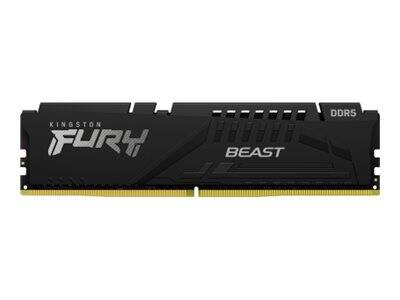
KF560C40BBK4-64
Delivery
Order Today...
Ships...
Delivery...
ℹ️ Large or fragile items (e.g. monitors) may require extra handling time. We'll keep you informed.
Payment options
Trusted Tech Choice
Buying Benefits
Verified
Competitive EU pricing
Delivered to Cyprus from EU stock
Local warranty support
Please sign in so that we can notify you about a reply
Kingston FURY Beast 64GB (4x16GB) DDR5-6000 CL40
64GB (4x16GB)DDR5-6000 CL40Intel XMP 3.0Black
The Kingston FURY Beast KF560C40BBK4-64 is a 64GB (4x16GB) DDR5-6000 CL40 desktop memory kit for Intel DDR5 desktop builds that need 64GB for gaming, content creation and heavy multitasking. It ships as a matched set of 4 x 16GB modules, tested together by Kingston, so every module runs the same timings in the same system.
Out of the box the kit starts at the safe default speed stored in its SPD (DDR5-4800 CL40-39-39, 1.1V) and reaches 6000 MT/s CL40 once you enable the XMP profile in the BIOS. The overclocking profile is Intel XMP 3.0 only — there is no AMD EXPO profile on this kit.
Before you order: This is DDR5 UDIMM memory for desktop motherboards with DDR5 slots. The kit has an Intel XMP 3.0 profile only — on an AMD AM5 board there is no EXPO profile, so plan for DDR5-4800 or manual settings, or choose an EXPO kit.
What's in the Box
- 4 x 16GB DDR5 UDIMM modules (64GB (4x16GB) total)
- Retail packaging from Kingston
- No screws, cables or adapters are needed — the modules clip straight into the slots
- No software is required for operation
What It Means in Practice
- Capacity: 64GB is comfortable for large games with browsers and voice chat in the background, 4K video timelines, big photo libraries, virtual machines and local development containers.
- Speed: the rated 6000 MT/s CL40 only applies after you enable XMP in the BIOS. Without it the kit runs at the JEDEC default (DDR5-4800), which is stable but slower.
- First boot after installing DDR5 is often slow — the board trains the memory and may restart once or twice. Let it finish before assuming a fault.
- Four modules means two per channel. This loads the CPU memory controller more than two modules do, so check your motherboard memory QVL — if the profile is not stable, one step lower in speed usually is.
- Do not mix this kit with other modules. Different kits, even with the same label, can use different DRAM and will not be guaranteed to run at the rated speed together.
What Will Not Work
- DDR4 motherboards — DDR5 modules have a different key notch and physically do not fit DDR4 slots.
- Laptops, mini PCs and all-in-ones that use SO-DIMM slots — this is a full-size 288-pin desktop DIMM.
- Servers and workstations that require registered (RDIMM) or ECC UDIMM memory — this is non-ECC unbuffered memory.
- Prebuilt desktops with locked BIOS (many office PCs) — the modules will usually run, but only at the default DDR5-4800, because the BIOS does not offer XMP.
- One-click rated speed on AMD AM5 — the kit has no EXPO profile.
Key Features
One-click XMP profile
Intel XMP 3.0 stores the tested speed, timings and voltage on the module, so one BIOS setting brings the kit to 6000 MT/s without manual tuning.
64GB as 4 x 16GB
Four 16GB modules fill all four slots of a typical ATX board — good when the case or RGB layout calls for a full set, but it leaves no slot free for later upgrades.
Low-profile heat spreader
At 34.9mm tall the low-profile heat spreader clears most tower air coolers, which matters in compact cases.
On-die ECC and on-module PMIC
Like all DDR5, the modules carry on-die ECC inside each DRAM chip and their own power management IC — this improves chip-level reliability but is not the system-level ECC that servers use.
Technical Specifications
Frequently Asked Questions
Singular Expert Insight · Buyer's Guide
Most of the real-world gain from DDR5 comes from enabling the profile, not from chasing the last few hundred MT/s — a 64GB kit that runs stably at its rated speed beats a faster one that needs manual tuning. With four DDR5 modules many boards will not hold 6000 MT/s; the built-in 5600 profile is the practical fallback, and a 2 x 32GB kit is the easier route to 64GB at high speed. Browse our memory range for other capacities and speeds.
✓ Buy it if you want all four slots filled on an Intel DDR5 board and accept 5600 if 6000 is not stable.
✕ Skip it if you want guaranteed high speed — two 32GB modules are easier on the memory controller.
→ Also consider Kingston FURY Beast 64GB (2x32GB) DDR5-6000 CL36 EXPO (KF560C36BBEK2-64).
Not sure it fits? Send us your motherboard or PC model and we will check compatibility before you order.
Features - Kingston - KF560C40BBK4-64
Colour
black
More Details
Product Code
04:430141
EAN Code
0740617335217
Manufacturer
Kingston