Special B2B pricing available after sign-in

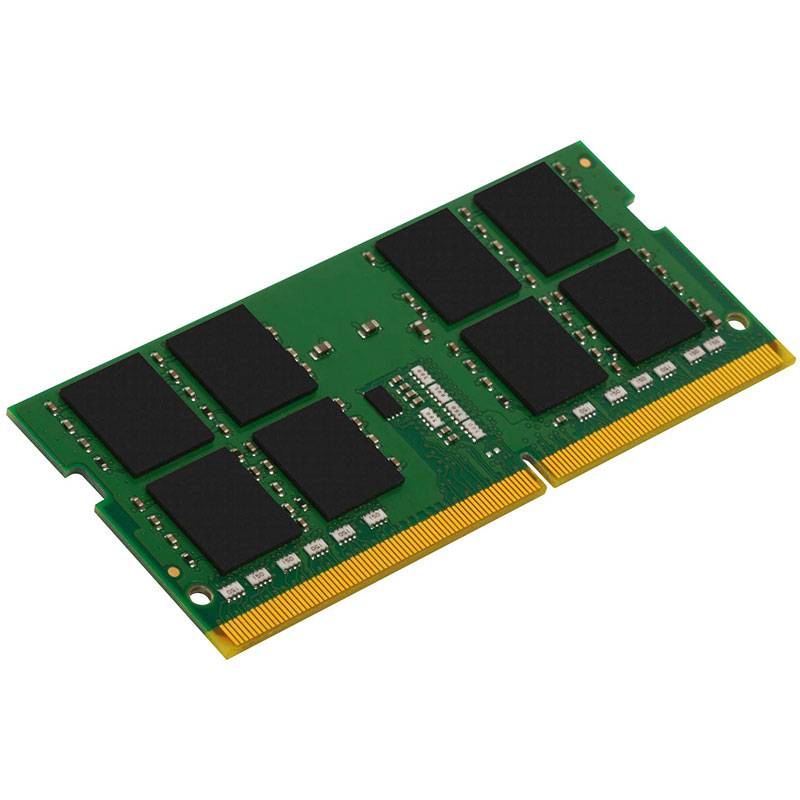
Kingston ValueRAM 32GB DDR4-3200 CL22 SO-DIMM Laptop Memory, 260-pin, 1.2V, Non-ECC Unbuffered

Brand:
Kingston
Kingston ValueRAM DDR4 module 32 GB SO-DIMM KVR32S22D832
Kingston ValueRAM 32GB DDR4-3200 CL22 SO-DIMM Laptop Memory, 260-pin, 1.2V, Non-ECC Unbuffered
€670.57 inc. VAT
Buy
KVR32S22D8/32
€563.50 €626.11
€670.57 inc. VAT
Ships from EU stock: 10 item(s)
Product Code
04:352448
EAN Code
0740617310924
Manufacturer
Kingston

Quick Specs

Capacity
32GB
Speed
DDR4-3200 (PC4-25600)
CL
CL22 (22-22-22)
Form
260-pin SO-DIMM
Delivery

Order Today...
Ships...
Delivery...
ℹ️ Large or fragile items (e.g. monitors) may require extra handling time. We'll keep you informed.
Payment options
✓ Bank Deposit
Secure checkout with flexible payment methods
Trusted Tech Choice
Buying Benefits Verified
Competitive EU pricing
Delivered to Cyprus from EU stock
Local warranty support

Kingston ValueRAM 32GB DDR4-3200 CL22 SO-DIMM

32GBDDR4-3200 CL22260-pin SO-DIMM1.2V

The Kingston ValueRAM 32GB is a DDR4-3200 CL22 DDR4 SO-DIMM memory module for business and home laptops, mini PCs and all-in-ones with DDR4 SO-DIMM slots. It is a single 32GB module, so you can add it to a free slot or replace a smaller factory module.

ValueRAM is Kingston's industry-standard line built to JEDEC specification: it runs at DDR4-3200 CL22-22-22 at 1.2V with no profiles to enable, and drops automatically to the platform's supported speed on older laptops. At DDR4-3200 each module moves up to 25.6 GB/s, and pairing it with a matching module doubles that in dual-channel.

Before you buy, three things decide whether a memory upgrade works: the memory generation (this is DDR4 — not DDR3 or DDR5), the form factor (SO-DIMM, the short 260-pin laptop module) and how much your system accepts per slot and in total. Speed and latency come after that: a faster module never hurts, because it steps down to whatever the platform runs, but it only helps if the system can use it. If you are replacing a module rather than adding one, note the capacity and speed of what is fitted now — Windows Task Manager (Performance, then Memory) shows the speed in use, the number of slots and how many are occupied.

Before you order: A 32GB SO-DIMM needs a laptop that supports 32GB per slot. Many laptops from the Intel 6th–7th generation era officially stop at 16GB per slot (32GB total) — check your laptop's maximum memory per slot before ordering, or send us the model and we will check it.

What's in the Box

  • 1 × 32GB DDR4 SO-DIMM module
  • Manufacturer packaging
  • No tools, cables or software — none are needed; most laptops only require a small screwdriver to open the memory cover

What It Means in Practice

  • For dual-channel bandwidth, pair it with a second module of the same capacity and speed; on its own it runs in single-channel mode.
  • The module runs at the lower of its rated speed and the speed your platform supports — on a DDR4-2400 or 2666 laptop it will simply run at 2400 or 2666.
  • 32GB comfortably covers heavy multitasking, large spreadsheets, virtual machines and photo or video editing on a laptop.
  • Mixing it with a different existing module usually works, but the system will fall back to the slowest speed and loosest timings of the two — a matched set avoids surprises.
  • Fitting it is a five-minute job on most laptops with a memory cover; we can also install it for you at our Limassol store.
  • Handle the module by its edges and touch a metal surface first; insert it at about 30 degrees, fully into the slot, then press down until the side clips lock.
  • The operating system detects the new memory automatically — there are no drivers to install. The first start after a memory change can take a little longer while the system trains the memory.
  • If the laptop has soldered memory plus one free slot, the module adds to the soldered memory; dual-channel then works best when the two capacities match.

What Will Not Work

  • Desktop PCs with full-size DIMM slots — this is a 260-pin SO-DIMM and does not fit a desktop slot.
  • DDR3, DDR3L or DDR5 laptops — the notch position is different and the module will not seat.
  • Laptops, tablets and ultrabooks with fully soldered memory, including Apple silicon Macs.
  • Servers and workstations that require ECC or registered (RDIMM) memory.

Key Features

 
JEDEC standard
Built to the industry specification, which is what laptop and mini-PC makers validate against.
 
DDR4-3200 CL22
The fastest JEDEC DDR4 speed; backward compatible with 2933, 2666, 2400 and 2133 platforms.
 
Standard 1.2V
Same voltage as factory memory — no extra heat or battery drain.
 
30 mm SO-DIMM
Standard-height 260-pin module with no heatspreader, for tight compartments.

Technical Specifications

Identification
Part Number KVR32S22D8/32
EAN / GTIN 0740617310924
Brand Kingston
Series ValueRAM
Memory
Type DDR4 SDRAM
Form factor 260-pin SO-DIMM
Capacity 32GB
Speed DDR4-3200 (PC4-25600, 25.6 GB/s per module)
CAS latency CL22
Timings 22-22-22
Voltage 1.2V
Speed setting JEDEC standard (no XMP)
ECC / buffering Non-ECC, unbuffered
Rank / organisation 2Rx8, 16Gbit DRAM
Physical
Colour Green PCB
Module height 30 mm (1.18")
Operating temperature 0 to 85 °C
Compatibility
Platforms (per Kingston) Laptops, mini PCs and all-in-ones with DDR4 SO-DIMM slots (JEDEC standard)
Not compatible Desktop DIMM slots, DDR3/DDR5 systems, soldered-memory devices
Warranty
Warranty 1-Year Warranty (Singular)
Manufacturer Term Lifetime warranty per Kingston — claims handled through Singular

Frequently Asked Questions

Will it run at 3200 in my laptop?
Only if the laptop's platform supports DDR4-3200. Otherwise it runs at the highest speed the laptop supports — it will not stop working, it just runs slower. Send us your model and we will tell you what speed to expect.
Can I add it next to my existing module?
Usually yes, as long as both are DDR4 SO-DIMM. The pair will run at the slower module's speed and timings, and dual-channel works best when capacities match.
How do I find out how much memory my laptop supports?
The maximum per slot and in total is in your laptop's specification sheet or service manual. If you are unsure, give us the exact model or serial number and we will check it for you.
Do I need to change anything in the BIOS after fitting it?
Normally no. The system reads the module's SPD data and sets speed and timings automatically. Some mini PCs offer XMP or manual memory settings, but for a standard laptop upgrade the defaults are the right choice.
Singular Expert Insight · Buyer's Guide
A memory upgrade is still the cheapest way to make a DDR4 laptop feel faster, provided the slot, generation and per-slot limit match. Check the slot count and maximum capacity first, then choose speed. Browse our memory range for other capacities and kits.
✓ Buy it if your laptop uses DDR4 SO-DIMM slots and supports 32GB per slot.
✕ Skip it if your device uses DDR5, DDR3 or soldered memory, or you need ECC memory.
→ Also consider KF432S20IBK2/64 (Kingston FURY Impact 2x32GB) for 64GB in two slots, or KVR32S22D8/32 for a JEDEC-standard 32GB module.
Not sure it fits? Send us your laptop or PC model (or serial number) and we will check memory compatibility before you order.

Features - Kingston - KVR32S22D8/32

More Details
Product Code
04:352448
EAN Code
0740617310924
Manufacturer
Kingston
Technical specifications
Memory Size
  • 32GB
  • Recently Viewed
  • Customers Also Bought
 
Why Buy from Singular

Trusted by businesses across Cyprus

Genuine products, EU stock, and expert support for every purchase.
✓ Genuine Products
Sourced through official distribution channels, with full manufacturer warranty.
✓ EU Stock
Shipped from our EU distribution network, with real-time availability on every product.
✓ B2B Ready
VAT invoices for business deduction and credit terms for verified buyers.
Expert Support
Talk to our team for sizing, configuration or volume orders.