
Lenovo ThinkStation P5 Gen 2 Workstation Intel Xeon 636 64GB DDR5 RDIMM 1TB SSD RTX PRO 2000 Windows 11 Pro
Brand:
Lenovo

Lenovo ThinkStation P5 Gen 2 Workstation Intel Xeon 636 64GB DDR5 RDIMM 1TB SSD RTX PRO 2000 Windows 11 Pro
€9791.24 inc. VAT




30KB0026GE
Delivery
Order Today...
Ships...
Delivery...
ℹ️ Large or fragile items (e.g. monitors) may require extra handling time. We'll keep you informed.
Payment options
Trusted Tech Choice
Buying Benefits
Verified
Competitive EU pricing
Delivered to Cyprus from EU stock
Local warranty support
Please sign in so that we can notify you about a reply
ThinkStation P5 Gen 2 — Intel Xeon 636 with ECC memory and RTX PRO 2000
Intel Xeon 636, 12 cores64 GB DDR5-6400 ECCRTX PRO 2000 16 GB8 DIMM slots, 1 TB max
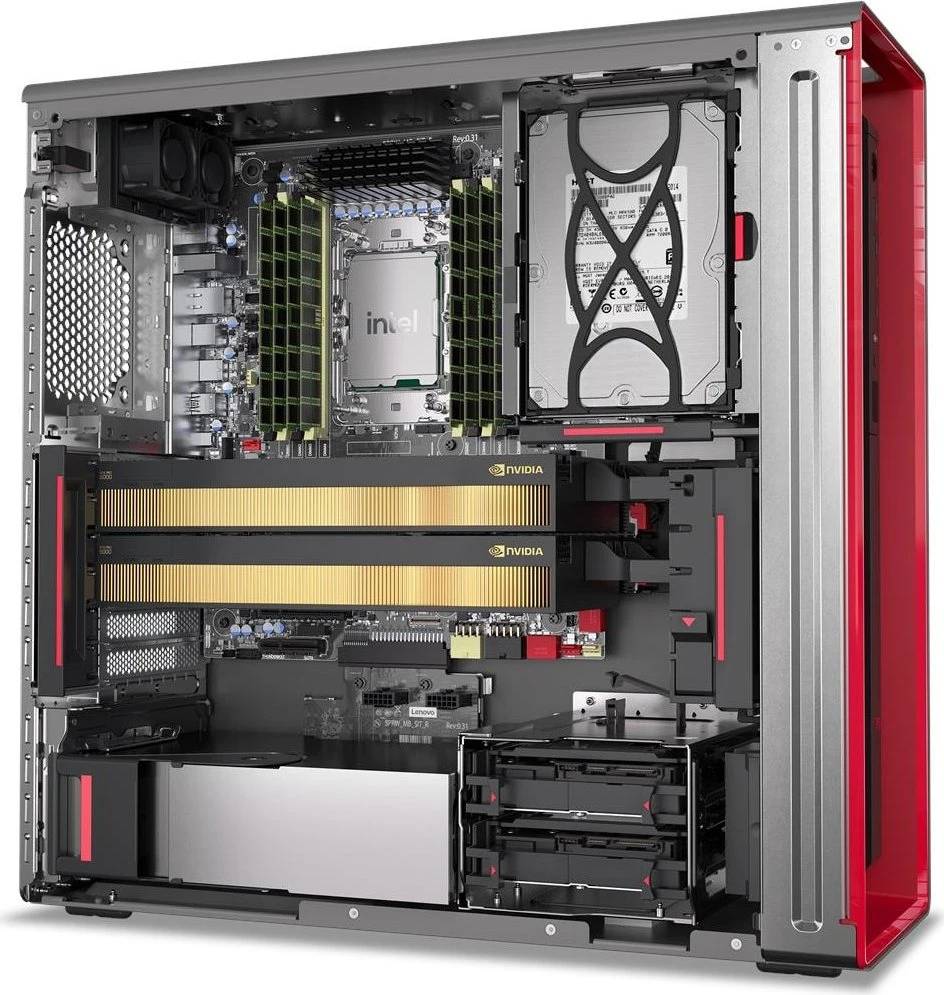
The ThinkStation P5 Gen 2 is the Xeon-class machine in Lenovo’s workstation range, and this configuration fits an Intel Xeon 636 with twelve cores and 24 threads, 64 GB of registered ECC DDR5-6400 across a quad-channel memory system, a 1 TB PCIe 5.0 NVMe SSD with hardware encryption, and an NVIDIA RTX PRO 2000 Blackwell with 16 GB of GDDR7. It runs Windows 11 Pro for Workstations. What separates a P5 from a P3 is not raw speed but the platform underneath: error-correcting registered memory across eight slots to a one-terabyte ceiling, quad-channel bandwidth, and 2.5 Gigabit networking as standard.
Compatibility — check before buying:
Understand what you are paying for. This machine uses registered ECC memory (RDIMM), which is not interchangeable with the unbuffered DDR5 in a P3 or a desktop — if you plan to expand it, the modules must be the right registered ECC type. Its value is in eight DIMM slots and a 1 TB memory ceiling, four times what a P3 Tower takes, and in ECC correcting single-bit errors rather than letting them silently corrupt a long calculation. The graphics card is the RTX PRO 2000 with 16 GB; Lenovo builds the same P5 Gen 2 with an RTX PRO 4000 and 24 GB under a different code, and everything else in that machine is identical — that is the specification customers most often order wrong. The unit is supplied with a German-language Windows image. No monitor, keyboard or mouse is included.
Best For
✓ Simulation, analysis and engineering that must not tolerate memory errors
✓ Datasets that will outgrow the 256 GB ceiling of a P3
✓ Long-running jobs where a silent bit-flip is unacceptable
✓ CAD, BIM and visualisation on certified drivers
✓ Offices with 2.5 Gigabit networking already in place
✓ Machines expected to be expanded rather than replaced
Key Features
Intel Xeon 636, 12 cores and 24 threads
Twelve performance cores with 24 threads, running 3.5 GHz base and 4.7 GHz turbo with 48 MB of cache, on socket FCLGA4710 within a 170 W envelope. A Xeon here is about platform features — ECC, registered memory, lane count — as much as about core throughput.
64 GB of registered ECC DDR5-6400, expandable to 1 TB
Two 32 GB RDIMMs in an eight-slot quad-channel system. ECC corrects single-bit memory errors as they occur, which matters when a job runs for hours; the 1 TB ceiling means datasets can grow a long way before the machine has to be replaced.
RTX PRO 2000 Blackwell, 16 GB GDDR7
A certified professional card — the kind CAD, BIM and visualisation vendors validate their software against. Sixteen gigabytes covers substantial assemblies and scenes, with drivers built for stability under a large model rather than for frame rate.
Built as a serviceable workstation
A 750 W fixed Platinum supply, discrete TPM 2.0 certified to FIPS 140-2, Intel vPro Enterprise with AMT for remote management, 2.5 Gigabit Ethernet on board, and a chassis designed for access. This is a machine an IT department deploys and maintains, not a sealed appliance.
Technical Specifications
Frequently Asked Questions
Singular Expert Insight
The P5 is bought for the memory platform, not for the core count — twelve cores is modest, and a P3 with a Core Ultra 9 will beat it in plenty of benchmarks. What a P3 cannot do is take a terabyte of registered ECC memory across eight slots, and that is the entire reason to choose this chassis. If your work does not need ECC and will never need more than 256 GB, you are paying for headroom you will not use. Within the P5 Gen 2 line, the only thing that changes between the two common codes is the graphics card, so decide that on your model sizes rather than on price: 16 GB here, 24 GB on the RTX PRO 4000 version. Screens are worth planning at the same time in our PC monitors section, and memory is where we will match registered ECC modules to what is fitted.
Buyer’s Guide
Buy it if
Your work needs error-correcting memory and a platform that can reach 1 TB, and 16 GB of certified professional graphics covers your models. The 3-year on-site term with Premier Support makes it deployable as a long-life engineering standard.
Skip it if
Your datasets fit inside 256 GB and you do not need ECC — a P3 Tower with a faster Core Ultra processor will do more work for the money. Skip it too if your scenes need 24 GB of graphics memory, or if a German-language image out of the box is a problem.
Also consider
The same P5 Gen 2 with an RTX PRO 4000 and 24 GB if you need the larger frame buffer, or a ThinkStation P3 Tower Gen 2 if ECC and the 1 TB memory ceiling are not requirements.
Features - Lenovo - 30KB0026GE
More Details
Product Code
04:590381
EAN Code
0199276328144
Manufacturer
Lenovo