
MSI MAG X870E GAMING MAX WIFI AMD X870E ATX Motherboard AM5 DDR5 PCIe 5.0 USB4 Triple M.2 Wi-Fi 7
Brand:
MSI

MSI MAG X870E GAMING MAX WIFI AMD X870E ATX Motherboard AM5 DDR5 PCIe 5.0 USB4 Triple M.2 Wi-Fi 7
€316.08 inc. VAT




7E86-001R
Delivery
Order Today...
Ships...
Delivery...
ℹ️ Large or fragile items (e.g. monitors) may require extra handling time. We'll keep you informed.
Payment options
Trusted Tech Choice
Buying Benefits
Verified
Competitive EU pricing
Delivered to Cyprus from EU stock
Local warranty support
Please sign in so that we can notify you about a reply
MSI MAG X870E GAMING MAX WIFI — AMD X870E ATX for Socket AM5 with USB4 and Wi-Fi 7
AMD X870E / Socket AM5USB4 40 Gbps Type-C3 x M.2, one PCIe 5.0Wi-Fi 7 + Realtek 5Gb LAN
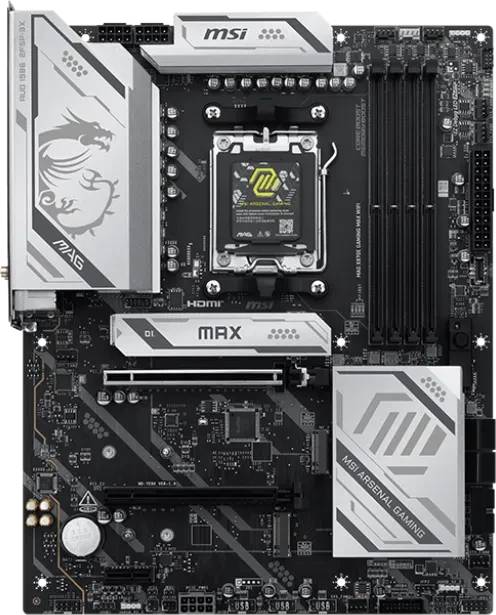
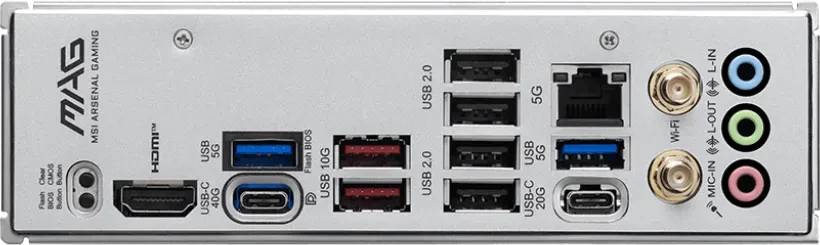
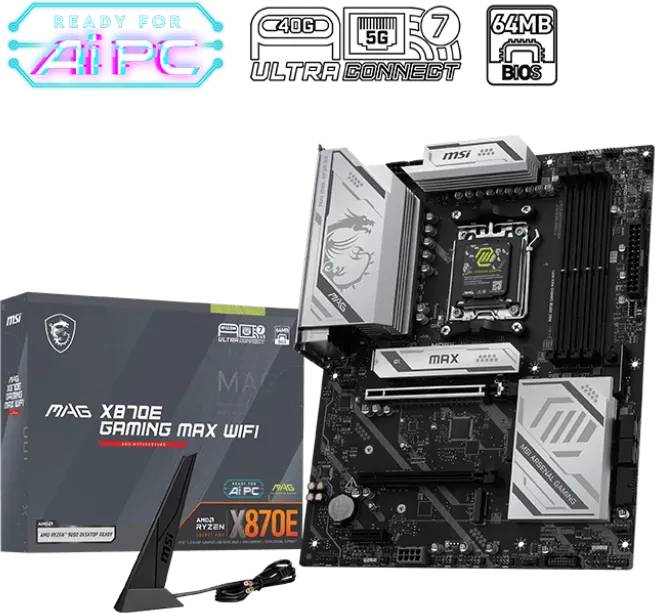
The MSI MAG X870E GAMING MAX WIFI is a full-size ATX motherboard on AMD’s flagship X870E chipset for Socket AM5, bringing USB4 at 40 Gbps and a 5Gb wired network port to a gaming board rather than a workstation one. It carries the part number 7E86-001R (EAN 4711377407199) and supports AMD Ryzen 9000, 8000 and 7000 Series processors, with four DDR5 UDIMM slots taking up to 256 GB and rated to 8200 MT/s when overclocked with AMD EXPO. Storage covers three M.2 slots — the first at PCIe 5.0 x4, the other two at PCIe 4.0 x4 — plus four SATA 6 Gb/s ports. Wireless is Wi-Fi 7 across 2.4, 5 and 6 GHz with Bluetooth 5.4, and the rear panel adds a 20 Gbps Type-C port alongside the USB4 one. Typically in stock with fast delivery across Cyprus.
Compatibility — check before buying:
Despite the reseller listings that describe this board as ITX, it is full ATX at 304.8 x 243.84 mm — do not size a case around an incorrect listing. The three M.2 slots differ in source and length support: M.2_1 is PCIe 5.0 x4 from the CPU (2280 / 2260), M.2_2 is PCIe 4.0 x4 from the chipset and takes 22110 drives, M.2_3 is PCIe 4.0 x4 from the chipset. Expansion beyond the graphics slot is one PCIe 4.0 x4 and one PCIe 3.0 x1. Video output is one HDMI at 4K 60 Hz plus DisplayPort over the USB4 Type-C port at up to 4K 120 Hz, and both need a CPU with integrated graphics. Onboard audio is a Realtek ALC897, a mainstream codec rather than the ALC4080 used on MSI’s TOMAHAWK and MPG boards. Socket AM5 means DDR5 only. The 5Gb LAN needs a 5GBASE-T switch to exceed gigabit.
Best For
✓ Gaming builds that also use a USB4 dock or external NVMe
✓ Ryzen 9000 systems with a PCIe 5.0 graphics card
✓ Users moving large captures or projects over 5Gb Ethernet
✓ Homes with a Wi-Fi 7 router on the 6 GHz band
✓ Builds with three NVMe drives plus four SATA disks
✓ Single-cable USB-C monitor or laptop-style docking setups
Key Features
USB4 at 40 Gbps with DisplayPort out
X870E requires USB4, and MSI delivers it as a rear Type-C port running at 40 Gbps that also carries DisplayPort at up to 4K 120 Hz. One cable can drive a monitor, connect an external NVMe enclosure and run a dock — the single biggest practical reason to choose X870E over B850.
Wi-Fi 7 plus Realtek 5Gb wired LAN
A Wi-Fi 7 module covers 2.4, 5 and 6 GHz with Bluetooth 5.4, and wired networking is a Realtek 8126 5Gb Ethernet controller rather than the 2.5GbE most gaming boards fit. Together they mean you are unlikely to be waiting on the network for anything.
Three M.2 slots, none reduced to x2
M.2_1 runs PCIe 5.0 x4 from the CPU, while M.2_2 and M.2_3 both run PCIe 4.0 x4 from the X870E chipset — the extra chipset lanes are why none of them is cut back to x2 as on many B-series boards. M.2_2 accepts longer 22110 drives.
Four DDR5 slots to 256 GB with EXPO
Four UDIMM sockets in dual channel take up to 256 GB with one-click AMD EXPO profiles and a rated ceiling of DDR5-8200 when overclocked. Starting with a two-module kit leaves a genuine upgrade path to 128 GB or 256 GB later.
Technical Specifications
Frequently Asked Questions
Singular Expert Insight
Most X870E boards are priced as workstation or flagship parts; the MAG line puts the chipset in reach of a normal gaming build. What you actually get for the X870E premium is USB4 and the extra chipset lanes that keep all three M.2 slots at x4 — both real, both easy to check against your own needs. What MSI has trimmed to make the price work is the audio codec, and that is the honest answer to why this costs less than a TOMAHAWK-tier X870E. If you use a headset over USB or wireless, you will never notice. Pair it with a PCIe 5.0 ready card from our graphics cards range and a matched two-module DDR5 memory kit, and put the Gen 5 SSD in M.2_1. Do check the reseller listing you compare against — several describe this board as ITX, which it is not.
Buyer's Guide
Buy it if
You want a gaming-oriented X870E board with USB4 at 40 Gbps, Wi-Fi 7 and 5Gb wired networking, PCIe 5.0 graphics and storage, and three full-bandwidth M.2 slots.
Skip it if
You never use USB4 or a fast wired network — B850 costs less for the same PCIe 5.0 — or you want premium onboard audio for wired headphones.
Also consider
The MSI PRO X870E-S EVO WIFI for the same chipset with professional styling, or the MSI MAG B850 TOMAHAWK WIFI if the ALC4080 codec matters more than USB4.
Features - MSI - 7E86-001R
CPU Socket
- Socket AM5
Colour
black
More Details
Product Code
04:580258
EAN Code
4711377407199
Manufacturer
MSI