
Peach Combi Pack Plus for HP 932XL and 933XL, 5 Remanufactured XL Cartridges with Chip, 2x Black, Cyan, Magenta, Yellow
Brand:
Peach

Peach Combi Pack Plus for HP 932XL and 933XL, 5 Remanufactured XL Cartridges with Chip, 2x Black, Cyan, Magenta, Yellow
€46.58 inc. VAT
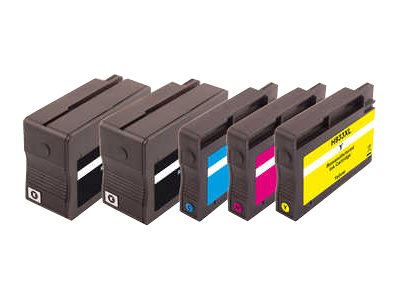
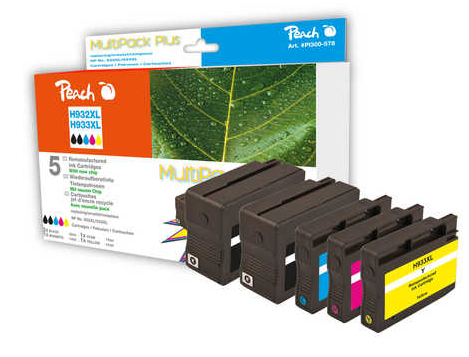


PI300-578
Delivery
Order Today...
Ships...
Delivery...
ℹ️ Large or fragile items (e.g. monitors) may require extra handling time. We'll keep you informed.
Payment options
Trusted Tech Choice
Buying Benefits
Verified
Competitive EU pricing
Delivered to Cyprus from EU stock
Local warranty support
Please sign in so that we can notify you about a reply
Peach Combi Pack Plus for HP 932XL / 933XL: two blacks and three colours
HP 932XL / 933XL5 cartridges2x black includedNew chip with ink level
The Peach Combi Pack Plus PI300-578 is a five-cartridge set of remanufactured XL inks that replaces the HP 932XL black (twice) and the HP 933XL cyan, magenta and yellow in the HP OfficeJet 6100, 6600, 6700, 7110, 7510 and 7600-series printers. It is built for small offices that print mostly text, because the pack includes a spare black alongside the three colours.
Each black holds 33 ml (Peach publishes 1,205 pages each) and each colour 14 ml (1,045 to 1,125 pages). Every cartridge carries a new chip with ink-level detection, so the printer shows remaining ink as usual.
What's in the Box
- 2x black cartridge, replaces HP 932XL, 33 ml each
- 1x cyan cartridge, replaces HP 933XL cyan, 14 ml
- 1x magenta cartridge, replaces HP 933XL magenta, 14 ml
- 1x yellow cartridge, replaces HP 933XL yellow, 14 ml
- No printhead or printer included
What It Means in Practice
- The second black means you change the colours once while black gets replaced twice, which matches how most offices actually use these printers.
- The new chip reports ink level, so low-ink warnings work normally instead of showing an unknown level.
- Install each cartridge the same way as the original: remove the orange clip or protective tape, push it into the matching colour slot until it clicks, and close the cover.
- The printer may show a one-time message that a non-original cartridge was detected; confirm it on the panel and printing continues normally.
- Print a nozzle check after the swap. If one colour shows gaps, one standard cleaning cycle normally clears it; repeated deep cleaning only wastes ink.
- Store spare cartridges sealed, upright and at room temperature, and use them within the date printed on the pack.
What Will Not Work
- HP printers using HP 950/951, 953 or 963 cartridges: different cartridge shape and chip.
- The standard-capacity HP 932/933 printers not listed below: always check your model in the list.
- HP printers that received a firmware update blocking non-HP cartridges (HP dynamic security): if your printer already rejects third-party cartridges, these will be rejected too. Tell us your model and we will check before you order.
- Printers that are not on the compatibility list, even from the same brand and family: cartridge shape and chip differ between series.
- Refilling or swapping chips between cartridges: the cartridges are supplied ready to use and are not meant to be refilled by the user.
Key Features
Spare black included
Two 33 ml black cartridges for text-heavy printing.
Ink level detection
New chip on every cartridge reports remaining ink to the printer.
XL capacity
About 1,205 pages per black and 1,045 to 1,125 pages per colour, as published by Peach.
Technical Specifications
Frequently Asked Questions
Singular Expert Insight · Buyer's Guide
For an HP OfficeJet 6600 or 7610 that prints mostly documents, a pack with two blacks is the most practical set to keep in the drawer. The one thing to check is HP firmware: if your printer already rejects third-party cartridges, update settings will not change that. See our compatible ink range for single colours and other HP packs.
✓ Buy it if your HP OfficeJet uses 932XL and 933XL cartridges and you print mostly black text.
✕ Skip it if your printer has already blocked non-HP cartridges, or it uses HP 950/951 or later cartridges.
→ Also consider the Peach Combi Pack Plus PI300-585 if your OfficeJet Pro uses HP 950XL and 951XL.
Not sure it fits? Send us your printer model (printed on the front panel or the label under the scanner lid) and we will check the cartridge match before you order.
Features - Peach - PI300-578
More Details
Product Code
04:201053
EAN Code
7640164822600
Manufacturer
Peach