
Philips Evnia 3000 24M2N3201P/00 23.8-inch Full HD Fast IPS Gaming Monitor, up to 260Hz OC, Height Adjustable, White
Brand:
Philips

Philips Evnia 3000 24M2N3201P/00 23.8-inch Full HD Fast IPS Gaming Monitor, up to 260Hz OC, Height Adjustable, White
€233.61 inc. VAT



24M2N3201P/00
Delivery
Order Today...
Ships...
Delivery...
ℹ️ Large or fragile items (e.g. monitors) may require extra handling time. We'll keep you informed.
Payment options
Trusted Tech Choice
Buying Benefits
Verified
Competitive EU pricing
Delivered to Cyprus from EU stock
Local warranty support
Please sign in so that we can notify you about a reply
Fast Full HD gaming in a white desktop setup
23.8-inch Fast IPSUp to 260Hz OC1ms GtG130 mm height
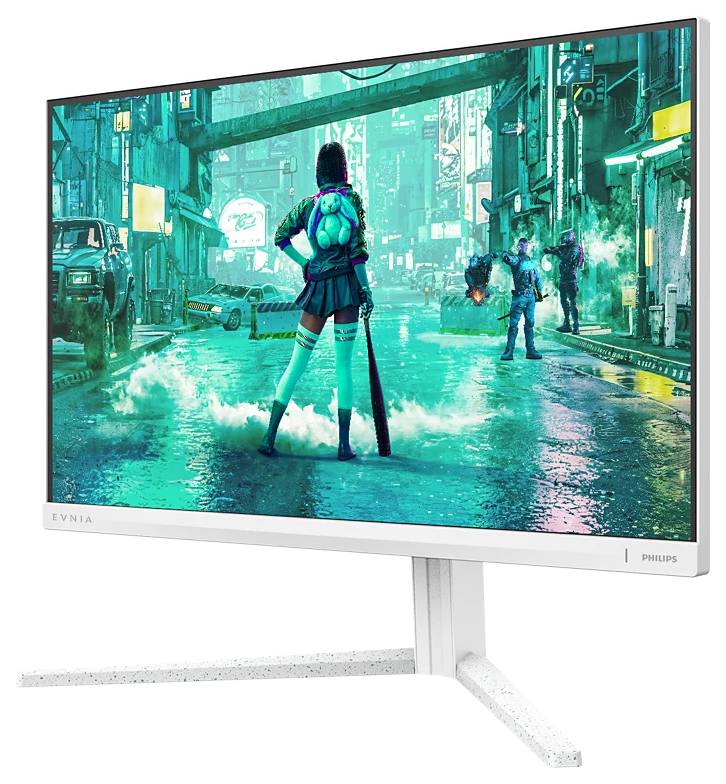
The Philips Evnia 3000 24M2N3201P/00 is one white 23.8-inch Full HD gaming monitor with a height-adjustable stand. Its Fast IPS panel supports up to 260Hz through an overclock setting over HDMI or DisplayPort, while the supplied stand adjusts height, swivel, tilt and portrait orientation. Connect it to a compatible PC or other video source and mains power; HDMI, DisplayPort and power cables are listed in the exact-model package.
Before you order:
Before ordering, check that your graphics output supports 1920 ×1080 at the desired refresh rate. 260Hz is an overclocked maximum, not a guaranteed frame rate in your games. If the picture is abnormal after enabling overclocking, Philips instructs you to disable the OSD overclock setting. 1ms GtG and 0.3ms Smart MBR describe different response measurements.
What's in the Box
- 1 ×24M2N3201P/00 monitor with stand
- DisplayPort cable and HDMI cable
- Power cable and user documentation
What It Means in Practice
- For an FPS setup, connect your PC with HDMI or DisplayPort, select the desired resolution and refresh rate in the graphics settings, and enable the OSD overclock setting if you want to try 260Hz. The PC still needs to render the game fast enough.
- Smart MBR uses backlight flashing to reduce perceived motion blur. It controls brightness while active and may cause flicker;Philips recommends disabling it outside gaming.
- Adjust 130 mm of height,±30° swivel and−5° to+20° tilt to suit your seat. Use±90° pivot for portrait documents when needed.
- HDR10 support requires a compatible source and content. The stated 300cd/m² brightness and 1000:1 typical contrast provide useful context;no DisplayHDR certification is claimed.
What Will Not Work
- Expecting 260fps from the monitor alone;game performance depends on the connected system.
- Treating 0.3ms Smart MBR as the GtG response time, or expecting manual brightness adjustment while Smart MBR is active.
- Using an HDMI connector label alone as proof that a source supports Full HD 260Hz.
Key Features
Fast IPS with adaptive refresh
Full HD resolution, up to 260Hz OC and Adaptive Sync(VRR) support suit fast-paced games. The specified GtG response is 1ms with SmartResponse.
Gaming picture controls
SmartImage Game, Smart Crosshair, ShadowBoost, Smart MBR Sync and Evnia Precision Center offer documented display adjustments.
White ergonomic design
A textured white enclosure,130mm height adjustment, pivot, swivel and tilt support varied desk positions. VESA 100 ×100mm is available for a compatible mount.
Straightforward video connections
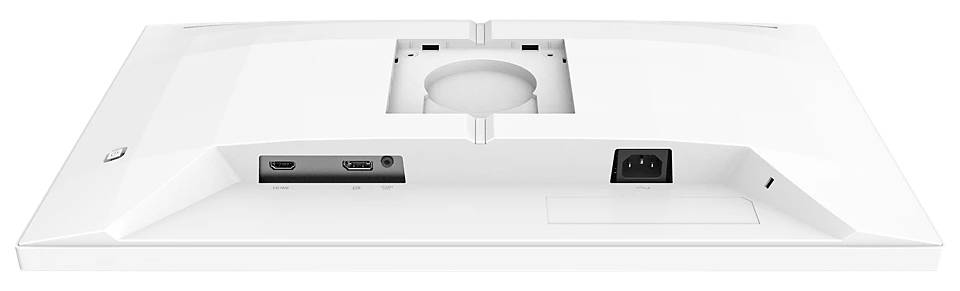
One HDMI 2.1 TMDS input, one DisplayPort 1.4 input and headphone output support a conventional PC gaming setup.
Technical Specifications
Frequently Asked Questions
Singular Expert Insight
This model suits a compact white gaming desk when fast Full HD refresh matters more than extra pixel count. Check the PC output and realistic game frame rates first, and treat Smart MBR as a mode to try rather than a setting everyone must leave enabled. The adjustable stand is also useful for normal desk work. Check your PC display connection with Singular
Buyer’s Guide
✓
Buy it if
you want a white 23.8-inch Full HD Fast IPS gaming screen with an ergonomic stand and up to 260Hz OC.✕
Skip it if
you need a higher resolution or expect the monitor to increase game frame rates by itself.→
Also consider
a higher-resolution display for more desktop detail, or a lower-refresh model if your source cannot use the faster modes.Share your graphics card and intended connection to check resolution and refresh compatibility.
Features - Philips - 24M2N3201P/00
Colour
white
More Details
Product Code
04:594524
EAN Code
8721038007749
Manufacturer
Philips
Technical specifications
Monitor Usage
- Gaming
Resolution
FHD (1080p)
Resolution (raw)
1920×1080