Special B2B pricing available after sign-in

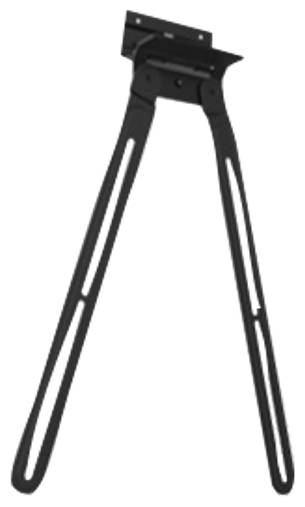
Poly Studio X52 and V52 VESA Mount, Mounting Kit for Attaching the Video Bar to a VESA Display Mount

Brand:
Hewlett Packard
Poly 875L9AA Studio X52 V52 VESA Display Mount Black
Poly Studio X52 and V52 VESA Mount, Mounting Kit for Attaching the Video Bar to a VESA Display Mount

€321.36 inc. VAT
Buy
875L9AA
€270.05
€321.36 inc. VAT
Ships from EU stock: 72 item(s)
Product Code
CJ15171
EAN Code
0197497663808
Manufacturer
Hewlett Packard

Quick Specs

Type
VESA mounting kit
Interface
VESA pattern on display mount
Key spec
Package 190 x 210 x 55 mm, 300 g
Compatibility
Poly Studio X52, Studio V52
Delivery

Order Today...
Ships...
Delivery...
ℹ️ Large or fragile items (e.g. monitors) may require extra handling time. We'll keep you informed.
Payment options
✓ Bank Deposit
Secure checkout with flexible payment methods
Trusted Tech Choice
Buying Benefits Verified
Competitive EU pricing
Delivered to Cyprus from EU stock
Local warranty support

Fit your Poly Studio X52 or V52 video bar to a VESA mount instead of clamping it to the screen

Poly Studio X52 / V52VESA mountingHP/Poly original partAlternative to the display clamp

The Poly Studio X52/V52 VESA Mount (HP 875L9AA, Poly 2215-88033-001) is the official mounting kit that lets you attach a Poly Studio X52 all-in-one video bar or a Poly Studio V52 USB video bar to a VESA mounting pattern, for meeting rooms where the bar should sit on a display mount, trolley or bracket rather than on top of the screen.

Out of the box, the Studio X52 and V52 come with a monitor clamp that hooks the bar over the top edge of a display. That works on most screens, but not on every one: very thin bezels, displays with rounded or sloped tops, interactive panels and screens mounted tight under a ceiling or bulkhead often leave no safe place for the clamp. The VESA mount is HP's answer for those rooms, giving the bar its own fixed position on a VESA interface.

Before you order: HP lists this mount for the Poly Studio X52 and the Poly Studio V52 only. Other Poly bars such as the Studio X50, X30, X70 or the USB Studio models have their own mounting accessories, and the VESA hole pattern of this kit is not published by HP, so check that your display mount, arm or bracket offers a matching VESA interface before ordering.

What's in the Box

  • 1 x Poly Studio X52/V52 VESA Mount (875L9AA) with the hardware supplied by HP/Poly
  • Quick start guide (pictorial installation steps, document 1725-87992-023B)

What It Means in Practice

  • Lets you place the video bar where the camera works best, independently of the display's top edge, as long as there is a VESA interface at that point.
  • Useful on trolleys and display carts with spare VESA positions, so the camera stays aligned when the cart is moved between rooms.
  • Replaces the monitor clamp, so the bar no longer depends on the shape or thickness of the display bezel.
  • Keeps the bar fixed in place, which helps in rooms where cleaners or users might knock a clamped bar out of alignment.
  • Mount the bar so the camera looks straight at the seating area; avoid VESA points far above or below the display centre, which tilt the view and make remote participants look up or down at the room.
  • The Studio V52 bar is about 770 mm wide and weighs about 2.5 kg, so the VESA point you choose must carry that load and leave the bar's full width clear.
  • Plan cable routing at the same time: an X52 needs power and network, and a V52 needs power and USB to the room PC, both reaching the bar's new position.

What Will Not Work

  • Poly Studio X50, X30, X70, Studio USB, Studio R30 and Studio E70: not listed by HP for this mount.
  • Direct wall mounting without a VESA interface: HP offers the separate Poly Studio X52/V52 Wall Mount (875L8AA) for that.
  • Standing the bar on a table: use the Poly Studio X52/V52 Table Stand (875M0AA).
  • Re-using a Studio X50 wall or VESA mount on a new X52: HP lists a separate Adapter Bracket (8L532AA) for that scenario.
  • Wall plugs, display mounts or VESA arms: not included, the kit only connects the bar to an existing VESA interface.

Key Features

 
Made for Studio X52 and V52
HP lists one mount for both bars, so the same part covers the all-in-one X52 and the USB-connected V52 in a mixed estate, and rooms can switch between the two bars without changing the mounting.
 
Independent of the screen
The bar no longer hangs on the display, so you can change or upgrade the screen without re-seating the camera on a new bezel.
 
Part of the official accessory range
HP lists the VESA mount alongside the wall mount, table stand, display clamp and X50 adapter bracket, so every room layout has a matching original part.
 
Compact kit
HP gives a package size of 190 x 210 x 55 mm and a package weight of 300 g, so spare kits are easy to store with the room's documentation.

Technical Specifications

Identification
Part Number 875L9AA
Poly part number 2215-88033-001
EAN / GTIN 0197497663808
Brand Poly (HP)
Product type VESA mounting kit for video bar
Compatibility
Poly Studio X52 Yes
Poly Studio V52 Yes
VESA hole pattern Not published by HP
Physical
Package dimensions 190 x 210 x 55 mm (7.48 x 8.26 x 2.16 in)
Package weight 300 g (0.66 lb)
Related HP/Poly mounting options
Wall Mount 875L8AA
Table Stand 875M0AA
Display Clamp 875M5AA
Adapter Bracket for Studio X50 Wall or VESA Mount 8L532AA
Warranty
Warranty 1-Year Warranty (Singular)
Manufacturer Term Manufacturer does not publish a separate term for this accessory — claims handled through Singular

Frequently Asked Questions

Do I need this if my video bar already has a monitor clamp?
Only if the clamp cannot sit safely on your display, or if you want the bar on a cart, arm or bracket. On a standard flat-topped screen, the included monitor clamp is enough.
Does it work with the Poly Studio X50?
No, HP lists it for the Studio X52 and V52 only. If you are replacing an X50 with an X52 and want to keep the existing X50 mount, ask us about the HP adapter bracket 8L532AA.
Which VESA pattern does it use?
HP does not publish the hole pattern on its product pages. Send us your display mount or arm model and we will check the fit with HP/Poly before you order.
Can I mount the bar below the display instead of above it?
Yes, if there is a VESA point there that carries the bar. Below-screen placement suits high-mounted displays, but keep the camera clear of the table edge and of any objects in front of it, and check that the microphones are not blocked.
Singular Expert Insight · Buyer's Guide
Decide the camera position before the display mount: the bar works best at eye level of seated participants, centred on the screen, and a VESA point on the mount or cart is only useful if it is in that position. If you are still choosing the hardware, pick display stands and mounts with a free VESA point for the video bar, so camera and screen stay aligned when the room is rearranged.
✓ Buy it if Buy it to fix a Poly Studio X52 or V52 to a VESA interface when the supplied monitor clamp does not suit the display or the room layout.
✕ Skip it if Skip it for other Poly bars, for direct wall mounting (875L8AA) or table placement (875M0AA), and if the monitor clamp already sits securely.
→ Also consider Consider the Poly Studio X52/V52 Wall Mount 875L8AA, the Table Stand 875M0AA or the Display Clamp 875M5AA for other room layouts.
Not sure it fits your display mount? Send us the video bar model and the mount or arm you use and we will check compatibility before you order.

Features - Hewlett Packard - 875L9AA

Colour
black
More Details
Product Code
CJ15171
EAN Code
0197497663808
Manufacturer
Hewlett Packard
  • Recently Viewed
  • Customers Also Bought
 
Why Buy from Singular

Trusted by businesses across Cyprus

Genuine products, EU stock, and expert support for every purchase.
✓ Genuine Products
Sourced through official distribution channels, with full manufacturer warranty.
✓ EU Stock
Shipped from our EU distribution network, with real-time availability on every product.
✓ B2B Ready
VAT invoices for business deduction and credit terms for verified buyers.
Expert Support
Talk to our team for sizing, configuration or volume orders.