Transcend JetFlash 920 — 512 GB USB 3.2 Gen 1 Drive at 420 MB/s Read
Up to 420 MB/s read, 400 MB/s write512 GB capacitySandblasted metal housingFive-year limited warranty
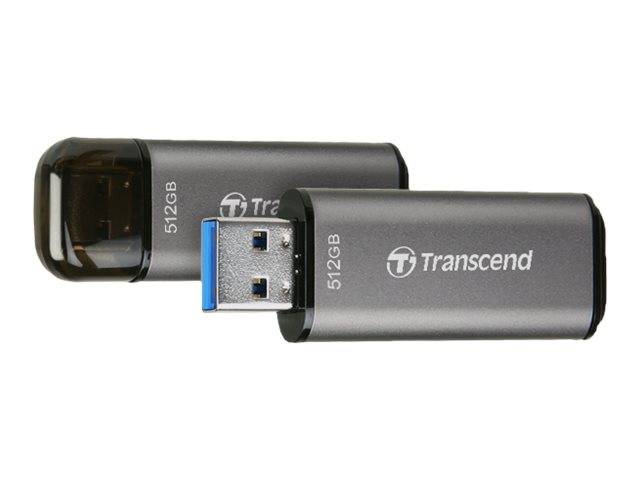
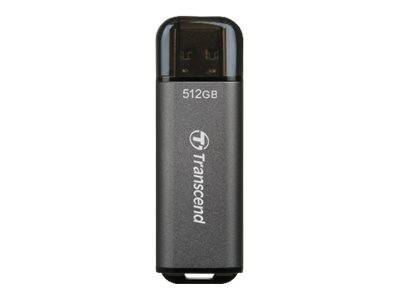
The Transcend JetFlash 920 (TS512GJF920) is a 512 GB USB Type-A flash drive that Transcend rates at up to 420 MB/s read and 400 MB/s write — roughly four times what an ordinary USB 3 stick manages, and fast enough to edit directly off it or move a full video shoot in minutes rather than an hour. The body is a sandblasted metal shell 62 mm long and 10 g, with a keyring loop, and it ships pre-formatted as exFAT so it works on Windows and macOS out of the box without a reformat.
Compatibility — check before buying:
This is a USB Type-A drive: it will not fit a USB-C-only laptop or phone without an adapter. If you need the same performance with a Type-C plug, the JetFlash 930C carries both connectors on one body at the same published speed — ask us to quote it. To actually see 420 MB/s you need a USB 3.2 Gen 1 or faster port; on an older USB 2.0 socket the drive still works but at a fraction of the speed. The drive arrives formatted exFAT, which Windows and macOS both read and write; some TVs, car stereos and older consoles want FAT32 instead and will ask you to reformat. Transcend does not state what is in the box beyond the drive.
Best For
✓ Editing photo and video directly off the drive
✓ Moving a full shoot off a camera card
✓ Carrying virtual machines or large project folders
✓ Fast backups of a working directory
✓ Windows and macOS, no reformat needed
✓ A metal keyring drive that is genuinely quick
Key Features
420 MB/s read, 400 MB/s write
Transcend publishes these figures for the JetFlash 920 line. Read and write are close together, which is the part that matters — plenty of fast-sounding drives read quickly and then crawl when you copy onto them.
Metal, sandblasted, 10 grams
62 x 20 x 7.8 mm in a sturdy sandblasted housing with a keyring loop. The finish hides fingerprints and scuffs, which is more useful on a drive that lives in a pocket than it sounds.
exFAT out of the box
No reformat needed to use it on both Windows and macOS. If you need FAT32 for a TV or car stereo you can reformat, but the default covers the common case.
Transcend Elite and RecoveRx
Both are free downloads. Elite handles scheduled backup, restore and folder encryption; RecoveRx recovers deleted files. Neither is required — the drive is plain storage without them.
Technical Specifications
| Identification |
| Brand |
Transcend |
| Series |
JetFlash 920 |
| Part Number |
TS512GJF920 |
| EAN / GTIN |
0760557850380 |
| Product Type |
USB flash drive |
| Capacity & Performance |
| Capacity |
512 GB |
| Interface |
USB 3.2 Gen 1, Type-A |
| Sequential Read |
Up to 420 MB/s |
| Sequential Write |
Up to 400 MB/s |
| Speed basis |
Transcend publishes one figure covering 128 GB, 256 GB and 512 GB — it is not a per-capacity measurement |
| Pre-formatted |
exFAT |
| Series capacities |
128 GB, 256 GB, 512 GB |
| Physical |
| Dimensions |
62 x 20 x 7.8 mm |
| Weight |
10 g |
| Housing |
Sandblasted metal finish |
| Colour |
Space grey |
| Keyring loop |
Yes |
| Software & Compatibility |
| Bundled software |
Transcend Elite and RecoveRx, both free downloads |
| Encryption |
Software folder encryption via Transcend Elite; no hardware encryption |
| Operating systems |
Windows and macOS read exFAT natively |
| In the box |
Transcend does not state box contents beyond the drive |
| Warranty & Support |
| Warranty |
1-Year Warranty (Singular) |
| Manufacturer Term |
Transcend publishes a five-year limited warranty on this series. Singular’s direct warranty is 1 year; beyond that we assist you with the manufacturer’s warranty process for its full duration. |
Frequently Asked Questions
Is the 512 GB faster than the 256 GB JetFlash 920?
No. Transcend publishes a single figure — up to 420 MB/s read and 400 MB/s write — covering 128 GB, 256 GB and 512 GB. There is no per-capacity table for this series, so choose the capacity you need and expect the same speed from all three.
Will I actually get 420 MB/s?
Only on a USB 3.2 Gen 1 or faster port, and only with large sequential files. Copying thousands of small documents is slower on any flash drive, and plugging into an old USB 2.0 socket will cap you far below the rating. Check the port on the machine before you judge the drive.
What is the difference between the JetFlash 920 and the 930C?
The 920 has a USB Type-A plug only. The 930C has both a Type-A and a Type-C connector on the same body — used one at a time, not together. Transcend publishes the same 420/400 MB/s figure for both, so the choice is purely about which ports you need to reach.
Do I need to reformat it?
Not for Windows or macOS — it arrives as exFAT, which both read and write. You would only reformat if a TV, car head unit or older console insists on FAT32, and reformatting to FAT32 limits individual files to 4 GB, which matters if you are carrying video.
Singular Expert Insight
The JetFlash 920 is the one Transcend drive in this group with a real published number behind it, and that is the reason to buy it. 420 MB/s read with 400 MB/s write is close to portable-SSD territory in a 10 g stick, and the balanced write figure is what separates it from drives that read fast and then stall on the copy. It is also the honest answer whenever someone asks how fast the JetFlash 790 is: the 790 has no published figure at all, and if speed is why you are buying, this is the drive Transcend actually stands behind. The one thing to check before ordering is the port. This is Type-A only. If half your machines are USB-C, the 930C gives you the same speed with both plugs and saves you carrying an adapter.
Buyer’s Guide
Buy it if
You need real speed from a flash drive — 420 MB/s read and 400 MB/s write, published by Transcend — in a metal 10 g body with a five-year warranty.
Skip it if
Your machines are USB-C only, or you just need cheap capacity for documents, where the slower JetFlash 790 costs less for the same 512 GB.
Also consider
JetFlash 930C for the same published speed with USB-A and USB-C on one body, or a portable SSD if you need more than 512 GB at this speed.