USB-C docking and Windows Hello in one display
23.8-inch IPS / Full HD100 Hz / 1 ms MPRTUSB-C video + up to 65 W5 MP Windows Hello webcam
The black iiyama ProLite XB2497HSNH-B1 combines a 23.8-inch Full HD IPS display with a USB-C dock and integrated video-call hardware. Its autofocus 5 MP webcam supports Windows Hello on compatible hosts and includes a privacy shutter. One upstream USB-C cable can carry video and data and deliver up to 65 W charging, with LAN, a peripheral USB hub and DisplayPort output for a connected workstation.
Best For: Business desks and home offices using a compatible USB-C laptop and a compact, adjustable Full HD display.
Before you order: Check that the laptop USB-C port supports video and USB Power Delivery; a charge-only port or cable is insufficient. Maximum charging output is 65 W, so higher-power laptops may need their original charger. DisplayPort daisy chaining requires compatible graphics, OS and MST support; the specified output resolution limit is 1920×1080. Windows Hello requires a supported Windows host and setup. Connect USB for the webcam and microphone, select them in the meeting app and check the privacy shutter.
What's in the Box
- XB2497HSNH-B1 monitor in black with integrated webcam, stand neck and base with screw.
- Power, HDMI and USB-C cables, quick start and safety guides.
- Laptop, network cable, DisplayPort cable, second monitor and peripherals are not listed as included.
What It Means in Practice
- Connect a compatible laptop through the upstream USB-C port for video, data and up to 65 W PD. Use the full-featured supplied cable.
- Connect a network cable to RJ45 and peripherals to the two Type-A and two Type-C downstream ports. Host support and drivers may be required.
- Use HDMI or DisplayPort input for a separate video source. A video-only connection does not supply the USB dock functions.
- Enable MST DP-Out when using a supported second display and verify the host’s resolution and refresh limits.
- Adjust height through 150 mm, swivel 60° each way, tilt 23° up / 5° down or pivot 90° in either direction while keeping cables clear.
- Open the privacy shutter when using the camera, select the USB webcam/microphone in the application and configure Windows Hello on a supported host.
What Will Not Work
- USB-C docking depends on the laptop’s video, data and charging support. It cannot supply more than 65 W.
- DisplayPort MST is not guaranteed to provide an extended desktop on every operating system.
- 1 ms is an MPRT figure, not a grey-to-grey response-time claim.
- This is the HSNH webcam model; it is not a touchscreen or an integrated computer.
Key Features
Full HD IPS desktop
1920×1080 at up to 100 Hz with wide viewing angles, 350 cd/m² typical brightness and 1500:1 static contrast.
Single-cable docking
Compatible USB-C hosts can combine video, USB data, wired networking and up to 65 W charging.
Expandable workspace
DisplayPort MST output can connect a supported second Full HD display; check host and OS compatibility.
Integrated meeting hardware
The 5 MP autofocus webcam, microphone, privacy shutter and Windows Hello compatibility support suitable host applications.
Technical Specifications
| Exact model / EAN | XB2497HSNH-B1 / 4948570125968 |
| Panel / diagonal | IPS, matte / 23.8-inch, 60.5 cm; 24-inch class |
| Native resolution / refresh | 1920×1080 / up to 100 Hz |
| Brightness / contrast | 350 cd/m² typical, 155 cd/m² default / 1500:1 static |
| Response metric | 1 ms MPRT |
| Viewing angles / colours | 178° horizontal and vertical / 16.7 million |
| Video inputs | HDMI 1.4, DisplayPort 1.2, USB-C |
| USB-C upstream | Video, USB data and Power Delivery up to 65 W |
| DisplayPort output | MST daisy chain; maximum specified output 1920×1080 |
| USB hub | USB 3.2 Gen 1, 5 Gbps; 2× Type-A and 2× Type-C downstream |
| Network / audio | RJ45 LAN; 3.5 mm headphone output; 2× 2 W speakers |
| Webcam | 5 MP / 30 fps, autofocus, microphone, privacy shutter; Windows Hello compatible |
| Stand | 150 mm height; swivel ±60°; tilt +23°/−5°; pivot ±90° |
| Mounting / colour | VESA 100×100 mm / black |
| Size | 539 mm wide, 513 mm maximum landscape height, 209.5 mm deep |
| Power supply | Internal AC 100–240 V, 50/60 Hz |
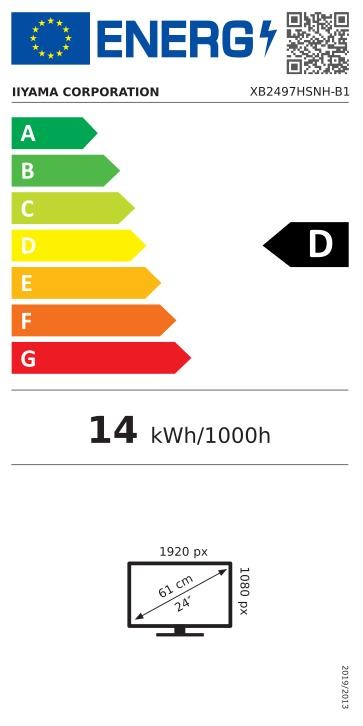
| Power use | 15 W default without USB devices; 0.5 W standby maximum; 0.3 W off maximum |
| Operating environment | 5–35°C; 10–80% RH, non-condensing |
| Condition | New |
Frequently Asked Questions
Does it include a webcam?
Yes. The HSNH model has a 5 MP autofocus webcam, microphone and privacy shutter.
Can it charge any laptop?
It provides up to 65 W through compatible USB-C Power Delivery. Higher-power laptops may need their original adapter.
Will every USB-C port carry video?
No. Check that the laptop port supports the required video mode and that the cable is full-featured.
Does Windows Hello work on every computer?
It requires a compatible Windows host and the appropriate setup. Connect the USB link and follow the host’s sign-in configuration.
Can I connect a second monitor?
DisplayPort MST output supports a compatible second display up to the stated Full HD limit, subject to host graphics and operating-system support.
Singular Expert Insight
Before choosing a docking monitor, compare the laptop’s USB-C capabilities and normal charger rating with the monitor’s 65 W limit. Test the intended wired network, peripherals and MST layout together. Test the webcam, microphone and Windows Hello setup as well. The adjustable stand organises the desk, while host compatibility determines whether one cable handles the complete setup.
Buyer’s Guide
✓ Buy it if You need a compact black Full HD business display with USB-C docking, webcam and an adjustable stand.
✕ Skip it if You require touch input, a higher-resolution panel or laptop charging above 65 W.
→ Also consider Laptop USB-C video and PD support, charger rating, MST compatibility and separately supplied network or DisplayPort cables.