
ASRock DeskMini Wi-Fi 6E M.2 Kit with Intel AX210 Module and Two Antennas, Wi-Fi 6E and Bluetooth, M.2 2230 Key E
Brand:
ASRock

ASRock DeskMini Wi-Fi 6E M.2 Kit with Intel AX210 Module and Two Antennas, Wi-Fi 6E and Bluetooth, M.2 2230 Key E
€48.92 inc. VAT
90-BXG3R0-A0XCR3W
Delivery
Order Today...
Ships...
Delivery...
ℹ️ Large or fragile items (e.g. monitors) may require extra handling time. We'll keep you informed.
Payment options
Trusted Tech Choice
Buying Benefits
Verified
Competitive EU pricing
Delivered to Cyprus from EU stock
Local warranty support
Please sign in so that we can notify you about a reply
ASRock DeskMini Wi-Fi 6E Kit — Intel AX210 M.2 Module with Antennas
Intel AX210Wi-Fi 6EBluetoothFor ASRock DeskMini
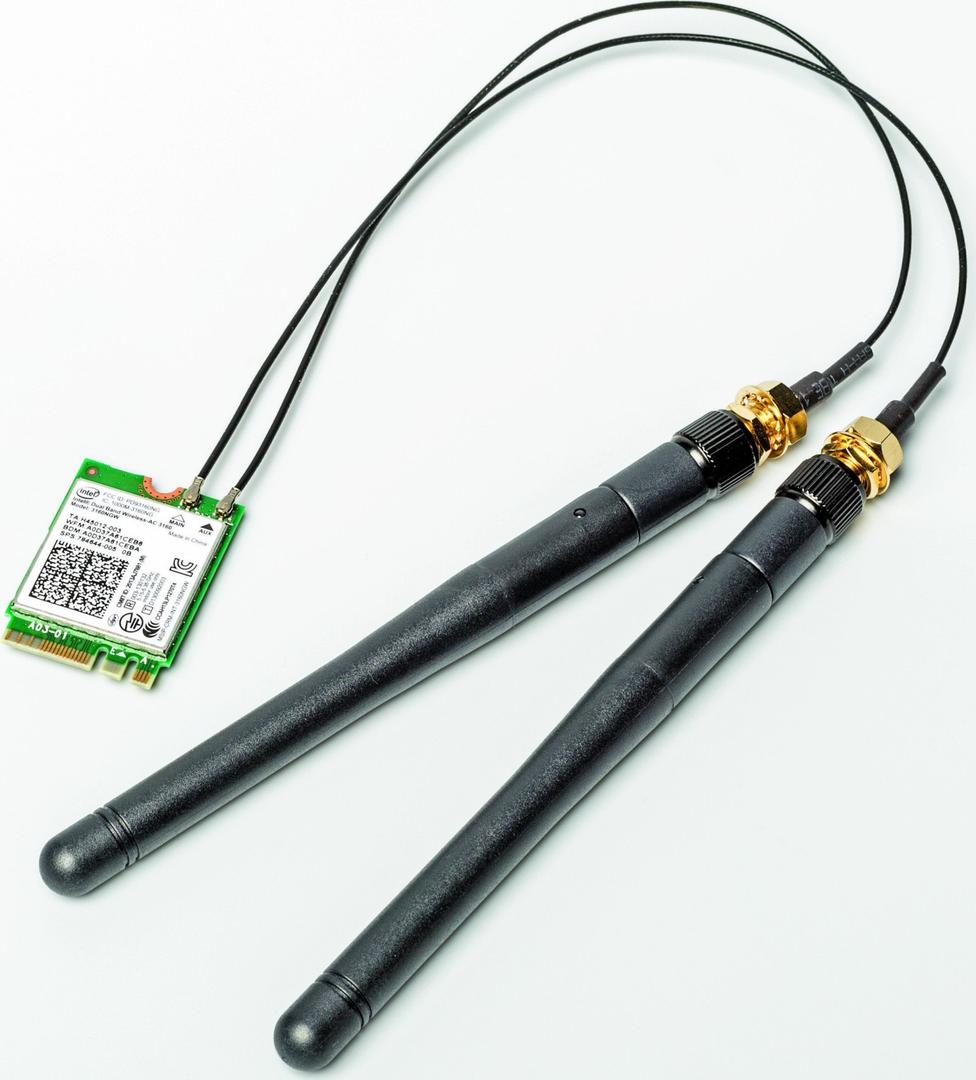
The ASRock DeskMini Wi-Fi 6E M.2 Kit (90-BXG3R0-A0XCR3W) adds Wi-Fi 6E and Bluetooth to an ASRock DeskMini mini PC: it combines an Intel AX210 M.2 2230 wireless module with two antennas, as ASRock describes it, “offering wireless connectivity for DeskMini”.
DeskMini barebones ship without wireless, so this kit is the official way to add Wi-Fi when building one. The AX210 supports the 6 GHz band of Wi-Fi 6E alongside 2.4 and 5 GHz, and provides Bluetooth through the M.2 slot's USB lines, so you do not need a separate dongle for keyboards, mice or headsets.
Before you order: Designed for ASRock DeskMini models with an M.2 Key E (2230) Wi-Fi slot — ASRock lists the Intel AX210 in its DeskMini Wi-Fi module lists (e.g. DeskMini X600) and notes that kit availability varies by model and region. Check your DeskMini model before ordering. 6 GHz needs a Wi-Fi 6E router and Windows 11.
What's in the Box
- Intel AX210 M.2 2230 Wi-Fi 6E + Bluetooth module
- Two antennas
- ASRock does not publish a detailed package list; distributor listings mention antenna cables for the DeskMini chassis
What It Means in Practice
- Installs in the DeskMini's M.2 Key E slot; the antennas mount on the chassis antenna holes.
- Gives a compact PC wireless networking where no Ethernet cable is available.
- Bluetooth connects wireless peripherals without taking a USB port.
- On a Wi-Fi 6E router, the 6 GHz band offers less interference than 2.4/5 GHz.
What Will Not Work
- PCs without an M.2 Key E slot, or with a CNVi-only slot that does not accept a standard AX210 PCIe module.
- DeskMini models that ASRock does not list for the AX210 kit — check first.
- 6 GHz on Windows 10 — Wi-Fi 6E 6 GHz requires Windows 11 and a 6E router.
- Laptops — this kit is for DeskMini/DeskMeet chassis.
Key Features
Intel AX210
Wi-Fi 6E tri-band module (2.4/5/6 GHz), 2T2R.
Bluetooth built in
Bluetooth via the M.2 module, no USB dongle needed.
Official ASRock kit
Module and antennas matched to the DeskMini chassis.
Technical Specifications
Frequently Asked Questions
Singular Expert Insight · Buyer's Guide
If you are building a DeskMini, order the Wi-Fi kit with it — fitting the antennas afterwards means opening the chassis again. Check the model against ASRock's list first. For a full desktop instead, a PCIe Wi-Fi card is the simpler route.
✓ Buy it if you are building or upgrading an ASRock DeskMini and want Wi-Fi 6E and Bluetooth.
✕ Skip it if your PC has no M.2 Key E slot or is not a DeskMini.
→ Also consider a USB Wi-Fi adapter if you prefer not to open the case.
Not sure your DeskMini supports this kit? Send us the model and we will check before you order.
Features - ASRock - 90-BXG3R0-A0XCR3W
More Details
Product Code
04:420059
EAN Code
4710483937071
Manufacturer
ASRock