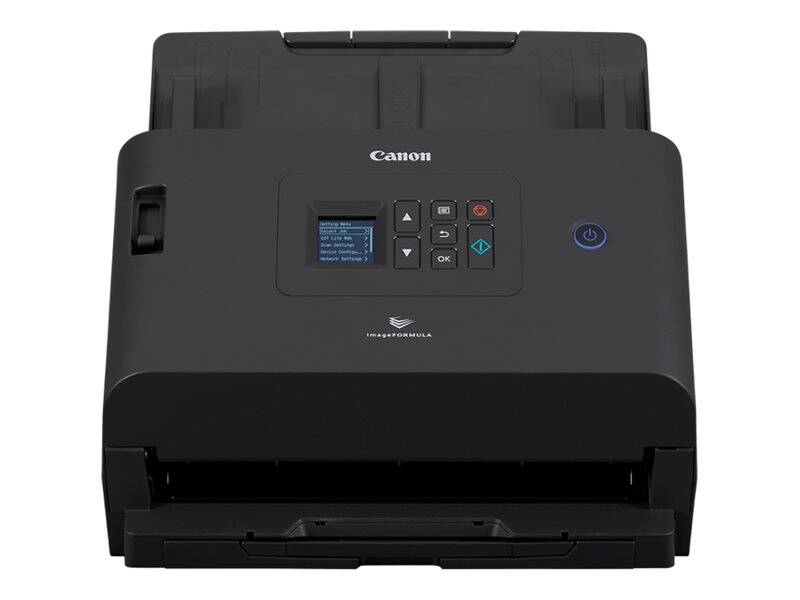
Canon imageFORMULA DR-S250N: a wired network scanner for shared offices
50ppm / 100ipm duplexGigabit LAN + USB 3.2Driverless browser scanning6,000-9,000 scans/day
The Canon imageFORMULA DR-S250N is an A4 duplex network document scanner that captures both sides at 50 pages per minute and connects to your office by Gigabit Ethernet or USB 3.2, built for teams sharing one device. Because it runs CaptureOnTouch Lite Web inside the scanner, users on PCs, Macs, Chromebooks, tablets and phones can scan from a browser without installing a driver. Jobs can go straight to email, shared folders and FTP, and Canon lists Microsoft Teams and Slack integration, with user authentication and password-protected documents for sensitive files. Windows users still get ISIS/TWAIN drivers and CaptureOnTouch Pro. Administration is handled centrally: Canon's DR Management Tool and CoT Admin Server let IT push settings and destinations to the scanner rather than visiting it. It is EPEAT Gold certified, draws 22W or less when scanning and 1.6W in sleep, and the trays close to a 291 x 267 mm footprint. Who is it for? Offices of 5 to 50 people that want a single scanner in a shared area, from law and accounting firms to clinics, schools and municipal counters. Instead of a scanner on every desk, one DR-S250N on the network lets each person scan to their own email or folder from the device or from a browser, while IT keeps settings in one place. It also suits hot-desking offices where laptops change and installing drivers on every machine is not practical. Set-up is done once by IT through the scanner's web settings or Canon's admin tools, after which users simply choose a destination.
Before you order: The DR-S250N has no Wi-Fi: it needs an Ethernet cable to your network or a USB connection to one computer. If the scanner will sit away from a network socket, the DR-S350NW adds Wi-Fi.
What's in the Box
- Canon imageFORMULA DR-S250N scanner
- Exact accessory list varies by region — ask us and we confirm before you order
What It Means in Practice
- Put it on the LAN once and every desk can use it, so you buy one scanner instead of one per person.
- 50ppm in mono and colour at 200 dpi (40ppm colour at 300 dpi) keeps up with HR onboarding packs, invoices and contracts.
- Guest laptops and Chromebooks can scan through the browser, which avoids IT having to install drivers on every machine.
- Passports up to 4 mm thick and plastic cards go through the feeder with the optional passport carrier sheet.
- A 6,000-9,000 scans per day rating means a whole department can rely on it.
What Will Not Work
- No Wi-Fi: wired Ethernet or USB only.
- No flatbed for books; pair it with the optional Flatbed Scanner Unit 102 (A4) or 202 (A3).
- No A3 through the feeder: maximum width is 216 mm.
- The supplied drivers and admin tools are for Windows; other systems scan through the browser app.
- Scanning into cloud services or mail needs the right network access and accounts; the scanner does not bypass your firewall or mail policies.
Key Features
Driverless scanning
CaptureOnTouch Lite Web runs on the scanner and works from a browser on many operating systems, including smartphones and Chromebooks.
Direct destinations
Scan straight to email, shared folders and FTP, with Teams and Slack integration listed by Canon.
Security options
User authentication and password encryption for scanned documents help when HR or finance share the device.
Document with photo mode
A dedicated mode improves quality on pages that mix text and photographs, such as ID copies and brochures.
Technical Specifications
| Identification |
| Part Number |
6383C003 |
| EAN/GTIN |
4528472111544 |
| Model |
imageFORMULA DR-S250N |
| Brand |
Canon |
| Scanning |
| Type |
Desktop sheet-fed duplex scanner |
| Sensor |
CIS, RGB LED |
| Optical Resolution |
600 dpi |
| Output Resolution |
100-1200 dpi |
| Speed Mono |
50ppm / 100ipm (200 and 300 dpi) |
| Speed Colour |
50ppm at 200 dpi, 40ppm at 300 dpi |
| Daily Volume |
6,000-9,000 scans/day |
| Paper Handling |
| ADF Capacity |
60 sheets |
| Document Width |
50.8-216 mm |
| Document Length |
54-356 mm, long mode up to 5,588 mm |
| Thickness |
0.04-0.30 mm |
| Plastic Cards |
86 x 54 mm, under 1.4 mm |
| Passport |
Up to 4.0 mm, 300 dpi or less |
| Connectivity & Software |
| USB |
USB 3.2 Gen1 |
| Ethernet |
10/100/1000Base-T |
| Bundled Software (Windows) |
ISIS/TWAIN driver, CaptureOnTouch Pro, DR Management Tool, CoT Admin Server |
| Browser |
CaptureOnTouch Lite Web |
| Physical & Power |
| Dimensions (W x D x H) |
291 x 267 x 242 mm (tray closed) |
| Weight |
Approx. 3.4 kg |
| Power |
AC 220-240V, 50/60 Hz |
| Consumption |
22W or less scanning, 1.6W sleep, 0.1W or less off |
| Operating Environment |
10-32.5 C, 20-80% RH |
| Warranty |
| Warranty |
1-Year Warranty (Singular) |
| Manufacturer Term |
Standard manufacturer warranty — claims handled through Singular |
Frequently Asked Questions
Can a phone scan to it?
Yes, through the browser: CaptureOnTouch Lite Web works from smartphones and tablets on the same network, and Canon describes QR-code access for mobile users.
Can it scan to a shared folder without a PC switched on?
Canon lists email, shared folder and FTP as direct destinations from the scanner.
Do I need a PoE switch?
No. It uses its own mains power; you only need a free Ethernet port on a standard switch.
What wears out?
Feed rollers wear with use. Canon sells an Exchange Roller Kit for this model; replacing it when misfeeds start to appear restores reliable feeding, and we can supply it.
Singular Expert Insight · Buyer's Guide
For most Cyprus offices with a cabled desk, the DR-S250N is the better value of Canon's two network models; pay extra for the DR-S350NW only if you need Wi-Fi or the touchscreen. If your switch is out of ports,
a small Gigabit switch solves it. Put it on a fixed IP or DHCP reservation so users' bookmarks to the browser app keep working. A DR-S250N on the network often replaces two or three USB scanners, which makes it cheaper per user than it first looks.
✓ Buy it if Buy it if a team needs one shared scanner on a wired network with browser-based scanning.
✕ Skip it if Skip it if there is no network socket where the scanner will sit; the DR-S350NW has Wi-Fi.
→ Also consider Also consider the Canon imageFORMULA DR-S350NW for Wi-Fi and a touchscreen.
Not sure which scanner fits your volume or software? Tell us your daily page count, document types and the software you scan into, and we will check compatibility before you order.