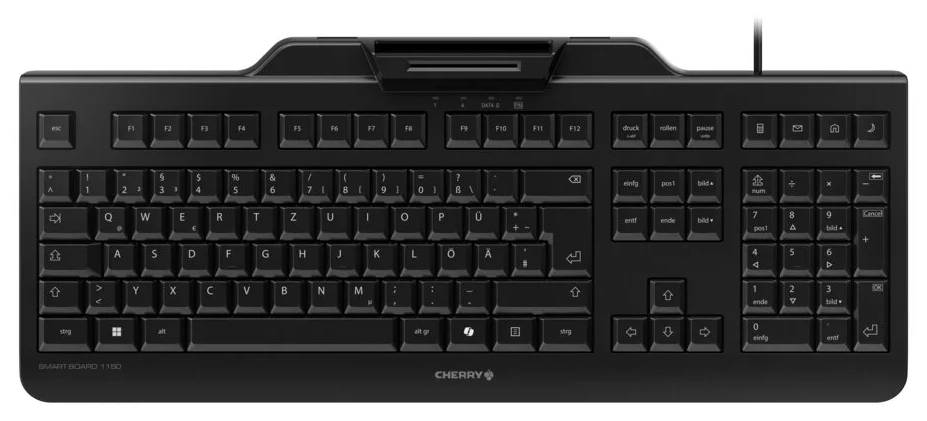
CHERRY SMART BOARD 1150 — keyboard with integrated smart card reader
Smart card reader built inUS layout with €Copilot keyUSB, no driver needed
The CHERRY SMART BOARD 1150 (JK-A1150EU-2, black) is a full-size wired USB keyboard with a built-in smart card reader, so ID cards, employee badges and signature cards can be used for login, e-signatures and encryption without a separate reader on the desk. It is aimed at offices, public-sector and healthcare workstations, banks and any organisation that uses smart card authentication.
The reader follows the PC/SC and CCID standards, so it works without installing a driver, and it reads and writes ISO 7816 cards with T=0 and T=1 protocols. The low-profile card slot lets users insert a card with one hand. The keyboard itself has 105 keys plus 4 extra keys, including a dedicated Copilot key, an integrated metal plate for stability and adjustable feet.
This variant uses CHERRY's EU layout, which is the US English key layout with the € symbol added. Firmware can be updated, and CHERRY offers its CHERRY KEYS, Card Reader Tools and PC/SC Diagnose Tool software.
Before you order: Layout is US English with € (CHERRY "EU" layout), not Greek and not German QWERTZ. The smart card reader supports ISO 7816 contact cards via PC/SC; check that your authentication software or middleware supports a standard CCID reader.
What's in the Box
- CHERRY SMART BOARD 1150 keyboard with integrated smart card reader
- Operating manual
What It Means in Practice
- Staff log in to Windows or a web portal by inserting their ID card into the keyboard instead of using a separate USB card reader.
- No driver installation: Windows, macOS and Linux detect the reader as a standard CCID device.
- The Copilot key opens Microsoft Copilot directly on Windows 11 PCs that support it.
- The metal plate gives a solid typing feel for full-day data entry; the numeric keypad is included.
What Will Not Work
- Contactless (NFC/RFID) cards: the reader is for contact smart cards to ISO 7816.
- Greek or German key printing: this is the US English layout with €.
- Wireless use: it connects by USB cable only.
- A built-in USB hub or backlighting: CHERRY lists neither.
Key Features
Integrated smart card reader
PC/SC and CCID, reads and writes ISO 7816 cards, T=0 and T=1.
No driver required
Plug-and-play on Windows, macOS and Linux.
Copilot key
Dedicated key for Microsoft Copilot on supported Windows 11 PCs.
Metal plate, full size
105 + 4 keys, integrated metal plate and adjustable feet.
Technical Specifications
| Identification |
| Part Number |
JK-A1150EU-2 |
| EAN / GTIN |
4025112122811 |
| Brand |
CHERRY |
| Model |
SMART BOARD 1150 (JK-A01) |
| Keyboard |
| Layout |
US English with € (CHERRY EU layout) |
| Keys |
105 + 4 additional keys, incl. Copilot key |
| Format |
Full-size (100%) |
| Keycaps |
ABS |
| Construction |
Integrated metal plate, adjustable feet |
| Response time |
3–5 ms |
| Illumination |
None |
| Smart card reader |
| Standards |
PC/SC, CCID |
| Cards |
ISO 7816, T=0 / T=1, read and write |
| Uses |
Login, e-signature, encryption, access control |
| Connectivity |
| Interface |
USB 2.0, USB-A connector |
| Current consumption |
Max 80 mA |
| Operating systems |
Windows, macOS, Linux |
| Software |
CHERRY KEYS, Card Reader Tools, PC/SC Diagnose Tool |
| Physical |
| Dimensions |
458 × 188 × 46 mm |
| Colour |
Black |
| Operating temperature |
0 to 50 °C |
| Approvals |
CE, cURus, GS, FCC, RCM, UKCA |
| Warranty |
| Warranty |
1-Year Warranty (Singular) |
| Manufacturer Term |
2-year manufacturer warranty per CHERRY — claims handled through Singular |
Frequently Asked Questions
Does it work with ID cards for e-government or banking?
It works with ISO 7816 contact smart cards through standard PC/SC. Your card issuer's middleware must support CCID readers, which is the norm.
Is the layout Greek?
No. It is the US English layout with the € symbol; Greek characters are typed through the Windows or macOS keyboard settings as usual.
Do I need to install a driver?
No. The reader is CCID-compliant and is recognised automatically.
Singular Expert Insight · Buyer's Guide
Putting the card reader in the keyboard removes one more USB device and cable from every desk, and it stops readers from walking away. Before ordering in quantity, confirm that your authentication middleware supports CCID readers. For standard keyboards and other layouts, see our
keyboards.
✓ Buy it if your users log in or sign documents with contact smart cards and you want one device per desk.
✕ Skip it if you use contactless cards only, or you need Greek key printing.
→ Also consider a standard CHERRY wired keyboard plus a separate reader if smart card use is occasional.
Not sure your smart card system supports it? Send us the card type and software you use and we will check before you order.