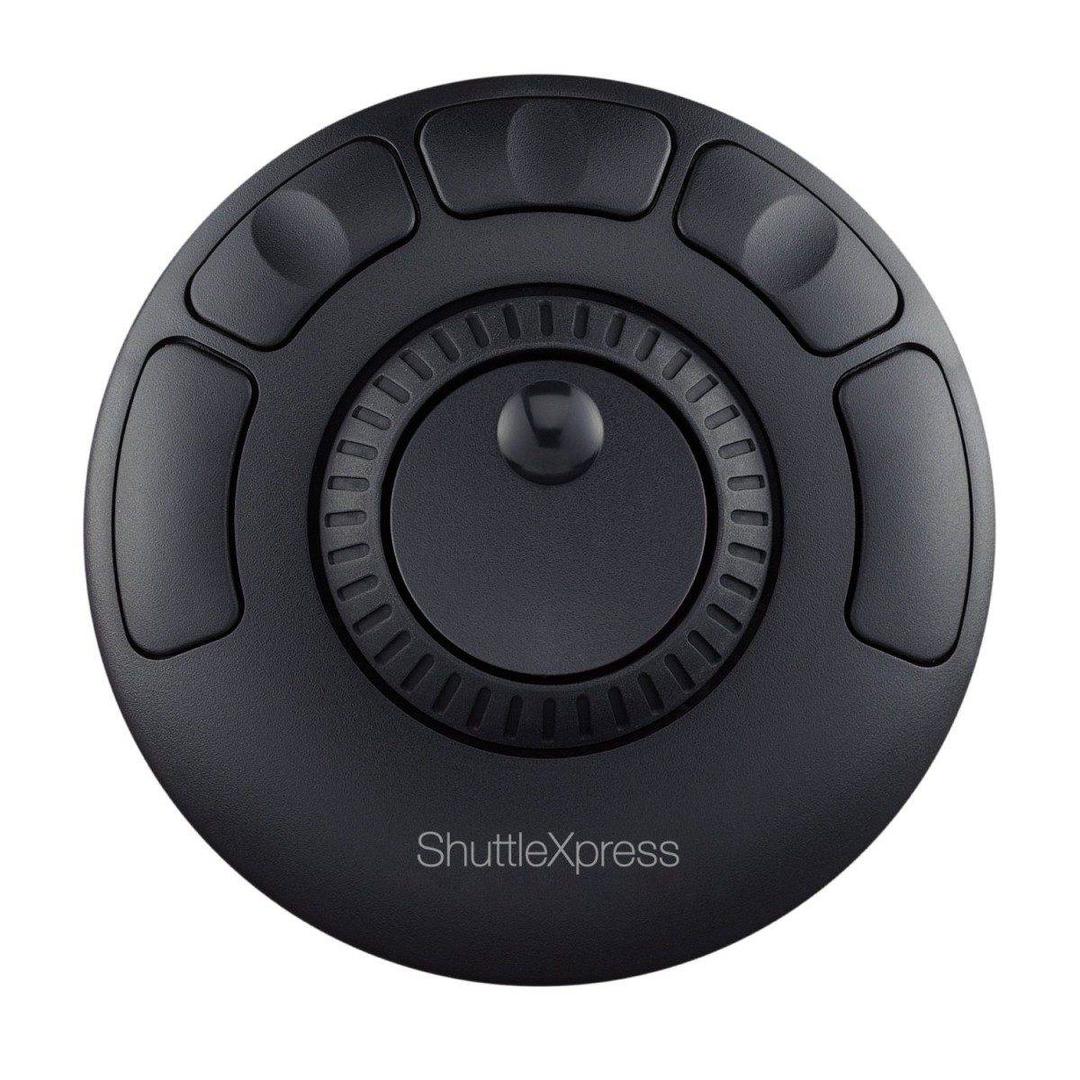
Contour ShuttleXpress — Jog, Shuttle and 5 Programmable Buttons
5 buttonsJog + shuttleUSB50+ apps
Editing is a two-handed job, and the hand that is not on the mouse has nothing useful to do. That is the gap Contour’s Shuttle controllers fill. The inner jog wheel steps the timeline frame by frame for the precise work, and the outer shuttle ring gives you variable-speed fast-forward and rewind — press it further, it moves faster; let it go, it springs back. Around them sit 5 programmable buttons for the commands you hit hundreds of times a session, so cutting, marking and playing stop being keyboard reaches. It is USB and wired, which for a control surface is a feature rather than a compromise: nothing to charge, nothing to pair, no latency. Contour lists Windows and macOS support and states that it works with most major creative tools including Adobe Premiere Pro, Final Cut Pro, After Effects, Audition, Pro Tools, DaVinci Resolve and Cubase, with over 50 applications supported and plug-and-play behaviour in many of them. This is the compact one: symmetrical, so it works under either hand, and small enough for a mobile kit or a cramped desk.
Compatibility — check before buying:
Two things decide this purchase. First, which of the two: the ShuttleXpress has five buttons and a symmetrical body you can drive with either hand, and the ShuttlePRO v2 has fifteen in a full-size shell. Five is enough for play, mark in, mark out and two edits; fifteen is enough to stop touching the keyboard. If you are not sure, count the shortcuts you actually use in a session. Second, the driver: many applications work plug and play, but the full customisation — assigning your own commands per application — needs Contour’s optional driver, and Contour publishes versions for Windows 7 to 11 and for macOS Ventura, Sonoma, Sequoia and Tahoe, plus legacy builds for older systems. Check your OS against that list before ordering, and tell us your editing software and we will confirm the fit. On the gaps: Contour publishes no dimensions, no weight and no cable length for this model — the specification table on its own page is left empty — so we quote none. Contour publishes a 30-day money-back guarantee and refers to a standard warranty without stating a term in years.
Best For
✓ Video and audio editors on Windows or macOS
✓ Premiere Pro, Final Cut Pro and DaVinci Resolve users
✓ Transcription and review work with heavy scrubbing
✓ Anyone whose left hand is idle during an edit
✓ Mobile kits and small edit desks
✓ Long sessions where keyboard shortcuts start to hurt
Key Features
Two controls, two jobs
The inner jog wheel steps frame by frame for the precise cut; the outer shuttle ring scrubs at variable speed to get you there. Neither replaces the other.
5 buttons under your fingers
The commands you hit hundreds of times a session move off the keyboard and onto the hand that was otherwise doing nothing.
Fifty applications and counting
Contour lists Premiere Pro, Final Cut Pro, After Effects, Audition, Pro Tools, DaVinci Resolve and Cubase among more than 50 supported applications.
Wired on purpose
USB means no charging, no pairing and no latency — on a control surface that is a specification, not a limitation.
Technical Specifications
| Identification |
| Brand |
Contour Design |
| Series |
ShuttleXpress |
| Part Number |
S-XPRS |
| EAN / GTIN |
0743870004968 |
| Colour |
Black |
| Controls |
| Programmable buttons |
5 |
| Inner control |
Jog wheel, frame-by-frame stepping, spring loaded and self centring |
| Outer control |
Shuttle ring, variable-speed playback |
| Body |
Symmetrical, for left or right hand |
| System and software |
| Connection |
USB, wired |
| Operating systems |
Windows 7 to 11; macOS Ventura, Sonoma, Sequoia, Tahoe |
| Applications |
Over 50, including Premiere Pro, Final Cut Pro, After Effects, Audition, Pro Tools, DaVinci Resolve, Cubase |
| Drivers |
Optional; many applications work plug and play |
| Legacy drivers |
Published by Contour for older Windows and macOS releases |
| Undisclosed |
| Dimensions |
Not published by Contour Design |
| Weight |
Not published by Contour Design |
| Cable length |
Not stated by Contour Design |
| Guarantee |
30-day money-back guarantee published |
| Warranty |
| Warranty |
1-Year Warranty (Singular) |
| Manufacturer Term |
Contour Design publishes a 30-day money-back guarantee and refers to a standard warranty, but states no term in years on this product page. Singular’s direct warranty is 1 year; beyond that we handle the claim with Contour Design on your behalf. |
Frequently Asked Questions
ShuttleXpress or ShuttlePRO v2?
Five buttons versus fifteen. The Xpress is symmetrical, compact and enough for play, mark in, mark out and a couple of edits. The PRO v2 is full size and holds enough commands that you stop reaching for the keyboard. Count the shortcuts you use.
Do I need to install anything?
Many applications work plug and play. Assigning your own commands per application needs Contour’s optional driver — published for Windows 7 to 11 and for macOS Ventura through Tahoe, with legacy builds for older systems.
How big is it?
Contour leaves the specification table on its own product page empty, so we will not quote dimensions or weight. Ask us and we will measure a unit before you order.
Singular Expert Insight
The jog wheel is the part you cannot replicate with a keyboard: scrubbing by feel instead of by arrow key is what makes an edit session faster, and it is why these controllers have outlasted most of the software they were bought for. Check the driver list against your OS. See our
keyboard accessories and our
wireless mice.
Buyer’s Guide
Buy it if
You edit video or audio, your left hand is idle, and you want jog, shuttle and 5 programmable buttons under it.
Skip it if
You need published dimensions, a wireless connection, or your OS is not on Contour’s driver list.
Also consider
The other Shuttle model, or a 3Dconnexion device if the work is CAD rather than editing.