
Datalogic Magellan 3550HSi | Omnidirectional In-Counter Imager | 1D/2D/Digimarc | Sapphire Glass | USB

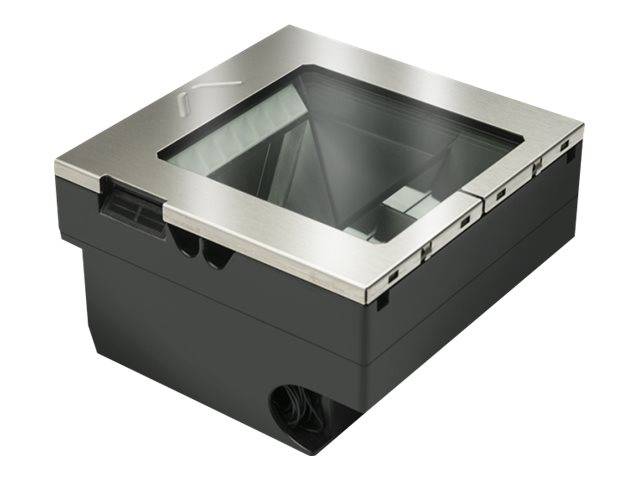


The Datalogic Magellan 3550HSi is a fixed in-counter omnidirectional barcode imager designed for high-throughput retail checkout environments. It reads all 1D and 2D barcodes — plus Digimarc digital watermarks — using a solid-state 1280×1024 imager with no moving parts. This is the M3551 variant with sapphire glass top, stainless steel housing, and USB interface. For grocery, pharmacy, DIY, and high-volume retail, the Magellan 3550HSi delivers consistent, maintenance-free scanning performance backed by a 36-month warranty.
Solid-State Omnidirectional Imaging — No Moving Parts
Traditional in-counter scanners use spinning mirrors and laser mechanisms that wear out over time and require periodic servicing. The Magellan 3550HSi replaces all of that with a solid-state imager — no motor, no mirror, no moving components of any kind. The result is a scanner that reads barcodes in any orientation at 39 million pixels per second, with nothing to maintain and nothing to replace over years of continuous retail operation.
1D, 2D and Digimarc — Complete Symbology Coverage
The 1280×1024 imager reads all standard 1D barcodes (EAN, UPC, Code 128, GS1 DataBar, etc.) and 2D symbologies (QR Code, Data Matrix, PDF417) with a minimum resolution of 5 mil. It also supports Digimarc Barcode — the invisible digital watermark printed into product packaging — enabling retailers to prepare for next-generation barcode workflows without changing hardware. The integrated microSD slot allows image capture for product verification and document workflows.
M3551 — Sapphire Glass Top
The M3551 variant features a sapphire glass scan window — significantly harder and more scratch-resistant than standard glass. In high-volume retail environments where heavy, abrasive items pass over the scan window hundreds of times per day, sapphire glass maintains optical clarity over the life of the scanner. The stainless steel top surround resists corrosion and provides the robust finish expected in a grocery or DIY checkout setting.
IP52 — Sealed for the Checkout Environment
IP52 sealing protects the electronics against dust ingress and water drips — relevant for checkout environments where liquids, produce moisture, and cleaning agents are a daily reality. The absence of moving parts also eliminates the ingress points that cause failures in traditional laser scanners over time.
| Specification | Detail |
|---|---|
| Model | M3551-010210-00403 |
| Type | Fixed in-counter omnidirectional imager |
| Imager Sensor | 1,280 × 1,024 pixels |
| Processing Speed | 39 million pixels per second |
| Resolution | 5 mil minimum |
| Read Height | 10.2 cm (4.0 in) above scan window |
| Symbologies | 1D, 2D, Digimarc Barcode |
| Moving Parts | None — solid-state imaging |
| Scan Window | Sapphire glass (M3551) |
| Housing | Stainless steel top |
| Interface | USB |
| IP Rating | IP52 |
| Storage | microSD slot (image capture) |
| Dimensions (LxWxD) | 15.2 × 15.2 × 8.7 cm |
| Weight | 0.98 kg |
| Warranty | 36 months |
| Applications | Grocery, pharmacy, DIY, high-volume retail POS |
Frequently Asked Questions
What is the difference between the M3550 and M3551?
The M3550 is the base model with no top. The M3551 includes a sapphire glass scan window and stainless steel top surround — more durable and better suited to high-volume environments where items are dragged across the surface repeatedly.
Does the Magellan 3550HSi read QR codes from mobile phones?
Yes — the 1280×1024 imager reads 2D barcodes including QR codes displayed on mobile screens, enabling mobile loyalty programs, digital coupons, and e-ticket scanning at the checkout.
What is Digimarc Barcode and why does it matter?
Digimarc is an invisible digital watermark embedded throughout product packaging. Scanners that support Digimarc can read the product anywhere on the packaging, significantly speeding up checkout and reducing missed scans.
Does it come with cables?
No — cables are not included and must be ordered separately. Ensure the correct USB cable type is specified when ordering for your POS system.