
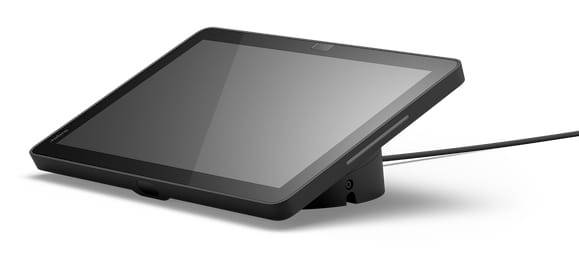
Jabra Control IP Microsoft Teams Rooms Touch Controller, 10.1-inch 1920x1200 Display, PoE 802.3af, Android 13
Μάρκα:
Jabra

Jabra Control IP Microsoft Teams Rooms Touch Controller, 10.1-inch 1920x1200 Display, PoE 802.3af, Android 13
€918.48 inc. VAT



8011-239
Delivery
Order Today...
Ships...
Delivery...
ℹ️ Large or fragile items (e.g. monitors) may require extra handling time. We'll keep you informed.
Payment options
Trusted Tech Choice
Buying Benefits
Verified
Competitive EU pricing
Delivered to Cyprus from EU stock
Local warranty support
Συνδεθείτε για να μπορέσουμε να σας ειδοποιήσουμε σχετικά με μια απάντηση
Jabra Control IP — Microsoft Teams Rooms touch controller for PanaCast video bars
Microsoft Teams Rooms10.1-inch touchPoE 802.3afPanaCast 40 / 50 VBS
The Jabra Control IP Microsoft Teams Rooms (8011-239) is a 10.1-inch networked touch controller that sits on the meeting-room table and runs the Teams Rooms console for Jabra PanaCast 40 VBS and PanaCast 50 VBS video bars.
It connects over the network rather than USB and takes power from the Ethernet cable (PoE), so one cable to the table is all it needs. Motion and proximity sensors wake the screen as people walk in.
Before you order: The PanaCast 40 VBS already includes a Control IP in its box. Order this one as a replacement, a second controller or for a PanaCast 50 VBS. For Zoom Rooms choose 8012-239, for UC 8010-239.
What's in the Box
- Jabra Control IP touch controller (Microsoft Teams Rooms version)
- PoE injector and network cable are separate accessories (Jabra 14402-21 and 14302-26) — plan for them if your table has no PoE port
What It Means in Practice
- Start and join Teams Rooms meetings, share content and control the camera and volume from the table.
- One Ethernet cable carries network and power (IEEE 802.3af PoE) — no power adapter at the table.
- Sensors wake the controller when someone approaches; a schedule view shows the room's bookings.
- Tilt it between 0° and 25° for the table, and lock it down with a Kensington lock in shared spaces.
- IT manages it like the rest of the room: secure and verified boot, SCEP certificates, appliance mode and logs through the Jabra Web Console.
What Will Not Work
- It is not a USB controller — it needs a network connection with PoE (802.3af) or a PoE injector.
- This MS Teams Rooms version is not the Zoom Rooms controller (8012-239) or the UC controller (8010-239).
- Jabra publishes it for the PanaCast 40 VBS and PanaCast 50 VBS; it is not a controller for third-party or PC-based room systems.
- It is not a room display or scheduling panel for outside the room.
Key Features
10.1-inch touch
1920 x 1200 landscape display for a full Teams Rooms console at the table.
Power over Ethernet
IEEE 802.3af PoE: one cable for data and power.
Wake on approach
Two sensors (motion and proximity) wake the screen as people arrive.
Enterprise security
Secure and verified boot, SCEP, appliance mode and remote log collection.
Technical Specifications
Frequently Asked Questions
Singular Expert Insight · Buyer's Guide
The Control IP turns a PanaCast bar into a proper room system, but it is only as good as the cable behind it: plan an 802.3af PoE port at every table before the installer arrives. A small PoE switch in the room cabinet usually covers the controller and leaves ports for the bar. Match the platform — MS, Zoom or UC — to the bar and your licences.
✓ Buy it if you run Microsoft Teams Rooms on a PanaCast 40 or 50 VBS and need a table controller, a spare or a second one.
✕ Skip it if you run Zoom Rooms, your bar is not a PanaCast 40/50 VBS, or you are buying a PanaCast 40 VBS that already includes one.
→ Also consider the Jabra Control IP Zoom Room (8012-239) or UC (8010-239) versions.
Not sure which controller your room needs? Tell us the video bar model and meeting platform and we will confirm the right version.
Χαρακτηριστικά
Product Code
CP24446
EAN Code
5706991034370
Manufacturer
Jabra