
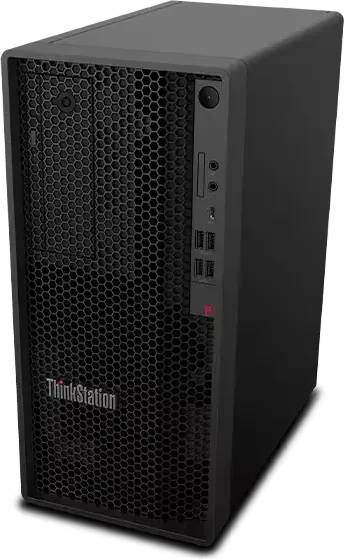
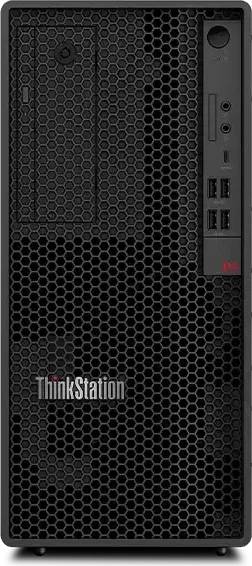
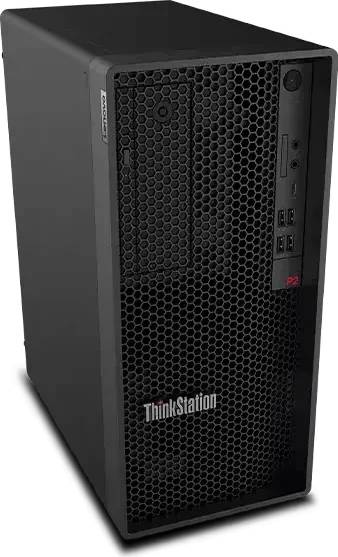
Lenovo ThinkStation P2 Tower Gen 2 Workstation Core Ultra 7 265 32GB DDR5 512GB SSD RTX 2000 Ada Windows 11 Pro
Brand:
Lenovo

Lenovo ThinkStation P2 Tower Gen 2 Workstation Core Ultra 7 265 32GB DDR5 512GB SSD RTX 2000 Ada Windows 11 Pro
€4020.62 inc. VAT


30JQ00BKGE
Delivery
Order Today...
Ships...
Delivery...
ℹ️ Large or fragile items (e.g. monitors) may require extra handling time. We'll keep you informed.
Payment options
Trusted Tech Choice
Buying Benefits
Verified
Competitive EU pricing
Delivered to Cyprus from EU stock
Local warranty support
Please sign in so that we can notify you about a reply
ThinkStation P2 Tower Gen 2 — 20-core Core Ultra 7 265 with RTX 2000 Ada
20-core Core Ultra 7 265RTX 2000 Ada 16 GB32 GB DDR5-560065 W processor
The ThinkStation P2 Tower Gen 2 is Lenovo’s entry certified workstation, and this configuration pairs a 20-core Intel Core Ultra 7 265 with an NVIDIA RTX 2000 Ada Generation card holding 16 GB of GDDR6, 32 GB of DDR5-5600 fitted as two modules, and a 512 GB NVMe SSD, running Windows 11 Pro. It is the machine for CAD, drafting, BIM and design work that needs certified graphics drivers without the cost of a P3 or P5. The processor is the 65 W non-K version, which means a quieter, cooler machine than the overclockable variants and no practical difference for the software this workstation is bought to run.
Compatibility — check before buying:
Three things worth knowing. The processor is the Core Ultra 7 265, not the 265K — 20 cores in both, but this one runs at 65 W with a 5.3 GHz peak rather than 125 W and 5.5 GHz. For certified professional work that is a sensible trade, and it is why this machine runs quieter. Memory is 32 GB fitted as two modules in a four-slot board; the P2 Tower Gen 2 platform tops out at 128 GB, lower than the 256 GB of the P3, so if you expect to need very large memory later the P3 is the better starting point. And Lenovo does not publish the power supply wattage or a warranty term against this specific configuration code — the chassis is offered with 500 W and 750 W 80 PLUS Platinum supplies and 1-, 2- and 3-year on-site warranty options, and we will confirm both with the distributor before you order. No monitor, keyboard or mouse is included.
Best For
✓ CAD and drafting with certified graphics drivers
✓ Architectural and BIM work on mid-sized models
✓ Design and engineering offices on a budget
✓ Quiet offices — a 65 W processor and a 70 W card
✓ First certified workstation for a small practice
✓ Machines that need 3.5-inch drive bays as well as M.2
Key Features
20-core Core Ultra 7 265 at 65 W
Eight performance cores and twelve efficient cores, 30 MB of cache and a 5.3 GHz peak within a 65 W base power. The low power figure is the point: less heat, less fan noise, and a machine that sits under a desk in a quiet office without announcing itself.
NVIDIA RTX 2000 Ada, 16 GB GDDR6
A certified professional card in a dual-slot, 70 W form — it draws its power from the slot rather than needing supplementary connectors. Sixteen gigabytes is enough for substantial CAD assemblies, and the certified drivers are what the software vendors validate against.
Real expansion for an entry workstation
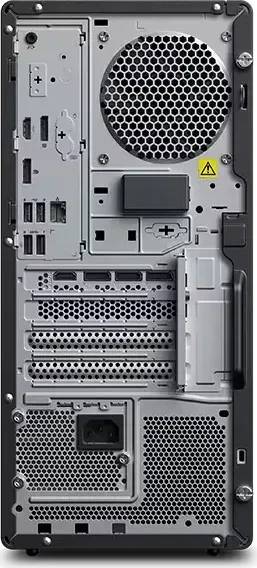
Four PCIe slots, four DDR5 DIMM sockets, three M.2 positions (one PCIe 5.0 and two PCIe 4.0), three SATA connectors and bays for two 3.5-inch and two 2.5-inch drives. The P2 is the small one in the range, but it is not a sealed box.
Business security built in
Infineon TPM 2.0, UEFI Secure Boot, BIOS Guard and Boot Guard, BIOS self-healing, supervisor and power-on passwords, and Intel vPro with AMT for remote management. These are the features that let IT deploy a fleet rather than a set of individual machines.
Technical Specifications
Frequently Asked Questions
Singular Expert Insight
The P2 Tower Gen 2 exists to be the sensible first certified workstation, and this configuration is exactly that: enough card for real CAD work, 32 GB of memory with room to double it, and a 65 W processor that keeps the machine quiet. Where it will run out is memory — 128 GB is the platform ceiling against 256 GB on the P3 — so if you can already see that limit coming, buy the bigger chassis now rather than replacing this in two years. Two figures we will not print: the power supply wattage and the warranty length, neither of which Lenovo publishes against this code. We will confirm both in writing before you order. Plan the displays alongside it in our PC monitors section, and memory is where to go when 32 GB stops being enough.
Buyer’s Guide
Buy it if
You want a certified workstation for CAD, drafting or BIM without paying for a P3, and 16 GB of professional graphics memory covers your models. The 65 W processor and the slot-powered card make it a quiet machine for a shared office.
Skip it if
You can see 128 GB of memory or 24 GB of graphics memory in your future — the P3 Tower is the right starting point. Skip it too if 512 GB of local storage is not enough on day one, or if your software is not certified against professional drivers.
Also consider
The ThinkStation P3 Tower Gen 2 if you need a larger memory ceiling or a bigger professional card, or the Core Ultra 9 configuration of the P2 if the processor rather than the card is your limit.
Features - Lenovo - 30JQ00BKGE
More Details
Product Code
04:590368
EAN Code
0199276525253
Manufacturer
Lenovo