
LogiLink UA0125 10-Port USB 2.0 Hub with On/Off Switch Activity LED and Included 5 V 3.5 A Power Supply
Μάρκα:
LogiLink

LogiLink UA0125 10-Port USB 2.0 Hub with On/Off Switch Activity LED and Included 5 V 3.5 A Power Supply
€35.87 inc. VAT
UA0125
Delivery
Order Today...
Ships...
Delivery...
ℹ️ Large or fragile items (e.g. monitors) may require extra handling time. We'll keep you informed.
Payment options
Trusted Tech Choice
Buying Benefits
Verified
Competitive EU pricing
Delivered to Cyprus from EU stock
Local warranty support
Συνδεθείτε για να μπορέσουμε να σας ειδοποιήσουμε σχετικά με μια απάντηση
LogiLink UA0125 — ten powered USB 2.0 ports with one switch
10 x USB-A5 V / 3.5 A adapter includedMaster on/off switchOver-current protection
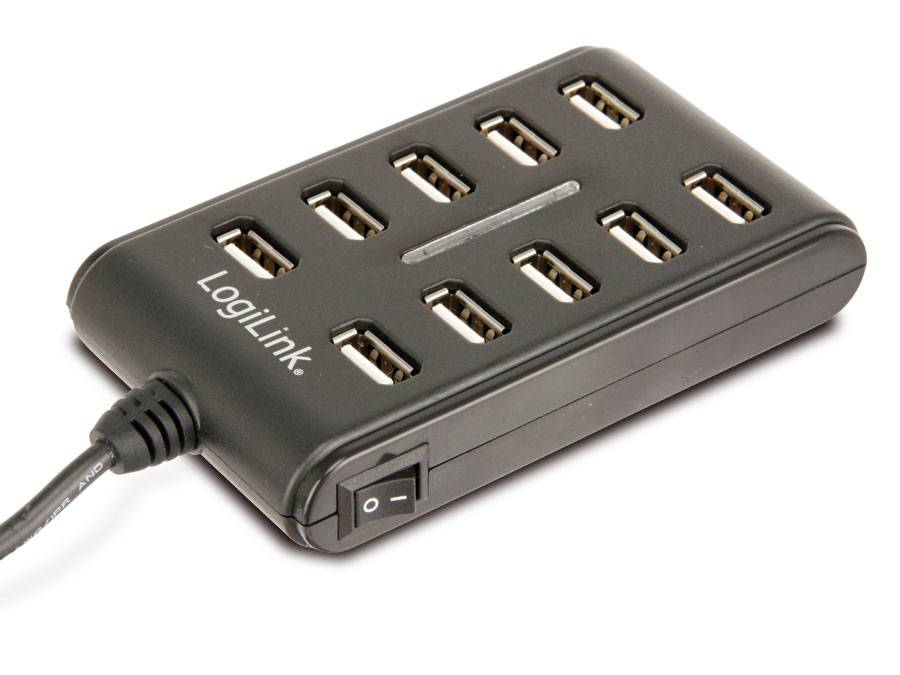
The LogiLink UA0125 is a mains-powered desktop hub that turns one USB port into ten. It ships with its own 5 V / 3.5 A adapter and a USB cable, so the ports do not have to live on whatever current the computer’s own socket can spare, and a single on/off switch cuts the whole hub when you are done. Built-in over-current detection protects the host if a device misbehaves. The ports are USB 2.0 — the right tool for keyboards, mice, receivers, barcode scanners, licence dongles, chargers and test rigs, and the wrong one for fast storage.
Compatibility — check before buying:
These are USB 2.0 ports at up to 480 Mbps, shared across all ten — an external SSD or a modern flash drive will work but will run at a fraction of its speed. The switch is one master switch for the whole hub, not a switch per port, so it cuts power and data to everything at once. The hub needs its supplied adapter to run properly; it is not designed as a bus-powered travel hub. LogiLink does not publish a per-port current limit or the length of the supplied USB cable, so if you plan to charge phones or tablets from it, tell us what you want to run and we will check it.
Best For
✓ Workshop and test benches with many small devices
✓ Reception desks, POS and scanner setups
✓ Licence and security dongles that must stay plugged in
✓ Keyboards, mice and wireless receivers
✓ Server rooms and lab rigs that need a lot of low-speed ports
✓ Anyone who wants one switch to kill all of them
Key Features
Ten ports, mains powered
The included 5 V / 3.5 A adapter means the ports are fed from the wall, not from the computer’s USB socket — the usual reason a device drops out on an overloaded bus-powered hub.
One switch for the whole hub
A single on/off switch with an activity LED cuts the entire hub. Useful at the end of the day, and useful for power-cycling a stuck device without unplugging ten cables.
Over-current detection built in
LogiLink publishes over-current detection and protection, so a faulty device on one port is not allowed to pull the host down with it.
Technical Specifications
Frequently Asked Questions
Singular Expert Insight
Ten ports is a lot, and USB 2.0 is exactly why this hub can offer them at this price. Think of the UA0125 as a peripheral farm rather than a data hub: keyboards, mice, receivers, scanners, dongles and chargers all sit happily at 480 Mbps and never come close to saturating it, while a single external SSD would. If storage is what you are plugging in, look at the 5 Gbps and 10 Gbps models in our USB hub range instead — and if you are moving files onto USB flash drives, the difference is minutes versus seconds. Two things to know before ordering: the switch is one master switch for the whole hub, not one per port, and the supplied 5 V / 3.5 A adapter is what makes ten ports workable, so keep it with the hub.
Buyer’s Guide
Buy it if
You need a lot of low-speed ports on a desk, bench or rack and you want them mains-powered so nothing drops out. You want one switch to shut the whole hub down at the end of the day. You are plugging in keyboards, mice, receivers, scanners and dongles rather than fast storage.
Skip it if
You are connecting an external SSD or drive and care about speed — USB 2.0 at 480 Mbps shared is the wrong hub. You want a switch per port, or a slim hub for the laptop bag: this one runs from a mains adapter and is not a travel product.
Also consider
A 5 Gbps or 10 Gbps powered hub if any of the devices are storage. A hub with individual per-port switches if you need to power devices on and off one at a time. A USB-C hub if the host machine has no USB-A port to plug into.
Interface
- USB2.0
Χαρακτηριστικά
Product Code
04:94387
EAN Code
4052792006896
Manufacturer
LogiLink