Apple Mac Studio (2026) · M5 Max with 40-core GPU · 64GB · 2TB SSD
M5 Max 18-core CPU40-core GPU64GB unified memory2TB SSD
The Apple Mac Studio (2026) in this configuration is a compact desktop built on the M5 Max chip with an 18-core CPU, the upgraded 40-core GPU, a 16-core Neural Engine, 64GB of unified memory and a 2TB SSD, aimed at video editors, 3D and motion designers, photographers, developers and anyone running local AI models who wants generous memory headroom with a balanced amount of fast internal storage.
This is a configure-to-order (CTO) build based on the standard M5 Max Mac Studio (Apple base MHL64). Compared with that base model it moves from the 32-core to the 40-core GPU, from 36GB to 64GB of memory and from 512GB to 2TB of storage. The 40-core GPU also raises memory bandwidth from 460GB/s to 614GB/s, which matters for GPU rendering, large timelines and on-device machine learning.
Before you order: Memory and storage are part of the Apple silicon design and cannot be upgraded after purchase. 64GB suits most professional workloads; if you work with very large AI models or 3D scenes, or keep many large video projects on the Mac itself, ask us about the 128GB or 4TB–8TB configurations before ordering. No display, keyboard or mouse is included.
What's in the Box
- Mac Studio (M5 Max, 18-core CPU, 40-core GPU, 64GB, 2TB SSD)
- Power cord
- No display, keyboard, mouse or trackpad — these are sold separately
What It Means in Practice
- Multicam 4K and 8K editing in Final Cut Pro or DaVinci Resolve stays responsive: the M5 Max media engines handle ProRes and HEVC in hardware, and 614GB/s of bandwidth keeps the GPU fed.
- 2TB of internal SSD holds the operating system, applications and your current projects comfortably; finished work and archives move to a NAS or Thunderbolt drive.
- 64GB of unified memory is shared by CPU and GPU, giving room for larger local language models, heavy After Effects compositions, big Lightroom catalogues and several virtual machines at once.
- GPU rendering in Blender, Redshift or Octane and real-time 3D in Unreal or Unity get noticeably more headroom from the 40-core GPU than from the standard 32-core chip.
- One machine can drive up to five external displays — useful for colour grading, trading desks or development setups with several screens.
- 10Gb Ethernet and Thunderbolt 5 (up to 120Gb/s) give fast transfers to a NAS, RAID array or external SSD for archive and backup.
What Will Not Work
- It is a desktop with no built-in screen, battery, keyboard or mouse — you need your own monitor and input devices.
- RAM and SSD cannot be upgraded later; further storage expansion is external only (Thunderbolt or USB enclosures, NAS).
- Windows cannot be installed natively (no Boot Camp on Apple silicon). Windows on Arm runs only through virtualisation such as Parallels Desktop, and some x86-only drivers, anti-cheat games and specialised hardware tools will not work.
- External GPUs (eGPU) are not supported on Apple silicon Macs.
- It is not a rack-mount server; rack installation needs a third-party shelf or mount.
- Do not confuse it with the base MHL64 Mac Studio (32-core GPU, 36GB, 512GB) — this unit is the upgraded 40-core GPU, 64GB, 2TB configuration.
Key Features
M5 Max, 18-core CPU
6 super cores plus 12 performance cores for heavy multi-threaded work such as compiling, encoding and simulation.
40-core GPU
The higher-tier M5 Max GPU with 614GB/s memory bandwidth for rendering, effects, gaming-engine work and on-device AI.
Thunderbolt 5 everywhere at the back
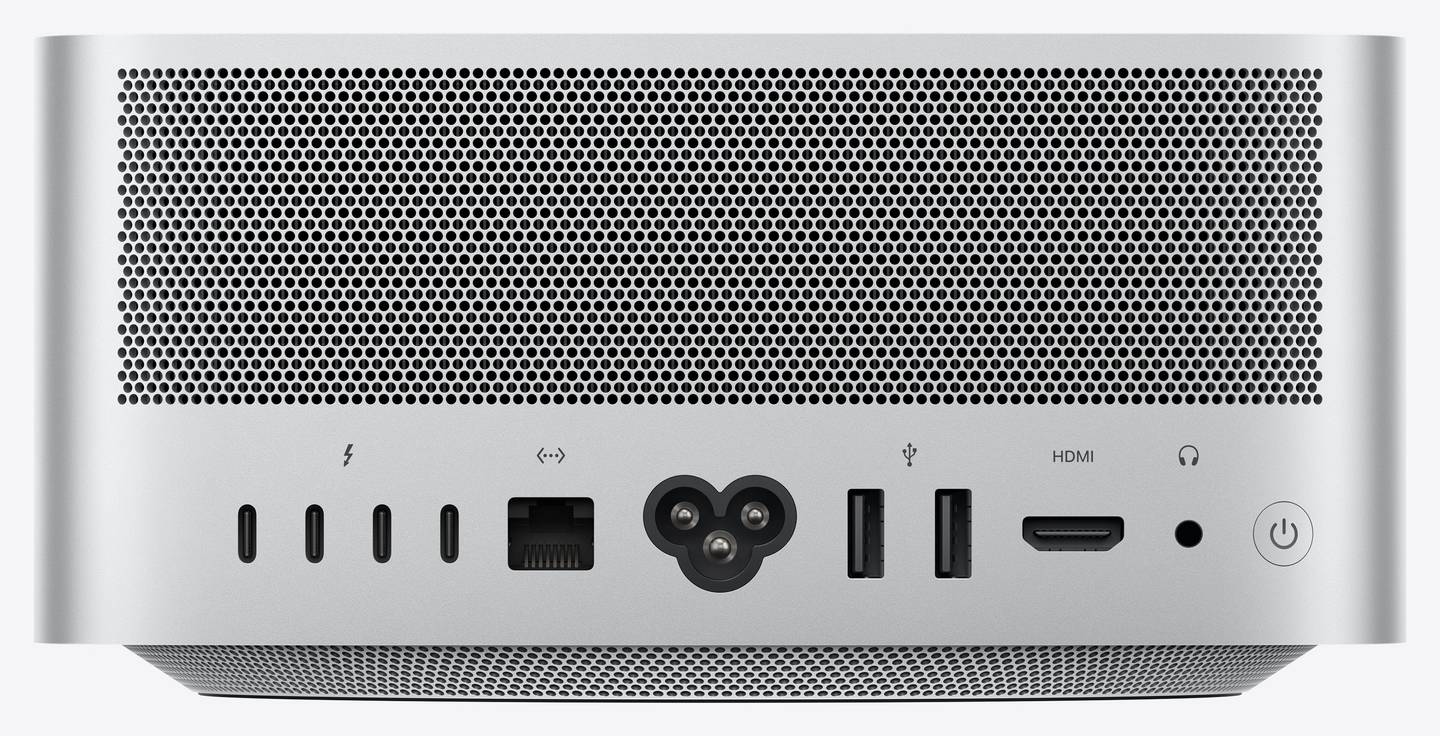
Four Thunderbolt 5 ports at up to 120Gb/s with DisplayPort 2.1, plus HDMI 2.1 and 10Gb Ethernet for a fast, clean studio setup.
Wi-Fi 7 and Bluetooth 6
Apple N1 wireless chip with Wi-Fi 7 (802.11be), Bluetooth 6 and Thread for current routers, peripherals and smart-home devices.
Technical Specifications
| Identification |
| Part Number |
Z1U4-13 (CTO, base model MHL64) |
| Brand |
Apple |
| Model |
Mac Studio (2026), M5 Max |
| Colour |
Silver |
| Processor |
| Chip |
Apple M5 Max |
| CPU |
18-core: 6 super cores and 12 performance cores |
| GPU |
40-core |
| Neural Engine |
16-core |
| Memory bandwidth |
614GB/s |
| Memory and storage |
| Unified memory |
64GB (not upgradable) |
| SSD |
2TB (not user-upgradable) |
| Configurable options (40-core GPU) |
48GB, 64GB or 128GB memory · 1TB, 2TB, 4TB or 8TB SSD |
| Ports |
| Rear |
4× Thunderbolt 5 (USB-C, up to 120Gb/s, DisplayPort 2.1) · 2× USB-A (up to 5Gb/s) · HDMI 2.1 · 10Gb Ethernet (RJ45) · 3.5 mm headphone jack |
| Front |
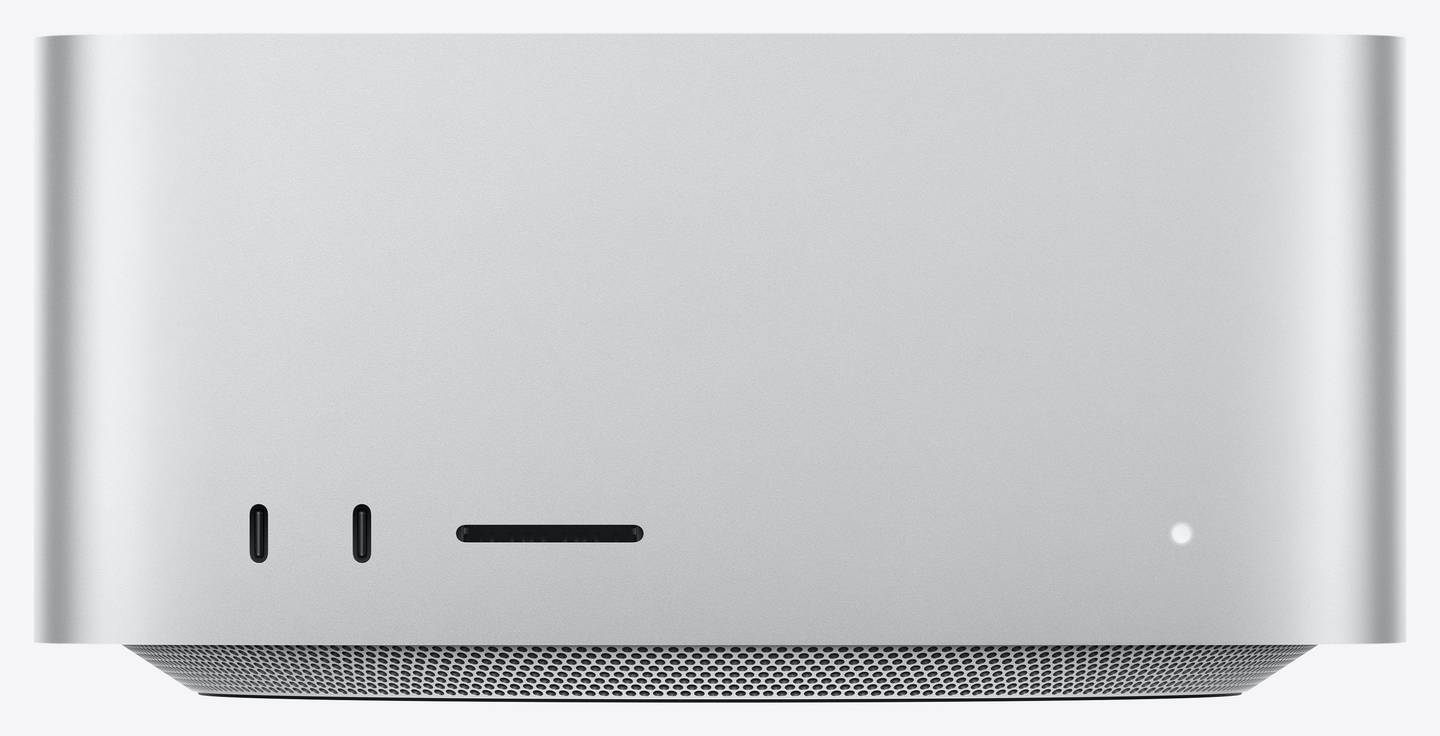
2× USB-C (up to 10Gb/s) · SDXC card slot (UHS-II) |
| Wireless |
| Wi-Fi |
Wi-Fi 7 (802.11be) |
| Bluetooth |
Bluetooth 6 |
| Other |
Thread · Apple N1 wireless chip |
| Display support |
| External displays |
Up to five: four up to 6K at 60Hz or 4K at 165Hz plus one up to 5K at 60Hz over HDMI |
| Alternative |
Up to three: two up to 8K at 60Hz, 5K at 120Hz or 4K at 240Hz plus one up to 5K at 60Hz over HDMI |
| Features |
VRR, HDR, multichannel audio |
| Physical and power |
| Dimensions (H × W × D) |
9.5 × 19.7 × 19.7 cm |
| Weight |
2.7 kg (varies by configuration) |
| Power |
100–240V AC, 50–60Hz, 480W maximum continuous |
| Operating temperature |
10 to 35°C, 5% to 90% relative humidity (non-condensing) |
| Software |
| Operating system |
macOS |
| Warranty |
| Warranty |
1-Year Warranty (Singular) |
| Manufacturer Term |
Apple One-Year Limited Warranty — claims handled through Singular |
Frequently Asked Questions
Is the 40-core GPU worth it over the standard 32-core M5 Max?
If your work leans on the GPU — 3D rendering, effects, colour grading, local AI — yes: you get 25% more GPU cores and 614GB/s instead of 460GB/s memory bandwidth. For mainly CPU-bound work such as coding or audio, the standard chip is closer in performance.
64GB or 128GB?
64GB covers 4K/8K editing, photography, development and mid-sized local AI models comfortably. Choose 128GB only for very large language models, huge 3D scenes or many simultaneous virtual machines — memory cannot be added later.
Is 2TB enough storage?
For apps plus a few active projects, yes. If you keep many 8K or ProRes RAW projects on the Mac at the same time, consider the 4TB configuration or a Thunderbolt 5 external SSD for working media.
Which plug does the power cord have?
The cord supplied depends on the region of the unit; tell us if you need a specific plug type and we will confirm before ordering.
Singular Expert Insight · Buyer's Guide
The Mac Studio is the Mac to buy when a MacBook Pro or Mac mini runs out of sustained GPU power or ports. This configuration is the balanced pro choice: the faster 40-core GPU with full 614GB/s bandwidth, 64GB of memory for larger models and compositions, and 2TB of internal SSD for current work, with archives on a NAS or Thunderbolt storage. Pair it with one of our
PC monitors — a 5K or 6K panel gets the most out of macOS scaling.
✓ Buy it if you edit video, render 3D, grade colour or run local AI models and want plenty of memory while keeping long-term media on external or network storage.
✕ Skip it if your work is office, web and light photo editing — a Mac mini is enough — or you want all your large video projects on the internal drive, in which case 4TB fits better.
→ Also consider the same Mac Studio with 4TB or 8TB SSD, the 128GB memory option, or the M3 Ultra Mac Studio for the maximum memory and GPU cores.
Not sure which configuration fits your workload? Tell us the software and project sizes you use and we will recommend memory and storage before you order.