
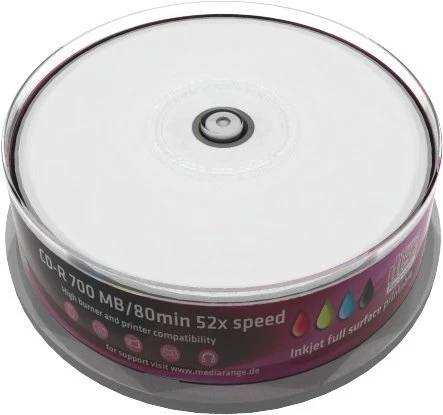
MediaRange CD-R 700 MB 80 min 52x, 25-Pack Spindle, white inkjet full-surface printable, print area 23–118 mm
Μάρκα:
MediaRange

MediaRange CD-R 700 MB 80 min 52x, 25-Pack Spindle, white inkjet full-surface printable, print area 23–118 mm
€13.91 inc. VAT


MR202
Delivery
Order Today...
Ships...
Delivery...
ℹ️ Large or fragile items (e.g. monitors) may require extra handling time. We'll keep you informed.
Payment options
Trusted Tech Choice
Buying Benefits
Verified
Competitive EU pricing
Delivered to Cyprus from EU stock
Local warranty support
Συνδεθείτε για να μπορέσουμε να σας ειδοποιήσουμε σχετικά με μια απάντηση
MediaRange CD-R 700MB 80min 52x inkjet fullsurface printable — 25 × 700 MB / 80 min, 52x
25 discs700 MB / 80 minUp to 52xSpindle
The MediaRange CD-R 700MB 80min 52x inkjet fullsurface printable 25-Pack is a 25-pack of write-once CD-R discs (700 MB / 80 min, up to 52x) supplied on a spindle — made for anyone who wants a clean, printed label on every disc instead of handwriting or stick-on labels.
The label side is white and inkjet-printable across the full surface (print area 23–118 mm) and quick-drying; MediaRange states compatibility with all inkjet printers that support disc printing and lists UV and scratch resistance.
Spindle-style packs are the most economical per disc for in-house burning; if discs will be handed out, add sleeves or cases for the ones that leave the office.
What's in the Box
- 25 × MediaRange write-once CD-R discs, 700 MB / 80 min, supplied on a spindle
- The discs stay on the spindle until used — keep the cover on to protect unused discs from dust
- No burning software is included — Windows, macOS and most Linux desktops can burn discs with their built-in tools or any burning application
What It Means in Practice
- Write-once: files you burn stay on the disc permanently and cannot be deleted — good for archives, records and hand-overs that should not change
- Multisession burning lets you add more files later until the disc is full, as long as the disc was not closed (finalised)
- Up to 52x is the maximum write speed; the drive chooses the actual speed, and a moderate speed is often the safer choice for audio CDs
- For a car or home CD player, burn the music as an Audio CD (CD-DA); a disc of MP3 files only plays on players that state MP3 support
- Printing on the disc needs an inkjet printer with a CD/DVD printing tray and its disc-printing software; let the ink dry fully before handling or inserting the disc
What Will Not Work
- Discs are not usable without an optical drive — most current laptops have none, so you will need an external USB CD/DVD writer
- CD-R is write-once: data cannot be erased or overwritten — for reusable discs choose CD-RW
- A CD holds 700 MB — for larger files or full backups use DVD, Blu-ray, a USB flash drive or an external drive
- The printable surface cannot be printed with a normal paper printer, a laser printer or a thermal printer — only inkjet printers with disc printing
Key Features
Full-surface inkjet print
White, quick-drying surface printable from 23 mm to 118 mm on any inkjet printer with disc printing.
Up to 52x write speed
Rated up to 52x; the burner selects the actual speed for the disc and drive combination.
25-disc spindle
Spindle storage keeps unused discs stacked and covered until you need them.
700 MB / 80 min
Standard CD capacity of 700 MB or 80 minutes of audio.
Technical Specifications
Frequently Asked Questions
Singular Expert Insight · Buyer's Guide
CD media is still the simplest way to hand over files, invoices, firmware or music that has to stay unchanged — and many Cyprus offices, tax advisors and hi-fi users still rely on it. The label side is white and inkjet-printable across the full surface (print area 23–118 mm) and quick-drying; MediaRange states compatibility with all inkjet printers that support disc printing and lists UV and scratch resistance. For bigger or frequently changing files, USB flash drives are the faster, reusable alternative.
✓ Buy it if You print titles or artwork on your discs with an inkjet disc printer.
✕ Skip it if You only write on discs with a marker — a standard non-printable pack costs less.
→ Also consider A different pack size or surface from the same range, or CD-RW if you need to rewrite.
Not sure which disc suits your drive, printer or player? Send us the model and we will check it before you order.
Colour
white
Χαρακτηριστικά
Product Code
04:75001
EAN Code
4260057125019
Manufacturer
MediaRange