
Zebra Hands-Free Gooseneck Stand for LS1203 Scanner - Flexible Neck, Auto-Scan Cup, Free-Standing or Screw and Tape Mount
Brand:
Motorola

Zebra Hands-Free Gooseneck Stand for LS1203 Scanner - Flexible Neck, Auto-Scan Cup, Free-Standing or Screw and Tape Mount
€36.72 inc. VAT
20-73951-07R
Delivery
Order Today...
Ships...
Delivery...
ℹ️ Large or fragile items (e.g. monitors) may require extra handling time. We'll keep you informed.
Payment options
Trusted Tech Choice
Buying Benefits
Verified
Competitive EU pricing
Delivered to Cyprus from EU stock
Local warranty support
Please sign in so that we can notify you about a reply
Zebra Hands-Free Gooseneck Stand for LS1203
LS1203 specificHands-free scanningFlexible neckDesk or fixed mount
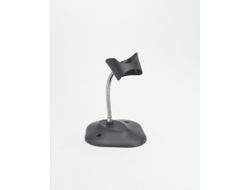
The Zebra 20-73951-07R is the hands-free gooseneck stand (IntelliStand) for the Zebra (formerly Symbol/Motorola) LS1203 laser scanner, holding it on a bendable neck so cashiers can present items under the beam instead of pressing the trigger — ideal for small shops and counters with steady, light scanning.
Unlike the LS2208, the LS1203 does not detect the stand by itself. Zebra puts an Auto-scan Mode barcode on the back of the cup: scan it once and the LS1203 scans continuously while it sits in the stand. This is the one setup step to remember.
Before you order: On the LS1203 hands-free mode is switched on by scanning the Auto-scan Mode barcode on the back of the cup — it is not automatic.
What's in the Box
- 1 × hands-free gooseneck stand: stand base, flexible neck with scanner cup, and wingnut
- No screws or adhesive tape are included
What It Means in Practice
- Assembly: unscrew the wingnut from the bottom of the neck, fit the neck into the base, tighten the wingnut and bend the neck to the angle you want.
- Scan the Auto-scan Mode barcode under the cup to enable hands-free scanning; keep the LS1203 Product Reference Guide handy if you later want to switch back.
- Fix the base with two #10 wood screws or double-sided tape on its three 1" × 2" tape holders where it might be knocked over.
- The scanner keeps its own cable to the PC or POS; the stand needs no power.
What Will Not Work
- Not listed for the LS2208, LI2208 or DS-series scanners — Zebra lists separate Intellistands for those.
- It will not switch modes automatically: without the Auto-scan setup barcode the LS1203 keeps working by trigger only.
- It carries no cable, charger or electronics.
- Mounting screws and tape are not supplied.
Key Features
Made for the LS1203
Shaped for the LS1203 handle, so the scanner sits securely at the angle you set.
Bendable neck
Aim the scan line at the spot where customers or staff present items.
Auto-scan barcode on the cup
The setup code you need is printed on the stand itself — no manual searching at install time.
Technical Specifications
Frequently Asked Questions
Singular Expert Insight · Buyer's Guide
The LS1203 is a trigger scanner first; this stand is what turns it into a hands-free counter scanner. The only catch is the one-time Auto-scan barcode — set it at installation and staff will not notice the difference. If you are also replacing the scanner's interface cable, see our cables range, or send us the scanner model and we will match it.
✓ Buy it if Buy it if you have an LS1203 at a counter and want customers or staff to scan without picking it up.
✕ Skip it if Skip it if your scanner is an LS2208, LI2208 or DS-series model — they need their own Intellistand.
→ Also consider Also consider 20-73951-01R, the same LS1203 stand in Cash Register White, or for newer scanners the Zebra Universal Gooseneck Intellistand STND-GS00UNC-04.
Not sure it fits your setup? Send us the model of your rack, switch or device and we will check compatibility before you order.
Features - Motorola - 20-73951-07R
More Details
Product Code
V353406
EAN Code
5712505024027
Manufacturer
Motorola