Special B2B pricing available after sign-in

Philips 3000 24B2U3301H/00 23.8-inch Full HD IPS Business Monitor, 120Hz, USB-C 90W Docking, RJ45, 5MP Windows Hello Webcam

Brand:
MMD - PHILIPS
Philips 24B2U3301H-00 Business Monitor Black Webcam
Philips 3000 24B2U3301H/00 23.8-inch Full HD IPS Business Monitor, 120Hz, USB-C 90W Docking, RJ45, 5MP Windows Hello Webcam
€347.59 inc. VAT
Buy
24B2U3301H/00
€292.09 €324.54
€347.59 inc. VAT
Ships from EU stock: 4 item(s)
Product Code
CR56900
EAN Code
8721038007268
Manufacturer
MMD - PHILIPS

Quick Specs

Screen
23.8-inch IPS, 1920 × 1080, 120Hz
Laptop connection
USB-C video/data + up to 90W PD
Video calls
5MP webcam, microphone, Windows Hello
Docking
RJ45, DP out, USB hub; 150mm height stand
Delivery

Order Today...
Ships...
Delivery...
ℹ️ Large or fragile items (e.g. monitors) may require extra handling time. We'll keep you informed.
Payment options
✓ Bank Deposit
Secure checkout with flexible payment methods
Trusted Tech Choice
Buying Benefits Verified
Competitive EU pricing
Delivered to Cyprus from EU stock
Local warranty support

One USB-C connection for a working video-call desk

23.8-inch IPS / 120HzUSB-C up to 90W5MP Windows HelloRJ45 + DP out

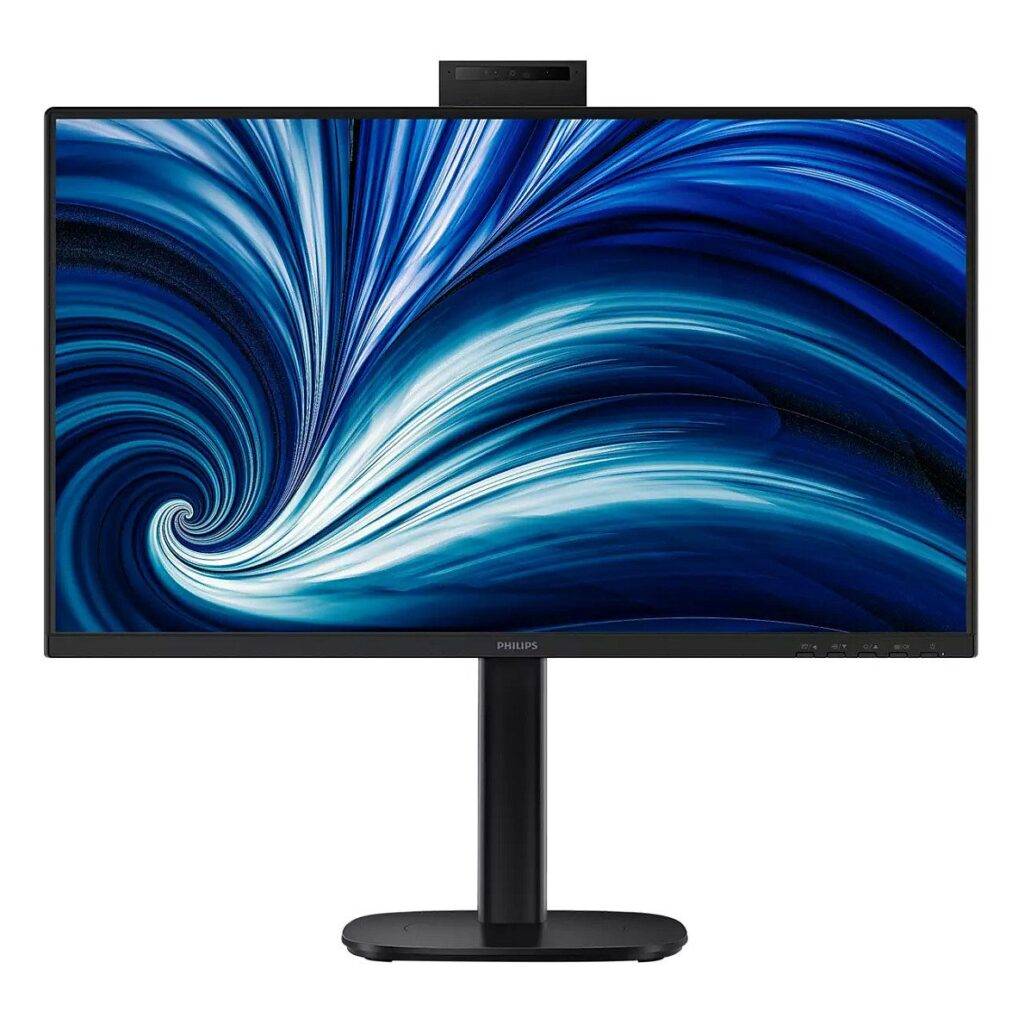
The Philips 24B2U3301H/00 combines one 23.8-inch Full HD IPS business screen with a USB-C dock, a 5MP Windows Hello webcam with microphone and two 2W speakers. Connect a compatible laptop to the upstream USB-C port to carry video and USB data, access the monitor Ethernet connection and receive up to 90W of charging power. The monitor itself still connects to mains power. A 150mm height-adjustable stand, pivot, swivel and tilt help fit the screen to your seat.

Before you order:
Your laptop USB-C port must support DisplayPort Alt Mode for video and USB PD charging if you want the one-cable setup. Check its power requirement against the 90W maximum. The downstream USB-C2 port is for data and up to 15W output; it is not the laptop docking input. Windows Hello requires a compatible Windows setup, and PXE/MAC pass-through/Wake-on-LAN depend on the host configuration.

What's in the Box

  • 1 × monitor with stand
  • HDMI cable, DisplayPort cable and USB-C to C cable
  • Power cable and user documentation; regional contents may vary

What It Means in Practice

  • For a meeting desk, connect the display to mains power and your network cable to its RJ45 socket, then connect the laptop to upstream USB-C. Select the monitor webcam, microphone and speakers in your calling application. The computer and calling software provide the meeting service.
  • 120Hz can make scrolling and window movement smoother when the source is configured for Full HD at 120Hz. It does not change the native 1920 × 1080 workspace into a higher-resolution display.
  • Use DP output for a compatible daisy-chain setup. Smart Link Sync needs all monitors in the chain to support Smart Link; do not assume every secondary monitor can synchronise settings.
  • The RJ45 connection reaches up to 1000Mbps in USB3.0 mode, while USB2.0 mode is limited to 10/100Mbps. Choose the host and USB configuration to suit network needs.

What Will Not Work

  • Video through a USB-C port that supports charging/data only and lacks DP Alt Mode.
  • Treating the downstream 15W USB-C port as the upstream 90W laptop connection.
  • Using this monitor as a standalone conferencing computer, or assuming D-mode establishes medical diagnostic approval.

Key Features

 
USB-C docking and networking
Up to 90W USB PD3.0, RJ45, a USB3.2 Gen1 hub and DisplayPort output consolidate the documented laptop connections.
 
Camera and sound built in
The 5MP webcam includes a microphone, LED indicator, Windows Hello support and ±30° tilt. Two 2W speakers and audio output handle desk audio.
 
IPS workspace at 120Hz
The 350cd/m² IPS panel provides 1500:1 typical contrast, Adaptive Sync, SmartImage and EasyRead. SoftBlue, flicker-free operation and eyesafe certification support viewing comfort.
 
SmartErgoBase positioning
Adjust 150mm of height, ±90° pivot, ±180° swivel and −5° to +30° tilt, or use a compatible VESA100 × 100mm mount.

Technical Specifications

Identity and display
Manufacturer / series Philips Business Monitor 3000
MPN 24B2U3301H/00
EAN 8721038007268
Colour / finish Black bezel, rear cover and base / textured
Panel / backlight 23.8-inch (60.47 cm) IPS / White LED
Maximum resolution / ratio 1920 × 1080 at 120Hz / 16:9
Response time 4ms GtG (SmartResponse)
Brightness / contrast 350 cd/m² / 1500:1 typical
SmartContrast 50000000:1
Colours 16.7 million (8-bit)
Colour gamut area sRGB 110% (CIE1931); NTSC 96% (CIE1976)
Viewing angles 178° H / 178° V at contrast ratio greater than 10
Pixel pitch / density 0.2745 × 0.2745 mm / 93 PPI
Viewable area 527.04 × 296.46 mm (H × V)
Scan range 30–140 kHz H / 48–120Hz V
Screen surface Anti-glare, 3H, haze 25%
Picture / comfort Adaptive Sync (VRR), SmartImage, sRGB, EasyRead, flicker-free, SoftBlue, EyeSafe, DICOM D-mode
Smart Link Sync Primary or secondary display; every daisy-chained display must support Smart Link
Docking, audio and camera
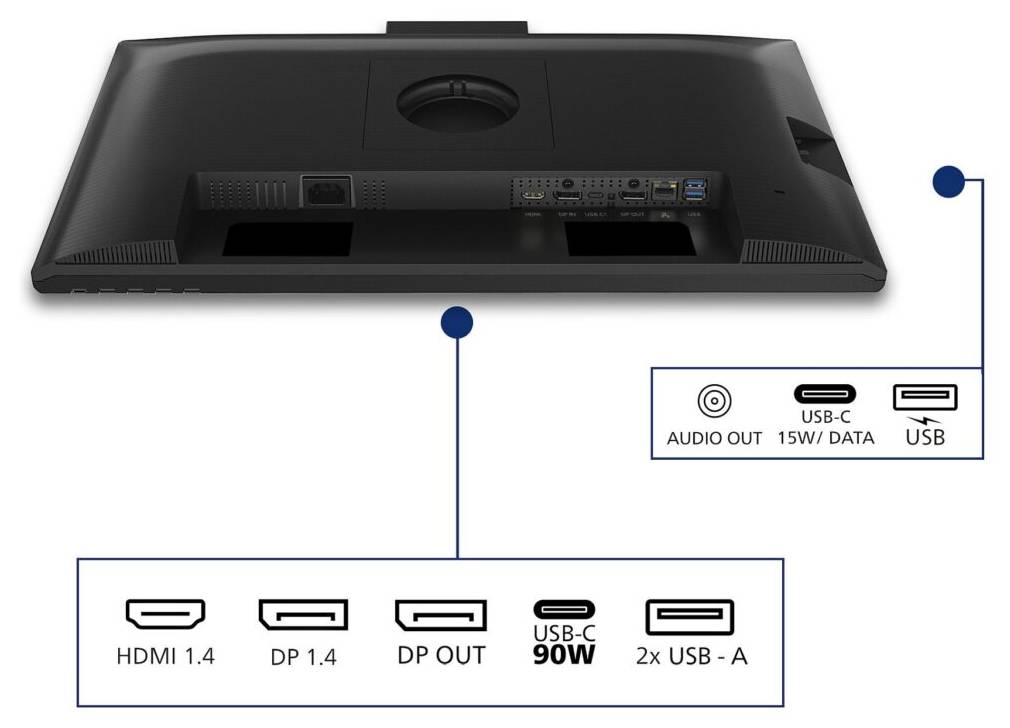
Video inputs 1 × HDMI 1.4; 1 × DisplayPort 1.4; 1 × USB-C upstream (DP Alt Mode, data, PD)
Video output DisplayPort output for daisy chaining
HBR3 / HDCP HBR3 over DP/USB-C; HDCP 1.4/2.2 over HDMI/DP/USB-C
USB hub USB 3.2 Gen1 5Gbps; upstream 1 × USB-C1; downstream 3 × USB-A (1 × BC1.2 fast charge), 1 × USB-C2 data/15W
Laptop charging Up to 90W, USB PD3.0
PD profiles 5/7/9/10/12/15V at 3A; 20V at 3.25A or 4.5A
Ethernet RJ45: 10/100Mbps in USB2.0 mode; up to 1000Mbps in USB3.0 mode; PXE/MAC pass-through/Wake-on-LAN on compatible systems
Speakers / audio 2 × 2W stereo speakers; audio output
Webcam 5MP with microphone and LED indicator; Windows Hello; ±30° camera tilt
Control / Plug and Play SmartControl; DDC/CI, Mac OS, sRGB, Windows11/10
OSD languages 21 including English and Greek
Ergonomics, power and environment
Stand adjustments Height 150mm; pivot ±90°; swivel ±180°; tilt −5° to +30°
Mount / security VESA 100 × 100 mm; Kensington lock slot
Power supply Internal 100–240VAC, 50–60Hz
Consumption On 14.36W (EnergyStar test), ECO 11W, standby 0.35W, off 0.3W (typical)
Energy class D
Dimensions with stand 542 × 499 × 228 mm (W × H × D, maximum height)
Dimensions without stand 542 × 320 × 48 mm (W × H × D)
Weight 5.74 kg with stand / 4.07 kg without stand
Operating / storage temperature 0–40°C / −20–60°C
Humidity 20–80%
Altitude 3658m operating / 12192m non-operating
MTBF 70000 hours excluding backlight
Sustainability 85% post-consumer recycled plastic; 100% recyclable packaging; PVC/BFR-free housing; Energy Star, RoHS
Approvals CB, CE, TUV/GS, TUV Ergo, TCO Certified, TCO Edge, EAC, EAC RoHS, MEPS, UKCA, EMF, FCC, ICES-003, TÜV Rheinland Low Blue Light (Hardware Solution), eyesafe CERTIFIED2.0
Included items Monitor with stand, HDMI cable, DP cable, USB-C to C cable, power cable, user documentation

Frequently Asked Questions

Does USB-C charge every laptop?
No. The laptop must accept USB PD and its power needs must fit within the up-to-90W output. Video also requires DP Alt Mode support.
Why are both 90W and 15W stated?
They refer to different ports: upstream USB-C1 is the laptop video/data/PD connection with up to 90W, while downstream USB-C2 provides data and up to 15W.
Can any monitor use Smart Link Sync?
No. Philips states that every daisy-chained display must support Smart Link for this setting-synchronisation feature to work correctly.
Singular Expert Insight
Choose this version for a laptop desk where networking, video calls and fewer daily cable connections matter. Check USB-C video and power support first, then plan the second display and host support if you intend to daisy-chain. D-mode improves grayscale differentiation; it should not be taken as evidence of a diagnostic workstation certification. Check laptop docking compatibility with Singular

Buyer’s Guide

✓ 

Buy it if

 you want a Full HD business monitor with USB-C docking, Ethernet and an integrated Windows Hello webcam.
✕ 

Skip it if

 you need more than 90W laptop charging or a higher native resolution.
→ 

Also consider

 a simpler monitor if docking and the webcam are unnecessary, or a higher-resolution dock display for more workspace.
Provide the exact laptop model and planned second monitor for a connection check.

Features - MMD - PHILIPS - 24B2U3301H/00

Colour
black
Interface
  • USB3.2,
  • USB Type-C,
  • Ethernet
More Details
Product Code
CR56900
EAN Code
8721038007268
Manufacturer
MMD - PHILIPS
Technical specifications
Monitor Usage
  • business monitor
Resolution
FHD (1080p)
Resolution (raw)
1920×1080
Complete Your Setup

Add the essentials to your monitor

Pair your monitor with accessories that match its capabilities.
HDMI & DP Cables

HDMI, DisplayPort and USB-C video cables to connect your monitor.

Browse →
Monitor Stands & Arms

Adjustable arms, desk mounts and stands for ergonomic positioning.

Browse →
Privacy Filters

Anti-glare and privacy filters to protect your screen and your work.

Browse →
Monitor Accessories

Cleaning kits, calibration tools and other monitor essentials.

Browse →
  • Recently Viewed
  • Customers Also Bought
 
Why Buy from Singular

Trusted by businesses across Cyprus

Genuine products, EU stock, and expert support for every purchase.
✓ Genuine Products
Sourced through official distribution channels, with full manufacturer warranty.
✓ EU Stock
Shipped from our EU distribution network, with real-time availability on every product.
✓ B2B Ready
VAT invoices for business deduction and credit terms for verified buyers.
Expert Support
Talk to our team for sizing, configuration or volume orders.