
Samsung SCX-FAX210 Super G3 Fax Kit, 33.6 Kbps, for MultiXpress SCX-6545N, SCX-6555N and CLX-8380ND
Μάρκα:
Samsung

Samsung SCX-FAX210 Super G3 Fax Kit, 33.6 Kbps, for MultiXpress SCX-6545N, SCX-6555N and CLX-8380ND
€260.19 inc. VAT
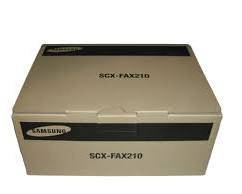



SCX-FAX210/SEE
Delivery
Order Today...
Ships...
Delivery...
ℹ️ Large or fragile items (e.g. monitors) may require extra handling time. We'll keep you informed.
Payment options
Trusted Tech Choice
Buying Benefits
Verified
Competitive EU pricing
Delivered to Cyprus from EU stock
Local warranty support
Συνδεθείτε για να μπορέσουμε να σας ειδοποιήσουμε σχετικά με μια απάντηση
Samsung SCX-FAX210 — the optional fax kit for MultiXpress machines that shipped without one
Super G3 fax kit33.6 KbpsOptional accessoryLegacy part
The SCX-FAX210 is Samsung’s optional fax kit for its MultiXpress multifunction printers. These machines shipped as print, copy and scan devices with fax as a paid option — this is the internal board that adds it. Samsung specifies it as Super G3 (ITU-T G3) at 33.6 Kbps, using the printer’s own hard drive for fax storage rather than dedicated memory.
Compatibility — check before buying:
Who needs this: if your MultiXpress has no fax menu and no telephone socket in use, fax was not fitted when the machine was bought. This board adds it and connects the printer to an analogue telephone line.
⚠️ A correction to our own previous listing. We had this described as an RS-232 serial interface. That figure does not appear in any Samsung document — it comes from a single third-party catalogue record that has propagated across every reseller listing of this part. A Super G3 fax board terminates on a telephone line, not a serial port. We have removed the RS-232 claim rather than repeat it.
Compatibility. Samsung’s own SCX-6555NX / SCX-6545NX datasheet names the fax option verbatim as “Fax Kit: SCX-FAX210” and describes fax on those machines as optional. The CLX-8380ND, CLX-8540ND and CLX-8540NX appear consistently across distributor listings for the same part, but we found no Samsung-authored document naming SCX-FAX210 for the CLX models — so we flag those three as distributor consensus rather than manufacturer-confirmed.
⚠️ Check the letter at the end of your model number. The NX variants of the 6545 and 6555 generally shipped with fax already fitted; the kit targets the N variants. If your machine already faxes, you do not need this.
⚠️ Do not confuse it with the CLX-FAX260, which is Samsung’s fax kit for a different set of colour MultiXpress machines. It is a separate part and they are not interchangeable.
⚠️ A correction to our own previous listing. We had this described as an RS-232 serial interface. That figure does not appear in any Samsung document — it comes from a single third-party catalogue record that has propagated across every reseller listing of this part. A Super G3 fax board terminates on a telephone line, not a serial port. We have removed the RS-232 claim rather than repeat it.
Compatibility. Samsung’s own SCX-6555NX / SCX-6545NX datasheet names the fax option verbatim as “Fax Kit: SCX-FAX210” and describes fax on those machines as optional. The CLX-8380ND, CLX-8540ND and CLX-8540NX appear consistently across distributor listings for the same part, but we found no Samsung-authored document naming SCX-FAX210 for the CLX models — so we flag those three as distributor consensus rather than manufacturer-confirmed.
⚠️ Check the letter at the end of your model number. The NX variants of the 6545 and 6555 generally shipped with fax already fitted; the kit targets the N variants. If your machine already faxes, you do not need this.
⚠️ Do not confuse it with the CLX-FAX260, which is Samsung’s fax kit for a different set of colour MultiXpress machines. It is a separate part and they are not interchangeable.
Best For
✓ A MultiXpress 6545N or 6555N that was bought without the fax option
✓ An office that still needs to send or receive faxes on an existing machine
✓ Restoring fax capability to a machine whose board has failed
✓ Anyone who would rather add fax than replace a working A3 multifunction printer
Key Features
Fax was an option on these machines, not standard
That is the whole reason this part exists. Samsung’s own datasheet lists fax on the SCX-6545 and SCX-6555 as “Fax (Optional)” and names SCX-FAX210 in the accessory list. If your machine has no fax menu, it was ordered without the kit.
Super G3 at 33.6 Kbps
Samsung specifies Super G3 (ITU-T G3) at 33.6 Kbps, with mono resolution to 300 × 300 dpi and colour to 200 × 200 dpi. Confirmed on Samsung’s own host-machine datasheet, not from a reseller.
Uses the printer’s hard drive for fax memory
Samsung lists fax memory as “HDD Store” — there is no separate memory on the board, so received-fax capacity is limited by the machine rather than by the kit.
⚠️ Not an RS-232 device — we have corrected our own listing
Almost every listing of this part, ours included until now, described it as RS-232 serial. That comes from one third-party catalogue record and is wrong for a Super G3 fax board, which connects to a telephone line. We would rather correct it than propagate it.
A legacy part, described honestly
These MultiXpress machines date from roughly 2010 to 2014, and Samsung sold its printer business to HP in 2017. No HP support page exists for SCX-FAX210 — HP carries only the different CLX-FAX260. What survives is the host machine’s own datasheet, and what is on the shelf is old stock.
Technical Specifications
Frequently Asked Questions
Singular Expert Insight
This is a part worth explaining rather than simply listing, because the thing most buyers need to know is not in any specification: fax was optional on these machines. A MultiXpress 6545N or 6555N that cannot fax is not faulty — it was ordered without the board, and this is the board. Two honest notes. We have removed the RS-232 claim that we, like every other reseller, had been carrying: it traces to one third-party catalogue record, appears in no Samsung document, and is wrong for a fax board that connects to a telephone line. And no installation guide survives, so treat fitting as a technician job. If you tell us the exact model from the front of the machine we will confirm the right part before you order — particularly if yours is a CLX, where the compatibility rests on distributor listings rather than a Samsung document. Browse our laser multifunction printers if the machine is nearing replacement, or our printer accessories range.
Buyer’s Guide
Buy it if
You have a MultiXpress SCX-6545N or SCX-6555N that was supplied without the fax option, and you need it to send and receive faxes.
Skip it if
Your machine already has a fax menu (the NX variants generally shipped with it), or your printer takes the different CLX-FAX260 kit.
Also consider
A current laser multifunction printer with fax built in, if the machine is nearing the end of its useful life, or the toner and drum consumables for the same MultiXpress.
Χαρακτηριστικά
Product Code
09:SCX-FAX210/SEE
EAN Code
8808987580759
Manufacturer
Samsung