
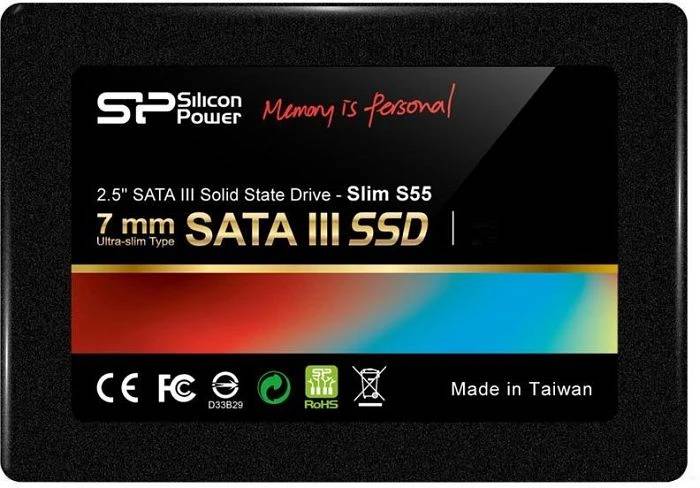
Silicon Power Slim S55 SP240GBSS3S55S25 240GB 2.5-inch SATA III Internal SSD 460/450 MB/s 3D NAND Black
Brand:
Silicon Power

Silicon Power Slim S55 SP240GBSS3S55S25 240GB 2.5-inch SATA III Internal SSD 460/450 MB/s 3D NAND Black
€73.41 inc. VAT
SP240GBSS3S55S25
Delivery
Order Today...
Ships...
Delivery...
ℹ️ Large or fragile items (e.g. monitors) may require extra handling time. We'll keep you informed.
Payment options
Trusted Tech Choice
Buying Benefits
Verified
Competitive EU pricing
Delivered to Cyprus from EU stock
Local warranty support
Please sign in so that we can notify you about a reply
Silicon Power Slim S55 240GB — 2.5-inch SATA III SSD, 460/450 MB/s
460 / 450 MB/s2.5-inch SATA III75 TBW · 3-year term3D NAND with SLC cache
The Silicon Power Slim S55 SP240GBSS3S55S25 is a 240GB 2.5-inch SATA III solid state drive in the standard 7 mm height, rated by Silicon Power at up to 460 MB/s read and 450 MB/s write at this capacity. It is the straightforward upgrade for a laptop or desktop still running a mechanical hard drive: the same bay, the same cable, and a machine that boots and opens applications in a fraction of the time. The drive uses 3D NAND with an SLC cache layer, where incoming data is written to a fast SLC region first and copied across to the main NAND afterwards, and it carries a 75 TBW endurance rating with a 3-year manufacturer term behind it.
Compatibility — check before buying:
This is a 2.5-inch SATA drive, 100 x 69.9 x 7.0 mm. It fits any laptop or desktop bay that takes a 2.5-inch drive and any SATA port — it does not go into an M.2 slot, and it is not an NVMe drive. A desktop with only 3.5-inch bays needs a mounting bracket, and a desktop build needs a SATA data cable and a power connector: Silicon Power does not publish a package contents list for this drive, so assume the drive alone and tell us if you need the bracket or cable added to the order. Note also that no hardware encryption is published for the S55 — there is no AES or TCG Opal claim anywhere on Silicon Power’s specification for it, so if your organisation requires a self-encrypting drive, this is not one. If you are replacing a drive in a specific laptop and want to be sure of the fit, send us the model and we will check it.
Best For
✓ Replacing a mechanical hard drive in a laptop
✓ Adding a fast system drive to an older desktop
✓ A second drive for games or projects alongside an existing SSD
✓ Refreshing an office fleet where NVMe is not an option
✓ Machines whose motherboard has no M.2 slot
✓ A low-cost, low-risk speed upgrade on ageing hardware
Key Features
460 / 450 MB/s at 240GB
These are the figures Silicon Power publishes for this capacity specifically. The larger drives in the same family are rated 500 MB/s read, so this is the drive’s own number rather than the family headline. Against a mechanical hard drive at roughly 100 MB/s, the difference is felt on every boot.
3D NAND with SLC caching
Incoming writes land in a fast SLC region and are copied to the main 3D NAND afterwards, which keeps everyday write bursts quick. Silicon Power describes the copy as happening internally rather than through the host, so it does not tie up the system while it works.
75 TBW with a 3-year term
Endurance is rated at 75 terabytes written for the 240GB. Silicon Power’s warranty runs for 3 years or until that figure is exceeded, whichever comes first — for a normal desktop or laptop workload, 75 TBW is years of writing.
Built to take a knock
Rated to 1500G shock and 20G vibration with an estimated MTBF of 1,500,000 hours, and with no moving parts at all. TRIM, S.M.A.R.T., NCQ, ECC, bad block management and wear levelling are all supported, and Silicon Power offers its SP ToolBox monitoring utility as a free download.
Technical Specifications
Frequently Asked Questions
Singular Expert Insight
The honest case for a SATA SSD in 2026 is fit, not speed. If the machine has an M.2 slot, an NVMe drive is the better buy and it is not close. If it does not — and a great many working laptops and office desktops still do not — then this is the upgrade that transforms them, and the jump from a mechanical hard drive to 460 MB/s is far larger than the jump from SATA to NVMe would be. Within Silicon Power’s own range, watch the capacity ladder rather than the family name: the S55 runs 120, 240, 480 and 960GB, while the similarly named Ace A55 runs 128, 256, 512GB and 1TB, so a 240GB A55 does not exist and the two lines are not interchangeable line items. At 240GB you are buying a system drive, not a library — Windows plus applications fits comfortably, a large games collection does not. If you need both, the 480GB version of this same drive is also quicker, rated 500 MB/s read rather than 460.
Buyer’s Guide
Buy it if
Your laptop or desktop still runs a mechanical hard drive and has a 2.5-inch bay. Your motherboard has no M.2 slot, so NVMe is not an option. You want a system drive for Windows and applications rather than bulk storage. You want a 3-year manufacturer term and a published endurance figure behind it.
Skip it if
Your machine has a free M.2 NVMe slot — you would be leaving most of the performance on the table. You need bulk storage for games or video, where 240GB fills quickly. You require a self-encrypting drive, which this model does not claim. You need the drive to arrive with a bracket and cable as standard.
Also consider
The 480GB Slim S55, which is both larger and rated faster at 500 MB/s read. A Silicon Power NVMe drive such as the UD90 if the machine has an M.2 PCIe slot. A 2.5-to-3.5-inch mounting bracket and a SATA cable for a desktop install. An external enclosure so the old drive can be reused for backups.
Features - Silicon Power - SP240GBSS3S55S25
Colour
black
Interface
- SATA
More Details
Product Code
04:158451
EAN Code
4712702629156
Manufacturer
Silicon Power
Technical specifications
Capacity
240GB