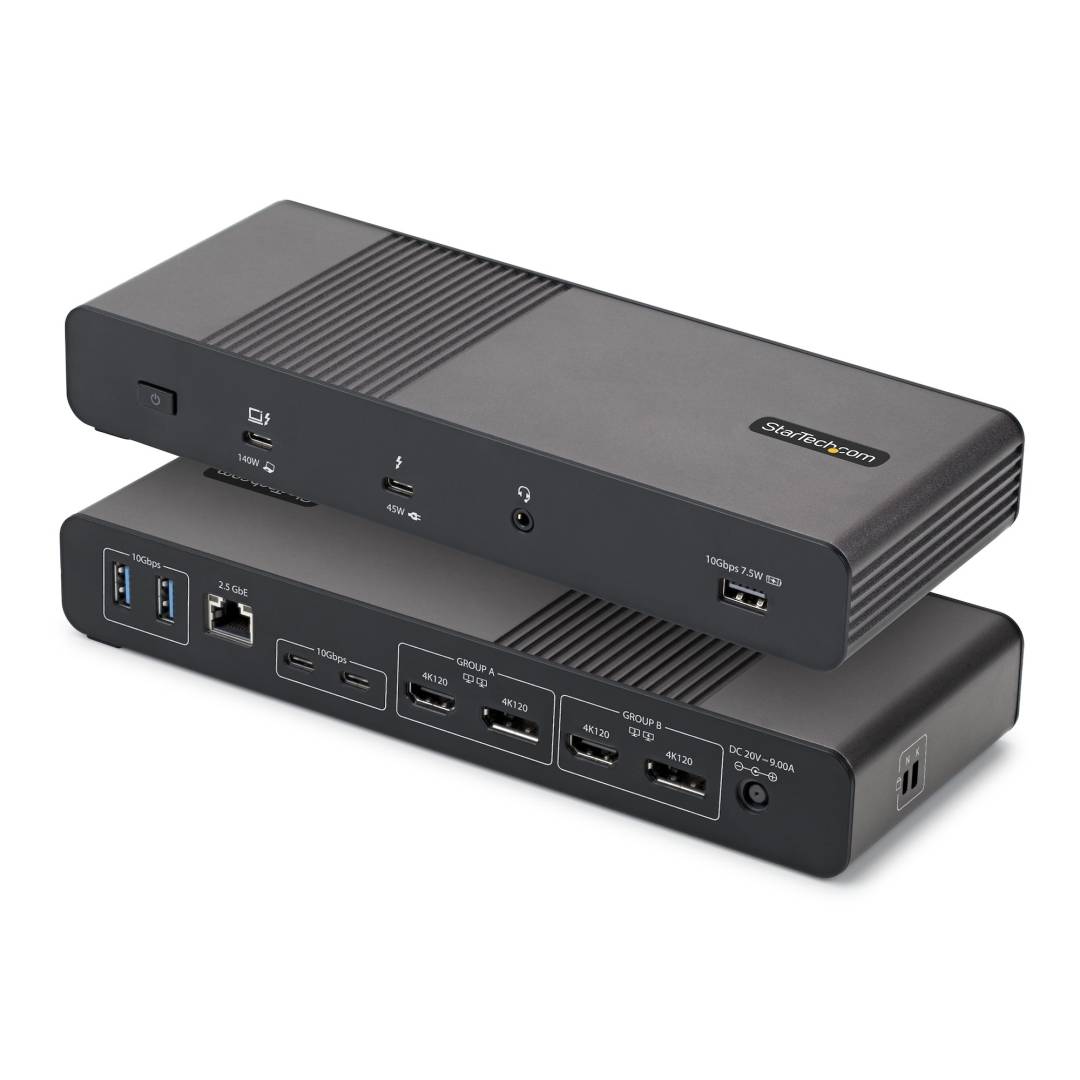
StarTech.com 206UE-TB5USB4DOCK Thunderbolt 5 Universal Docking Station
Thunderbolt 5 · 80/120GbpsUp to 4 displays140W laptop charging2.5GbE
The StarTech.com 206UE-TB5USB4DOCK is a Thunderbolt 5 universal docking station for Mac and Windows laptops with Thunderbolt 5, Thunderbolt 4 or USB4 ports. From a single cable it delivers up to 140W charging, up to four extended 4K displays on Windows, 2.5 Gigabit Ethernet, five USB ports and audio, making it a driverless standard dock for mixed-OS offices and hot desks.
Video comes from two HDMI 2.1 and two DisplayPort outputs in two MST groups, each up to 4K 120Hz, plus a downstream Thunderbolt 5 port for a TB/USB-C monitor at up to 4K 240Hz or further Thunderbolt devices. On Apple silicon the dock supports dual 6K on MacBook Pro/Max, triple 4K 120Hz on MacBook Pro with M5 Pro, and quad 4K with M5 Max when daisy-chaining two Thunderbolt monitors.
Connectivity includes 2x USB-C 10Gbps, 3x USB-A 10Gbps (BC 1.2 charging), the downstream TB5 port with 45W charging, 2.5GbE with PXE and Wake-on-LAN, and a 3.5 mm headset jack. Kensington standard and Nano lock slots, a 1 m Thunderbolt 5 cable and a 180W power adapter with EU and UK plugs are included.
Compatibility note: Not compatible with Thunderbolt 3 hosts (except Apple M1/M2/M3 base-chip Macs, which support one external display). macOS does not support MST, so on a Mac only one output from group A and one from group B work at the same time, and HDMI is limited to 4K 60Hz.
Key Features
Quad 4K on Windows
Four extended 4K 60Hz screens via 2x HDMI and 2x DisplayPort, or 4K 120Hz per group with DSC.
Built for Apple silicon
Dual 6K on Pro/Max MacBooks, triple 4K 120Hz on M5 Pro, driverless on macOS 15 and 26.
Full desk connectivity
140W PD, 2.5GbE, five 10Gbps USB ports, downstream TB5 and audio from one cable.
Technical Specifications
| Identification |
| Part Number |
206UE-TB5USB4DOCK |
| EAN/GTIN (UPC) |
065030921879 |
| MPN |
206UE-TB5USB4DOCK |
| Brand |
StarTech.com |
| Host & Bandwidth |
| Host Interface |
Thunderbolt 5 (80Gbps, 120Gbps Bandwidth Boost) · TB4 · USB4 |
| Host Charging |
Up to 140W |
| Chipset |
Intel JHL9480 (Barlow Ridge) |
| Host Cable |
1 m Thunderbolt 5 |
| Video |
| Outputs |
2x HDMI 2.1 · 2x DisplayPort · 1x Thunderbolt 5 (USB-C) |
| Max Displays |
4 (Windows) |
| Max Resolution |
HDMI/DP 3840x2160 at 120Hz · TB5 3840x2160 at 240Hz |
| Mac Support |
Dual 6K (Pro/Max) · triple 4K 120Hz (M5 Pro) · quad 4K (M5 Max with TB daisy chain) |
| Ports |
| USB-C |
2x 10Gbps + 1x Thunderbolt 5 downstream (45W) |
| USB-A |
3x 10Gbps (BC 1.2) |
| Network |
2.5GbE (Realtek RTL8156B) · PXE · WoL |
| Audio |
3.5 mm TRRS headset jack |
| Physical & Support |
| Power Adapter |
180W (20V 9A) · EU and UK plugs |
| Dimensions |
243 x 92 x 35.3 mm |
| Weight |
730 g |
| Colour |
Black and space grey |
| Security |
Kensington K-slot + Nano slot |
| OS Support |
Windows 11 (incl. ARM) · macOS 15 Sequoia · macOS 26 Tahoe |
| Manufacturer Warranty |
3 years |
Frequently Asked Questions
Does the 206UE-TB5USB4DOCK work with a Thunderbolt 4 or USB4 laptop?
Yes. Thunderbolt 4 and USB4 hosts are supported with their lower bandwidth, so the number and refresh rate of displays may be reduced compared with a Thunderbolt 5 host. Thunderbolt 3 PCs are not supported.
How many monitors can I use with a MacBook Air?
MacBook Air with M4 or M5 supports two external displays through the dock (one per group). M1, M2 and M3 base-chip MacBook Air models support one external display.
Are drivers needed on Windows or macOS?
No. The dock is driverless on both Windows and macOS, which simplifies deployment in mixed fleets and hot-desking environments.
Singular Expert Insight
The 206UE is a true one-dock-for-all option: native HDMI and DisplayPort outputs mean no display adapters, and Thunderbolt 5 bandwidth covers quad 4K on Windows or dual 6K on Mac. For a single laptop with one monitor it is overkill; a USB-C multiport adapter costs a fraction. Browse all
docking stations.
✓ Buy it if you run Thunderbolt 5/4 or USB4 laptops on mixed Mac and Windows desks with multiple monitors.
✕ Skip it if your laptop only has Thunderbolt 3, or you need just one display and a couple of USB ports.
→ Also consider the 303UE-TB5-HUB for Thunderbolt peripherals, or the 177B-USBC-MULTIPORT for a compact single-display setup.