
Zebra Ethernet Module for ZD421t, ZD421d and ZD421c Label Printers, Field-Installable 10/100 RJ45 Network Upgrade
Brand:
Zebra

Zebra Ethernet Module for ZD421t, ZD421d and ZD421c Label Printers, Field-Installable 10/100 RJ45 Network Upgrade
€128.37 inc. VAT
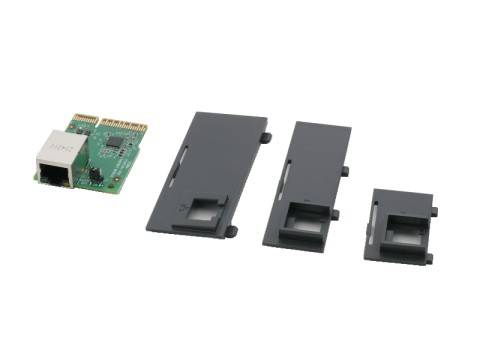
P1112640-015
Delivery
Order Today...
Ships...
Delivery...
ℹ️ Large or fragile items (e.g. monitors) may require extra handling time. We'll keep you informed.
Payment options
Trusted Tech Choice
Buying Benefits
Verified
Competitive EU pricing
Delivered to Cyprus from EU stock
Local warranty support
Please sign in so that we can notify you about a reply
Zebra Ethernet Module for ZD421 Desktop Label Printers
10/100 EthernetRJ45Field-installableZD421t · ZD421d · ZD421c
The Zebra P1112640-015 is the internal Ethernet (LAN) module for the Zebra ZD421 desktop label printer family, adding a 10/100 wired network port to a printer that was ordered with USB only. Zebra lists the same module in the parts catalogues of all three ZD421 versions: thermal transfer (ZD421t), direct thermal (ZD421d) and ribbon cartridge (ZD421c), at both 203 and 300 dpi.
It slides into the connectivity module bay at the back of the printer, so a shop, warehouse or office that has outgrown a single USB connection can share the printer over the network without replacing it.
Before you order: This module is for the ZD421 family only. The older ZD420 uses a different Ethernet module (P1080383-442), and ZD421 printers that already have the Wi-Fi or Ethernet option fitted do not need it. Check the model on the label under the printer before ordering.
What's in the Box
- 1 × Zebra Ethernet module for ZD421 (P1112640-015)
- Zebra does not publish a detailed packing list for this kit
What It Means in Practice
- The printer gets an RJ45 port and can be reached by any PC on the same network, instead of only the one connected by USB.
- Installation is done by the user: power off, remove the connectivity module access door, insert the module and close the door.
- After installation you set the IP address (DHCP or fixed) from the printer settings or Zebra Setup Utilities, then add the printer as a network printer in Windows or your labelling software.
- Only one connectivity module bay exists, so you choose Ethernet, Serial or Wi-Fi for that slot.
What Will Not Work
- Not for the ZD420, ZD410, ZD620 or GK/GX series — they use different modules.
- It does not add Wi-Fi or Bluetooth; that is a separate Zebra module.
- It does not provide PoE — the printer still runs from its own power supply.
- It cannot be fitted together with the Serial or Wi-Fi module in the same bay.
Key Features
Wired LAN for ZD421
Fast Ethernet 10/100 auto-switching (10Base-T and 100Base-TX) through a standard RJ45 connector.
User upgrade
Zebra classes it as a field-installable kit — no technician or printer return needed.
One part for all ZD421 versions
Same part number for thermal transfer, direct thermal and cartridge models, 203 and 300 dpi.
Technical Specifications
Frequently Asked Questions
Singular Expert Insight · Buyer's Guide
Adding the Ethernet module is the cheapest way to share an existing ZD421 between several workstations or to connect it to a cloud or ERP labelling system. If you are choosing a new printer instead, compare our Zebra and other label printers — some models ship with Ethernet already built in.
✓ Buy it if you own a ZD421t, ZD421d or ZD421c with USB only and want it on the wired network.
✕ Skip it if your printer is a ZD420 or another series, or you need wireless rather than a cable.
→ Also consider the Zebra Wi-Fi module for ZD421 if there is no network socket near the printer.
Not sure it fits your printer? Send us the full model from the label under the printer and we will check before you order.
Features - Zebra - P1112640-015
More Details
Product Code
CA86743
EAN Code
4040714632162
Manufacturer
Zebra