
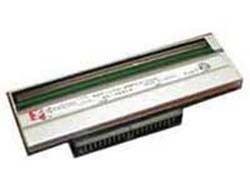
Zebra ZT200 Series Printhead 203 dpi for ZT210, ZT220 and ZT230 Industrial Label Printers, Genuine Zebra Replacement Part
Brand:
Zebra

Zebra ZT200 Series Printhead 203 dpi for ZT210, ZT220 and ZT230 Industrial Label Printers, Genuine Zebra Replacement Part
€541.97 inc. VAT
P1037974-010
Delivery
Order Today...
Ships...
Delivery...
ℹ️ Large or fragile items (e.g. monitors) may require extra handling time. We'll keep you informed.
Payment options
Trusted Tech Choice
Buying Benefits
Verified
Competitive EU pricing
Delivered to Cyprus from EU stock
Local warranty support
Please sign in so that we can notify you about a reply
Zebra ZT200 Series 203 dpi Printhead for ZT210, ZT220 and ZT230
203 dpiZT210, ZT220, ZT230104 mm print widthGenuine Zebra
The Zebra ZT200 Series printhead is the genuine 203 dpi replacement printhead for the ZT210, ZT220 and ZT230 industrial label printers, for warehouses, shops and production sites that keep these printers running every day.
It is the standard resolution of the ZT200 Series, right for shipping, warehouse and product labels with normal-size barcodes. Zebra lists one printhead per resolution for the whole ZT200 Series, so the same part fits all three models. Fit it to replace a worn, scratched or damaged 203 dpi head and your printer keeps the same label formats and print width.
Before you order: ZT210, ZT220 and ZT230 only. The newer ZT211 and ZT231 are not listed for this part.
What's in the Box
- One Zebra ZT200 Series printhead, 203 dpi (quantity 1, as listed in the Zebra ZT200 Series parts catalog).
What It Means in Practice
- Like-for-like swap: if your printer already prints at 203 dpi, this is the head you need. Formats, darkness and print width stay as they are.
- Print width: 104 mm (4.09 in) maximum. The printers take media from 19.4 mm to 114 mm wide.
- Works for direct thermal and, on printers with the thermal transfer option, for ribbon printing. The printhead itself is the same part in both cases.
- Zebra states that the ZT220 and ZT230 are designed to work only with genuine Zebra printheads. This is a genuine Zebra part.
- To make the new head last: use the lowest printhead pressure that gives good print (the two dials go from 1 to 4), clean head and platen roller regularly, and use ribbon at least as wide as the label.
What Will Not Work
- ZT211 and ZT231 (the newer ZT200 generation) and the ZT400, ZT500 and ZT600 Series: not listed for this part. Check your model on the front label before ordering.
- Wrong resolution: this is the 203 dpi head. For 300 dpi Zebra lists P1037974-011. Fitting a different resolution than the printer was built with is a conversion, not a swap.
- Changing resolution: Zebra lists a dedicated conversion kit for 300 dpi to 203 dpi on the ZT200 Series (P1037974-006). Ask us before ordering the bare printhead for a conversion.
- Older Zebra models such as the S4M, GK or GX series and desktop printers use different printheads.
Key Features
One head, three models
The same part fits the ZT210, ZT220 and ZT230.
203 dpi resolution
8 dots per mm across a 104 mm print width.
Genuine Zebra part
Listed in Zebra's ZT200 Series parts catalog. The ZT220 and ZT230 are designed to work only with genuine Zebra printheads.
Both print methods
For direct thermal and thermal transfer printing.
Technical Specifications
Frequently Asked Questions
Singular Expert Insight · Buyer's Guide
Most ZT200 printheads wear out early from too much pressure or darkness, ribbon narrower than the label, and skipped cleaning. Fixing those three often matters more than the head you buy. For cleaning supplies, ribbons and other label printer accessories, ask us when you order the head.
✓ Buy it if Buy this if you have a ZT210, ZT220 or ZT230 that already prints at 203 dpi and the head is worn, scratched or showing missing dots or white lines.
✕ Skip it if Skip it if you have a ZT211, ZT231 or another Zebra series, or if your printer is 300 dpi.
→ Also consider Consider a ZT200 Series platen roller if the old one is worn, Zebra cleaning pens or swabs, and ribbons at least as wide as your labels. Send us your printer model and serial label and we will confirm the part.
Not sure it fits your setup? Send us the model of your rack, switch or device and we will check compatibility before you order.
Features - Zebra - P1037974-010
More Details
Product Code
V364354
EAN Code
5712505021835
Manufacturer
Zebra